Redirecting to the latest documentation…
This is the multi-page printable view of this section. Click here to print.
Documentation
- 1: Texera Documentation
- 1.1: Overview
- 1.2: Getting Started
- 1.2.1: Install Texera
- 1.2.2: Installing Apache Texera using Docker
- 1.2.3: How to run Texera on local Kubernetes
- 1.2.4: Access/Login to Texera
- 1.2.5: Texera UI Overview
- 1.3: Concepts
- 1.4: Tutorials
- 1.4.1: Guide for how to use Texera
- 1.4.2: Create Dataset, upload data to it and use it in Workflow
- 1.4.3: Guide to Use a Python UDF
- 1.4.4: Guide to enable the LLM‐based Texera agent
- 1.4.5: Guide to launch Lakekeeper as the RESTCatalog Service for Texera's workflow result storage
- 1.4.6: Migrate a Jupyter Notebook to a Texera Workflow
- 1.5: Reference
- 1.5.1: Operators
- 1.5.1.1: Data Input
- 1.5.1.1.1: Arrow File Scan
- 1.5.1.1.2: CSV File Scan
- 1.5.1.1.3: CSVOld File Scan
- 1.5.1.1.4: File Lister
- 1.5.1.1.5: File Scan
- 1.5.1.1.6: File Scan From Input
- 1.5.1.1.7: JSONL File Scan
- 1.5.1.1.8: Text Input
- 1.5.1.2: Database Connector
- 1.5.1.2.1: AsterixDB Source
- 1.5.1.2.2: MySQL Source
- 1.5.1.2.3: PostgreSQL Source
- 1.5.1.3: Search
- 1.5.1.3.1: Dictionary matcher
- 1.5.1.3.2: Keyword Search
- 1.5.1.3.3: Regular Expression
- 1.5.1.3.4: Substring Search
- 1.5.1.4: Data Cleaning
- 1.5.1.4.1: Join
- 1.5.1.4.1.1: Cartesian Product
- 1.5.1.4.1.2: Hash Join
- 1.5.1.4.1.3: Interval Join
- 1.5.1.4.2: Set
- 1.5.1.4.2.1: Difference
- 1.5.1.4.2.2: Intersect
- 1.5.1.4.2.3: SymmetricDifference
- 1.5.1.4.2.4: Union
- 1.5.1.4.3: Aggregate
- 1.5.1.4.3.1: Aggregate
- 1.5.1.4.4: Sort
- 1.5.1.4.4.1: Sort
- 1.5.1.4.4.2: Sort Partitions
- 1.5.1.4.4.3: Stable Merge Sort
- 1.5.1.4.5: Distinct
- 1.5.1.4.6: Filter
- 1.5.1.4.7: Limit
- 1.5.1.4.8: Projection
- 1.5.1.4.9: Type Casting
- 1.5.1.5: Machine Learning
- 1.5.1.5.1: Sklearn
- 1.5.1.5.1.1: Sklearn Training
- 1.5.1.5.1.1.1: Training: Adaptive Boosting
- 1.5.1.5.1.1.2: Training: Bagging Training
- 1.5.1.5.1.1.3: Training: Bernoulli Naive Bayes
- 1.5.1.5.1.1.4: Training: Complement Naive Bayes
- 1.5.1.5.1.1.5: Training: Decision Tree
- 1.5.1.5.1.1.6: Training: Dummy Classifier
- 1.5.1.5.1.1.7: Training: Extra Tree
- 1.5.1.5.1.1.8: Training: Extra Trees
- 1.5.1.5.1.1.9: Training: Gaussian Naive Bayes
- 1.5.1.5.1.1.10: Training: Gradient Boosting
- 1.5.1.5.1.1.11: Training: K-nearest Neighbors
- 1.5.1.5.1.1.12: Training: Linear Perceptron
- 1.5.1.5.1.1.13: Training: Linear Regression
- 1.5.1.5.1.1.14: Training: Linear Support Vector Machine
- 1.5.1.5.1.1.15: Training: Logistic Regression
- 1.5.1.5.1.1.16: Training: Logistic Regression Cross Validation
- 1.5.1.5.1.1.17: Training: Multi-layer Perceptron
- 1.5.1.5.1.1.18: Training: Multinomial Naive Bayes
- 1.5.1.5.1.1.19: Training: Nearest Centroid
- 1.5.1.5.1.1.20: Training: Passive Aggressive
- 1.5.1.5.1.1.21: Training: Probability Calibration
- 1.5.1.5.1.1.22: Training: Random Forest
- 1.5.1.5.1.1.23: Training: Ridge Regression
- 1.5.1.5.1.1.24: Training: Ridge Regression Cross Validation
- 1.5.1.5.1.1.25: Training: Stochastic Gradient Descent
- 1.5.1.5.1.1.26: Training: Support Vector Machine
- 1.5.1.5.1.2: Adaptive Boosting
- 1.5.1.5.1.3: Bagging
- 1.5.1.5.1.4: Bernoulli Naive Bayes
- 1.5.1.5.1.5: Complement Naive Bayes
- 1.5.1.5.1.6: Decision Tree
- 1.5.1.5.1.7: Dummy Classifier
- 1.5.1.5.1.8: Extra Tree
- 1.5.1.5.1.9: Extra Trees
- 1.5.1.5.1.10: Gaussian Naive Bayes
- 1.5.1.5.1.11: Gradient Boosting
- 1.5.1.5.1.12: K-nearest Neighbors
- 1.5.1.5.1.13: Linear Perceptron
- 1.5.1.5.1.14: Linear Regression
- 1.5.1.5.1.15: Linear Support Vector Machine
- 1.5.1.5.1.16: Logistic Regression
- 1.5.1.5.1.17: Logistic Regression Cross Validation
- 1.5.1.5.1.18: Multi-layer Perceptron
- 1.5.1.5.1.19: Multinomial Naive Bayes
- 1.5.1.5.1.20: Nearest Centroid
- 1.5.1.5.1.21: Passive Aggressive
- 1.5.1.5.1.22: Probability Calibration
- 1.5.1.5.1.23: Random Forest
- 1.5.1.5.1.24: Ridge Regression
- 1.5.1.5.1.25: Ridge Regression Cross Validation
- 1.5.1.5.1.26: Sklearn Prediction
- 1.5.1.5.1.27: Sklearn Testing
- 1.5.1.5.1.28: Stochastic Gradient Descent
- 1.5.1.5.1.29: Support Vector Machine
- 1.5.1.5.2: Advanced Sklearn
- 1.5.1.5.2.1: KNN Classifier
- 1.5.1.5.2.2: KNN Regressor
- 1.5.1.5.2.3: SVM Classifier
- 1.5.1.5.2.4: SVM Regressor
- 1.5.1.5.3: Hugging Face
- 1.5.1.5.3.1: Hugging Face Iris Logistic Regression
- 1.5.1.5.3.2: Hugging Face Sentiment Analysis
- 1.5.1.5.3.3: Hugging Face Spam Detection
- 1.5.1.5.3.4: Hugging Face Text Summarization
- 1.5.1.5.4: Machine Learning General
- 1.5.1.5.4.1: Machine Learning Scorer
- 1.5.1.6: Utilities
- 1.5.1.6.1: Random K Sampling
- 1.5.1.6.2: Reservoir Sampling
- 1.5.1.6.3: Split
- 1.5.1.6.4: Unnest String
- 1.5.1.7: External API
- 1.5.1.7.1: Reddit Search
- 1.5.1.7.2: Twitter Full Archive Search API
- 1.5.1.7.3: Twitter Search API
- 1.5.1.7.4: URL Fetcher
- 1.5.1.8: User-defined Functions
- 1.5.1.8.1: Python
- 1.5.1.8.1.1: 1-out Python UDF
- 1.5.1.8.1.2: 2-in Python UDF
- 1.5.1.8.1.3: Python Lambda Function
- 1.5.1.8.1.4: Python Table Reducer
- 1.5.1.8.1.5: Python UDF
- 1.5.1.8.2: Java
- 1.5.1.8.2.1: Java UDF
- 1.5.1.8.3: R
- 1.5.1.8.3.1: 1-out R UDF
- 1.5.1.8.3.2: R UDF
- 1.5.1.9: Visualization
- 1.5.1.9.1: Basic
- 1.5.1.9.1.1: Bar Chart
- 1.5.1.9.1.2: Bubble Chart
- 1.5.1.9.1.3: Dot Plot
- 1.5.1.9.1.4: Dumbbell Plot
- 1.5.1.9.1.5: Figure Factory Table
- 1.5.1.9.1.6: Filled Area Plot
- 1.5.1.9.1.7: Gantt Chart
- 1.5.1.9.1.8: Hierarchy Chart
- 1.5.1.9.1.9: Icicle Chart
- 1.5.1.9.1.10: Line Chart
- 1.5.1.9.1.11: Pie Chart
- 1.5.1.9.1.12: Range Slider
- 1.5.1.9.1.13: Sankey Diagram
- 1.5.1.9.1.14: Scatter Plot
- 1.5.1.9.1.15: Tables Plot
- 1.5.1.9.1.16: Time Series Plot
- 1.5.1.9.2: Statistical
- 1.5.1.9.2.1: Box/Violin Plot
- 1.5.1.9.2.2: Continuous Error Bands
- 1.5.1.9.2.3: Empirical Cumulative Distribution Plot
- 1.5.1.9.2.4: Histogram
- 1.5.1.9.2.5: Histogram2D
- 1.5.1.9.2.6: Scatter Matrix Chart
- 1.5.1.9.2.7: Strip Chart
- 1.5.1.9.2.8: Tree Plot
- 1.5.1.9.3: Scientific
- 1.5.1.9.3.1: Carpet Plot
- 1.5.1.9.3.2: Contour Plot
- 1.5.1.9.3.3: Dendrogram
- 1.5.1.9.3.4: Heatmap
- 1.5.1.9.3.5: Network Graph
- 1.5.1.9.3.6: Parallel Coordinates Plot
- 1.5.1.9.3.7: Polar Chart
- 1.5.1.9.3.8: Quiver Plot
- 1.5.1.9.3.9: Radar Chart
- 1.5.1.9.3.10: Radar Plot
- 1.5.1.9.3.11: Ternary Contour
- 1.5.1.9.3.12: Ternary Plot
- 1.5.1.9.3.13: Volcano Plot
- 1.5.1.9.3.14: Wind Rose Chart
- 1.5.1.9.4: Financial
- 1.5.1.9.4.1: Bullet Chart
- 1.5.1.9.4.2: Candlestick Chart
- 1.5.1.9.4.3: Funnel Plot
- 1.5.1.9.4.4: Gauge Chart
- 1.5.1.9.4.5: Waterfall Chart
- 1.5.1.9.5: Media
- 1.5.1.9.5.1: HTML Visualizer
- 1.5.1.9.5.2: Image Visualizer
- 1.5.1.9.5.3: URL Visualizer
- 1.5.1.9.5.4: Word Cloud
- 1.5.1.9.6: Advanced
- 1.5.1.9.6.1: Choropleth Map
- 1.5.1.9.6.2: Scatter3D Chart
- 1.5.1.9.7: Nested Table
- 1.5.1.10: Control Block
- 1.5.1.11: Output Port Modes
- 1.5.1.12: Parameter Reference
- 1.5.1.12.1: SklearnAdvancedKNN Parameters
- 1.5.1.12.2: SklearnAdvancedSVC Parameters
- 1.5.1.12.3: SklearnAdvancedSVR Parameters
- 1.5.2: Engine
- 1.5.3: Frontend
- 1.5.4: Project Structure
- 1.5.5: Storage
- 1.5.6: Configuration
- 1.6: Contribution Guidelines
- 1.6.1: Making Contributions
- 1.6.2: Guide for Developers
- 1.6.3: Guide to Frontend Development (new gui)
- 1.6.4: Guide to Implement a Java Native Operator
- 1.6.5: Guide to Implement a Python Native Operator (converting from a Python UDF)
- 1.6.6: Build, Run and Configure micro‐services in local development environment
- 1.6.7: Apache License header
- 1.6.8: [VOTE] Release Apache Texera (incubating) Email Template
- 1.7: Security
- 1.8: Examples
1 - Texera Documentation
Welcome to the Texera Documentation Portal! This is your central hub for understanding, deploying, and contributing to the Texera platform.
Texera is an open-source data analytics and workflow management system. Use the sections below to find what you’re looking for.
📚 Getting Started
New to Texera? Start here to set up your environment, install dependencies, and explore deployment options (Docker, AWS, GCP, Kubernetes, or Single Node).
🎓 Tutorials
Learn by doing. Explore step-by-step guides on how to use the UI, create datasets, manage workflows, and operate advanced features like Python UDFs and LLM integrations.
🧠 Concepts
Deep dive into the theoretical framework behind Texera. Learn about Operators, Workflows, scalable execution, and how the core architecture hums under the hood.
🛠️ Contribution Guidelines
Want to build out Texera? Find resources on setting up a local microservice development environment, writing Java or Python operators, navigating making contributions, and understanding our code standards.
📖 Reference & Examples
Explore reference materials, past GUI screenshots, example workflows, and API specifications.
Don’t know where to begin? Head over to the Overview to read the pitch on why you should use Texera, who it’s built for, and how the architecture works at a high level.
1.1 - Overview
High-level overview of the Texera architecture, core concepts, and use cases.
Texera is an open-source system that supports collaborative data science at scale using Web-based workflows.
Texera combines powerful backend dataflow execution with an intuitive, drag-and-drop web interface. It allows users to build, execute, and share complex data workflows seamlessly across teams without worrying about the underlying computing infrastructure.
🏗️ Architecture: How it Works
At its core, Texera acts as a bridge between a highly accessible frontend and a scalable distributed computing backend.
- Web-Based Interface (Frontend): A rich GUI running directly in your browser. It allows users to construct data processing pipelines by dragging and dropping blocks on a canvas. No installation is required on client machines.
- Distributed Engine (Backend): When a workflow is submitted, the Texera engine compiles the graphical representation into an optimized, distributed execution plan. It then spins up computing units to process massive datasets in parallel.
- Storage Integration: Texera integrates smoothly with modern data lake and storage technologies (like LakeFS and MinIO) to persistently log runs and save datasets securely.
🧩 Core Concepts
To use Texera effectively, familiarize yourself with these foundational terms:
- Operators: The fundamental building blocks of a workflow. Each operator represents a single operation—such as filtering data, joining tables, training a machine learning model, or running a custom Python script. Operators have input and output ports to flow data seamlessly between them.
- Workflows: A Directed Acyclic Graph (DAG) constructed out of linked operators. Workflows represent fully end-to-end data pipelines.
- Datasets: Structured or semi-structured data sources uploaded to or generated by Texera. You can drag datasets directly into your workflow to begin processing them.
🎯 Use Cases & Target Audience
Texera bridges the gap between different technical proficiencies, making it ideal for teams to collaborate:
- Data Scientists: Quickly prototype data transformations, run machine learning algorithms, and visualize outputs without having to manage Spark or Kubernetes configurations manually.
- Domain Experts & Analysts: Utilize pre-built advanced analytics operators through an easy-to-learn visual interface, skipping the complex coding traditionally required for Big Data tasks.
- Software Engineers: Rapidly iterate and contribute back to the system by writing modular Java/Scala natively or injecting custom Python UDFs (User Defined Functions) directly into the execution graph.
Texera enables you to move from prototype to production data pipelines seamlessly.
1.2 - Getting Started
Quick start guide for running Texera and accessing it through the browser.
This section helps you quickly configure and launch Texera, and access the user interface.
Launch Texera
To begin, please follow our Installation Guide to set up Texera for your environment.
Once Texera is installed and running, open your web browser and navigate to its local URL:
http://localhost:4200
1.2.1 - Install Texera
To install Texera, you may choose one of the two supported architectures depending on your needs:
Single Node Deployment: ideal for quickly starting Texera on a local machine or testing deployments serving a small number of users. See Installing Apache Texera using Docker.
Kubernetes-based Deployment: recommended for production-level deployments at scale, supporting high availability serving a larger number of users. See Installing Apache Texera on a Kubernetes Cluster.
1.2.2 - Installing Apache Texera using Docker
This document describes how to set up and run Texera on a single machine using “Docker Compose”.
Prerequisites
Before starting, make sure your computer meets the following requirements:
| Resource Type | Minimum | Recommended |
|---|---|---|
| CPU Cores | 2 | 8 |
| Memory | 4GB | 16GB |
| Disk Space | 20GB | 50GB |
You also need to install and launch Docker Desktop on your computer. Choose the right installation link for your computer:
| Operating System | Installation Link |
|---|---|
| macOS | Docker Desktop for Mac |
| Windows | Docker Desktop for Windows |
| Linux | Docker Desktop for Linux |
After installing and launching Docker Desktop, verify that Docker and Docker Compose are available by running the following commands from the command line:
docker --version
docker compose version
You should see output messages like the following (your versions may be different):
$ docker --version
Docker version 27.5.1, build 9f9e405
$ docker compose version
Docker Compose version v2.23.0-desktop.1
By default, Texera services require ports 8080 and 9000 to be free. If either port is already in use, the services will fail to start.
On macOS or Linux, run the following commands to check:
lsof -i :8080
lsof -i :9000
If either command produces output, that port is occupied by another process. You will need to either stop that process or change Texera’s port configuration. See Advanced Settings > Run Texera on other ports for instructions.
Download Texera
Download the docker compose tarball and extract it.
Launch Texera
Enter the extracted directory and run the following command to start Texera:
docker compose --profile examples up
This command will start docker containers that host the Texera services, and pre-create two example workflows and datasets.
If you don’t want to have these examples pre-created, run the following command instead:
docker compose up
If you see the error message like
unable to get image 'nginx:alpine': Cannot connect to the Docker daemon at unix:///Users/kunwoopark/.docker/run/docker.sock. Is the docker daemon running?, please make sure Docker Desktop is installed and running
When you start Texera for the first time, it will take around 5 minutes to download needed images.
The system should be ready around 1.5 minutes. After seeing the following startup message:
...
=========================================
  Texera has started successfully!
  Access at: http://localhost:8080
=========================================
...
you can open the browser and navigate to the URL shown in the message.
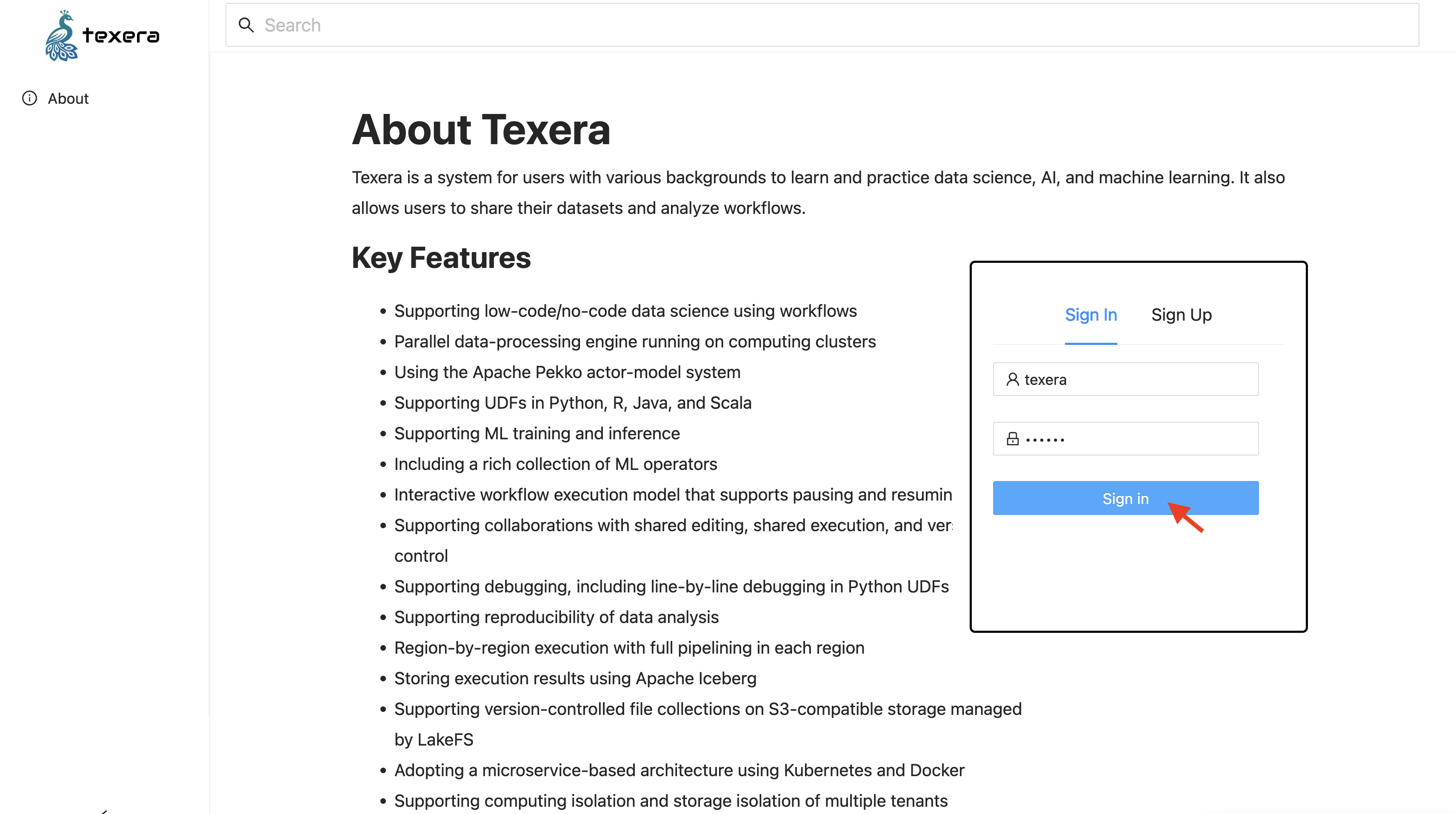
Input the default account texera with password texera, and then click on the Sign In button to login:
Stop, Restart, and Uninstall Texera
Stop
Press Ctrl+C in the terminal to stop Texera.
If you already closed the terminal, you can go to the installation folder and run:
docker compose --profile examples stop
to stop Texera.
Restart
Same as the way you launch Texera.
Uninstall
To remove Texera and all its data, go to the installation folder and run:
docker compose --profile examples down -v
⚠️ Warning: This will permanently delete all the data used by Texera.
Enable the Texera Agent
The Texera agent is powered by a large language model (LLM). By default, Texera uses Claude Haiku 4.5 as the LLM and queries it through LiteLLM. Without an API key, the Texera agent panel still appears but model calls will fail with a provider auth error.
To enable it:
- Stop Texera if it is already running.
- Get an API key for the LLM. Since Claude Haiku 4.5 is enabled by default, you need an Anthropic API key.
- Export the key and restart Texera:
export ANTHROPIC_API_KEY=sk-ant-...
docker compose --profile examples up
Once Texera is up, create a new workflow and open the Texera agent panel at the bottom right. Type a task like:
For /texera/popular-movies-of-imdb/v1/TMDb_updated.csv, visualize the top 10 most-voted movies.
To switch providers or add more LLMs, see Add more LLMs or providers.
Advanced Settings
Before making any of the changes below, please stop Texera first. Once you finish the changes, restart Texera to apply them.
All changes below are to the .env file in the installation folder, unless otherwise noted.
Run Texera on other ports
By default, Texera uses:
- Port 8080 for its web service
- Port 9000 for its MinIO storage service
To change these ports, open the .env file and update the corresponding variables:
- For the web service port (8080): change
TEXERA_PORT=8080to your desired port, e.g.,TEXERA_PORT=8081. - For the MinIO port (9000): change
MINIO_PORT=9000to your desired port, e.g.,MINIO_PORT=9001.
Change the locations of Texera data
By default, Docker manages Texera’s data locations. To change them to your own locations:
- Find the
persistent volumessection. For each data volume you want to specify, add the following configuration:
   volume_name:
     driver: local
     driver_opts:
       type: none
       o: bind
       device: /path/to/your/local/folder
For example, to change the folder of storing workflow_result_data to /Users/johndoe/texera/data, add the following:
   workflow_result_data:
     driver: local
     driver_opts:
       type: none
       o: bind
       device: /Users/johndoe/texera/data
If you already launched texera and want to change the data locations, existing data volumes need to be recreated and override in the next boot-up, i.e. select y when running docker compose up again:
$ docker compose up
? Volume "texera-single-node-release-1-1-0_workflow_result_data" exists but doesn't match configuration in compose file. Recreate (data will be lost)? (y/N)
y // answer y to this prompt
Add more LLMs or providers
Only Claude Haiku 4.5 is enabled by default. To add more LLMs, open litellm-config.yaml in the installation folder and append entries under model_list. Each entry follows this shape:
  model_list:
    ...
+   - model_name: <name shown in Texera>
+     litellm_params:
+       model: <provider model id>
+       api_key: "os.environ/<API_KEY_ENV_VAR>"
For example, to add OpenAI’s GPT-5.2 and Google’s Gemini 2.5 Pro:
  model_list:
    ...
+   - model_name: gpt-5.2
+     litellm_params:
+       model: gpt-5.2
+       api_key: "os.environ/OPENAI_API_KEY"
+
+   - model_name: gemini-2.5-pro
+     litellm_params:
+       model: gemini/gemini-2.5-pro
+       api_key: "os.environ/GEMINI_API_KEY"
Make sure to set the corresponding API key environment variable when you launch Texera (see Enable the Texera Agent). Get keys from each provider’s console — for example, OpenAI or Google.
If your provider is not Anthropic, OpenAI, or Google, also pass its key into the LiteLLM container by editing docker-compose.yml:
  litellm:
    ...
    environment:
      ANTHROPIC_API_KEY: ${ANTHROPIC_API_KEY:-}
      OPENAI_API_KEY: ${OPENAI_API_KEY:-}
      GEMINI_API_KEY: ${GEMINI_API_KEY:-}
+     <NEW_API_KEY>: ${<NEW_API_KEY>:-}
For the full list of supported providers and model IDs, see the LiteLLM proxy config docs.
Troubleshooting
Port conflicts
If Texera fails to start, a common cause is that ports 8080 or 9000 are already in use by another application. Check which ports are occupied:
lsof -i :8080
lsof -i :9000
Stop the conflicting process, or change Texera’s ports following the instructions in Advanced Settings > Run Texera on other ports.
Volume conflicts
PostgreSQL only runs the database initialization scripts on first startup (when its data volume is empty). If you previously started Texera and then ran docker compose down (without -v), the data volume still exists. On the next docker compose up, the initialization is skipped, which can cause services like lakeFS to fail because their required databases were never created.
To resolve this, remove all existing volumes and start fresh:
docker compose --profile examples down -v
docker compose --profile examples up
⚠️ Warning:
docker compose --profile examples down -vpermanently deletes all Texera data.
1.2.3 - How to run Texera on local Kubernetes
This document explains how to run Texera on Kubernetes locally for development purposes.
1. Prerequisites
Before you begin, you will need a local Kubernetes cluster manager. We use Minikube in this instruction.
- Install Minikube.
- Start your cluster:
minikube start - Verify that your node is running. You should see
minikubein your node list when you run:kubectl get nodes - Install Helm.
- Install local path plugin:
kubectl apply -f https://raw.githubusercontent.com/rancher/local-path-provisioner/master/deploy/local-path-storage.yaml
2. Install Texera using Helm
All the necessary Kubernetes files are located in the bin/k8s directory of this repository.
- Navigate to the
bindirectory:cd bin - Install the Texera Helm chart. This command will install all Texera services into a new
texera-devnamespace.helm install texera k8s --namespace texera-dev --create-namespace
Note: If you get an error about missing Helm dependencies, navigate to the
k8sdirectory and run the dependency update command, then try the installation again:cd k8s helm dependency update cd .. helm install texera k8s --namespace texera-dev --create-namespace
3. Verify the Installation
Wait for the required deployments to be in the Running state. You can check their status by running:
kubectl get deployments -n texera-dev
The key deployments required to run Texera are:
texera-webservertexera-file-servicetexera-workflow-computing-unit-manager
4. Accessing the Texera UI
Once the deployments are running, you can access the Texera web interface.
Port-Forwarding (If Required)
By default, the UI should be available at http://localhost:30080.
If you get a “connection refused” error, you may need to manually forward the ingress port. Open a new terminal and run:
kubectl port-forward -n envoy-gateway-system service/$(kubectl get svc -n envoy-gateway-system -l gateway.envoyproxy.io/owning-gateway-name=texera-gateway -o jsonpath='{.items[0].metadata.name}') 30080:80Login
Open http://localhost:30080 in your browser and log in using the default username and password.
5. Troubleshooting
File Upload Error
If you see an error when trying to upload a file to a dataset, you may need to forward the port for MinIO (our file storage service).
Run the following command in a new terminal:
kubectl port-forward -n texera-dev service/texera-minio 31000:9000
This maps the service’s port 9000 to your local port 31000.
Using Custom-Built Images
To test custom changes, you can update the bin/k8s/values.yaml file to use your own Docker images. After modifying the values.yaml file, upgrade the Helm release to apply the changes:
helm upgrade texera k8s --namespace texera-dev
6. Security Recommendation
For any deployment, especially in production, it’s crucial to apply the principle of least privilege to limit potential damage from a security vulnerability. While the OS user deploying the chart needs kubectl and helm permissions, a more critical concern is the user running the application inside the containers.
Run Containers as a Non-Root User
By default, many container images run as the root user. If an attacker exploits a vulnerability in an application (like the running code on computing unit), they would gain root privileges within the container, giving them full control to access or modify its contents and potentially attack other services.
To prevent this, you should configure the Kubernetes deployments to run the processes as a specific, unprivileged user.
The following is a sample template you can use:
spec:
  template:
    spec:
      securityContext:
        # Run as a non-root user (e.g., user 1001)
        runAsUser: 1001
        runAsGroup: 1001
        # Enforce that the container cannot run as root
        runAsNonRoot: true
        # Make the root filesystem read-only
        readOnlyRootFilesystem: true
      containers:
      - name: texera-webserver
        image: ...
1.2.4 - Access/Login to Texera
Instructions on how to install and set up Texera as a developer.
Guide to use Texera on your local machine or development environment.
Prerequisites
We assume you either went through
Texera should be up-and-running on your laptop before proceeding.
Note
Ensure Docker and Docker Compose are installed before building Texera.Access Texera through Browser
Enter Texera’s URL in your browser to access the interface.
By default, an admin account is pre-created:
| Username | Password |
|---|---|
texera | texera |
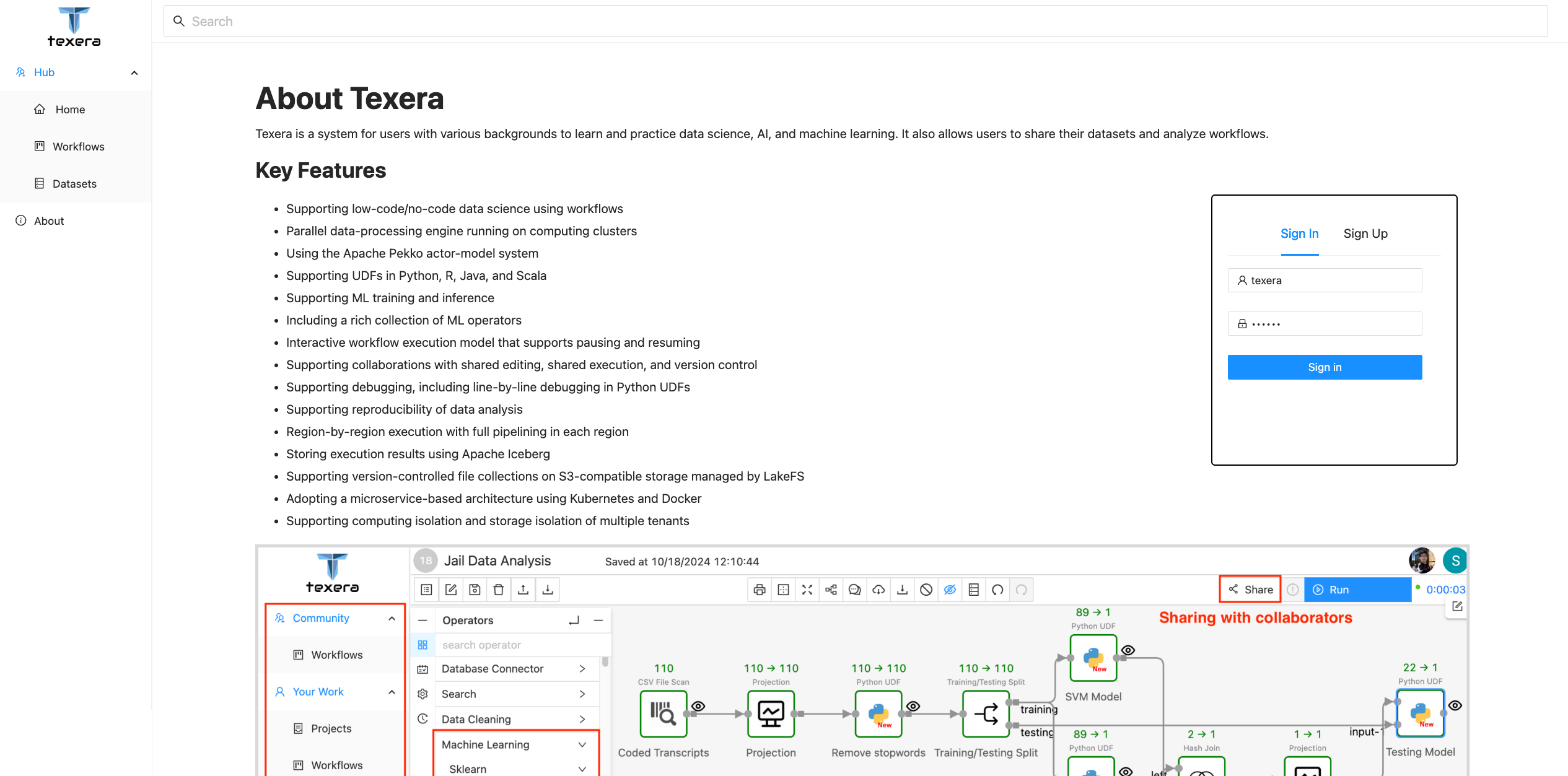
Input credentials and click the Sign in button to log in as the admin.
1.2.5 - Texera UI Overview
Explore Texera’s User Dashboard interface and its components.
Understand the layout and functionality of Texera’s User Dashboard.
User Dashboard
Once logged in, you should see the following page:
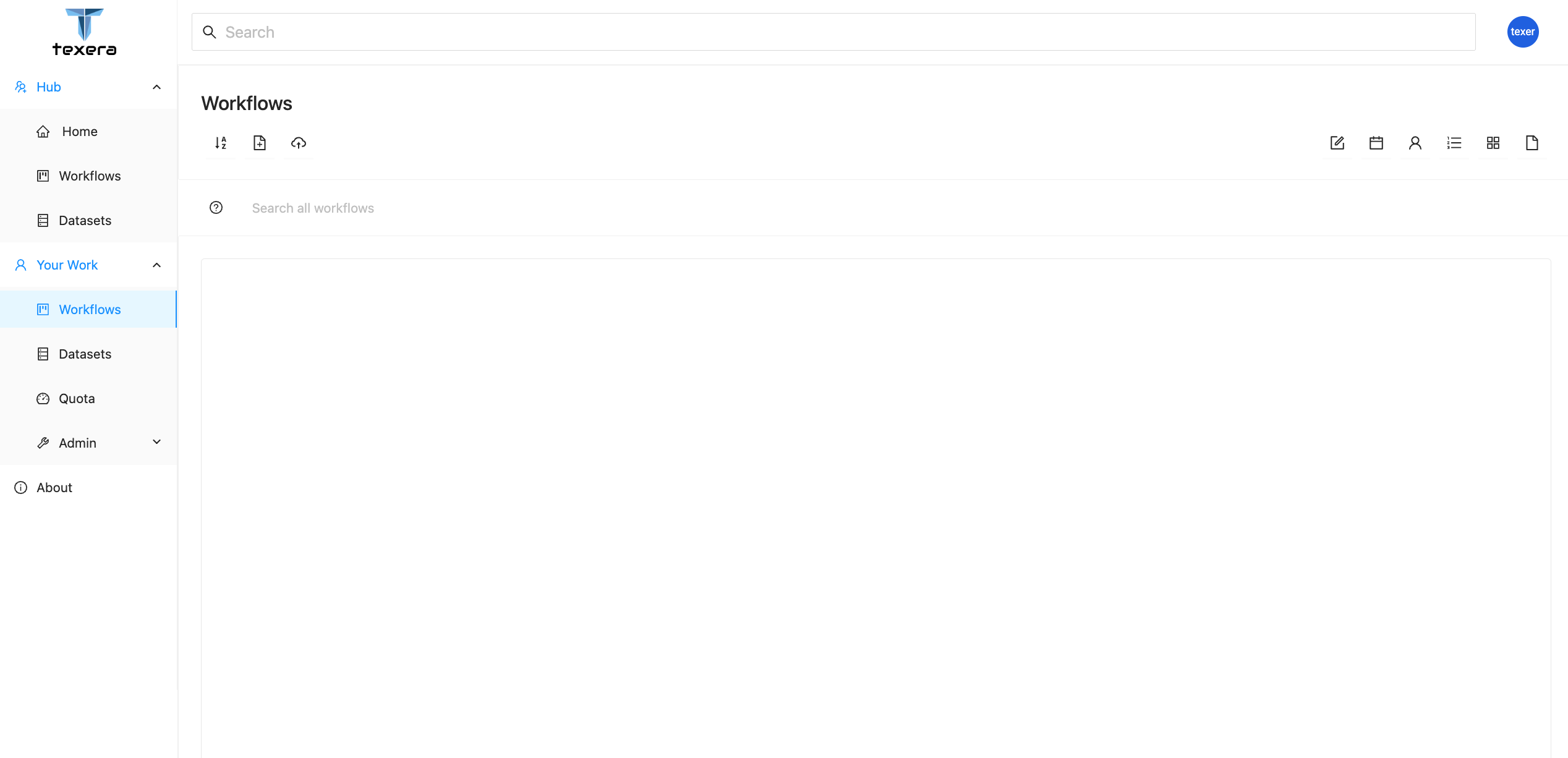
Navigation Bar
On the left sidebar, you can switch between different resource modules:
- Workflows — manage workflow projects.
- Datasets — upload and manage data files.
- Quota — check usage statistics and resource consumption.
- Admin — manage system users (visible only to admins).
Tip
Hover over the navigation icons to see quick tooltips for each section.1.3 - Concepts
Overview of the key ideas and components behind Texera. This section introduces core concepts that help users and contributors understand how Texera works.
This section explains the foundational concepts behind Texera — the ideas, architecture, and components that make up the platform.
Understanding Texera conceptually helps both users and contributors get the most out of the system.
For end users, it provides background on how workflows and operators interact to process data.
For contributors, it offers insight into the design principles and architecture that power Texera’s engine and user interface.
What’s in this section
The Concepts section introduces the core ideas that define Texera’s design and operation:
- Workflows: How users visually build and manage data pipelines.
- Operators: The modular units that perform data transformations.
- Execution Engine: The core component that executes workflows efficiently.
- Data Model: How Texera represents, stores, and streams data.
- Architecture: The high-level structure connecting frontend, backend, and execution layers.
Each page below explores one of these areas in more depth, explaining how Texera’s internal components work together to support flexible, scalable, and interactive data analytics.
When to read this section
If you’re new to Texera, start with the Overview page to understand what the platform does.
Then come here to learn how it works under the hood.
If you’re contributing to Texera or integrating it with other systems, the detailed concept pages — such as Engine, Operator Framework, and Architecture — will help you understand Texera’s internal design and extension points.
1.4 - Tutorials
Step-by-step guides for building workflows and applications with Texera.
This section provides complete, end-to-end tutorials that guide you through realistic Texera use cases — from building simple workflows to creating complex data analytics pipelines.
Texera tutorials help you learn by doing.
Each tutorial walks through a realistic workflow scenario, showing how to use Texera’s visual interface, operators, and execution engine to build and run data analytics applications.
🎯 What to Expect
The tutorials in this section will help you:
- Understand Texera’s workflow-based design step by step.
- Learn how to connect operators, configure parameters, and visualize results.
- Explore practical data use cases, such as text processing, joining datasets, and real-time analysis.
- Get comfortable with extending Texera by creating or modifying operators.
🧱 Structure
Each tutorial consists of:
- Goal Overview – what you’ll build and what problem it solves.
- Step-by-Step Instructions – detailed actions to complete the workflow.
- Key Takeaways – concepts and Texera features you’ll learn.
- Next Steps – related tutorials or examples to explore further.
🧭 Getting Started
If you’re new to Texera, start with the Getting Started guide to set up your local environment.
Once Texera is running, return here to begin working through the tutorials in order.
📚 Available Tutorials
This section will include multiple tutorials, such as:
- Building your first workflow
- Exploring data transformation operators
- Working with visualization tools
- Combining multiple datasets
- Extending Texera with custom operators
Each tutorial will include screenshots, sample data, and workflow files you can download and import into your Texera instance.
💡 Want to Contribute a Tutorial?
If you’ve built a useful workflow or want to help new users learn Texera, you can contribute your own tutorial:
- Create a Markdown page under
content/docs/tutorials/. - Include any relevant
.jsonworkflow files or sample datasets. - Submit a pull request following our Contribution Guidelines.
Texera tutorials are designed to help you go from understanding concepts to building complete solutions — one workflow at a time.
1.4.1 - Guide for how to use Texera
Texera is an open-source system that supports collaborative data science at scale using Web-based workflows. This page includes instructions on how to install the system as a developer and do a simple workflow.
Prerequisites
We assume you either went through Installing Apache Texera using Docker, or the Guide for Texera Developers. And Texera is up-and-running on your laptop.
Access Texera through Browser
Enter Texera’s URL on your browser to access Texera.
An admin account with username texera and password texera is pre-created by default. Input the username, password and click the Sign in button to login as the admin:
User Dashboard UI Overview
Once logged in, you should see the below page:
This is Texera’s dashboard page. On the left navigation bar, you can switch between different resource modules, including
Workflowsfor workflow managementDatasetsfor dataset managementQuotafor checking the usage statisticsAdminfor managing users on the Texera system. This tab is only visible for system admins.
Workflow Workspace UI Overview
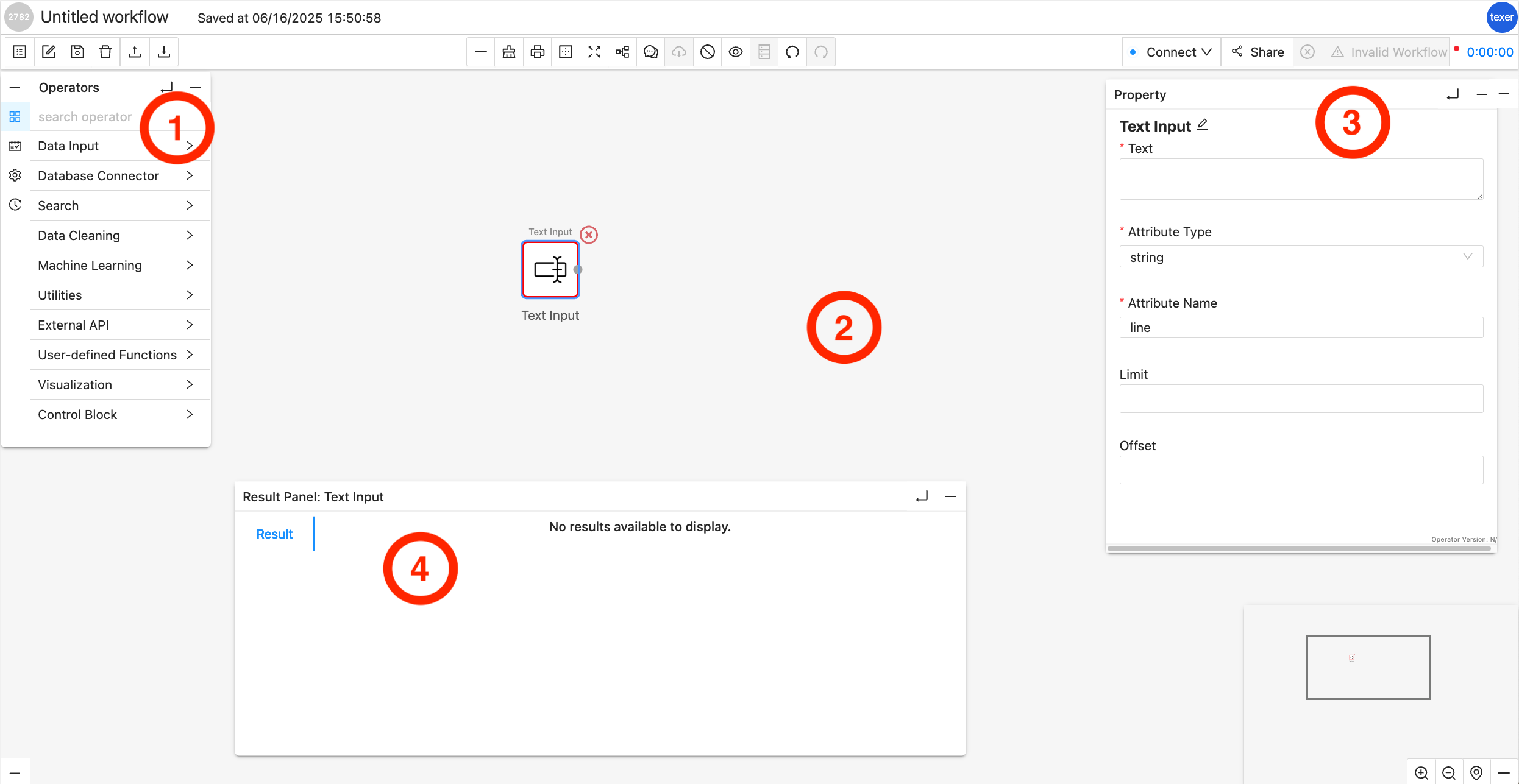
Operator Library/Menu:
It is separated into multiple dropdown menus based on the operator type, e.g., Source Operator, Search Operator, etc. You can drag and drop an operator from these dropdown menus onto the Workflow Canvas.
Workflow Canvas:
It is the main playground, where you can drag and drop Operators from the Operator Library onto it. Each operator is shown as a square box and connected with other operators with arrowed links which indicates the data flow.
Properties Editor Panel:
The panel will show up when you highlight a specific operator (by clicking on it) in the Workflow Canvas. You can customize the properties of the selected operator, for example, set the keyword for a filter. When the selected operator is configured correctly, a green ring will surround it; while a red ring usually indicates an error in configuration or connection to other operators.
Result Panel:
By default or when there is no result, it is hidden. You can click on the little UP arrow to expand this panel. When a workflow is finished running, the result panel will pop up with the data. You may slide up and down or left and right to view the data inside the panel.
1.4.2 - Create Dataset, upload data to it and use it in Workflow
This tutorial goes through the process of preparing data by creating dataset and creating a workflow to analyze data resided in the dataset using Texera.
More specifically, we are going to create a dataset named Sales Dataset which contains a file about the sales data of different types of merchandises for several countries. And the workflow will calculate the average sales per item type across different countries in Europe from the CountrySalesData.csv (Make sure the downloaded file is in .csv file extension). The sales data has been downloaded from eforexcel.com and has 100 rows of data.
We will first be creating a dataset and uploading the sales data to it. Then we will be creating a workflow on Texera Web UI to
- read the data from the file;
- filter the relevant data based on keywords;
- perform an aggregation.
1. Upload data by creating a Dataset
- Go to the Dataset tab and click the
dataset creationicon to start creating the datasaet - Name the dataset as
Sales Dataset, drag and drop theCountrySalesData.csvto the file uploading area - Click
Create, the dataset we just created, along with the preview ofCountrySalesData.csvis shown.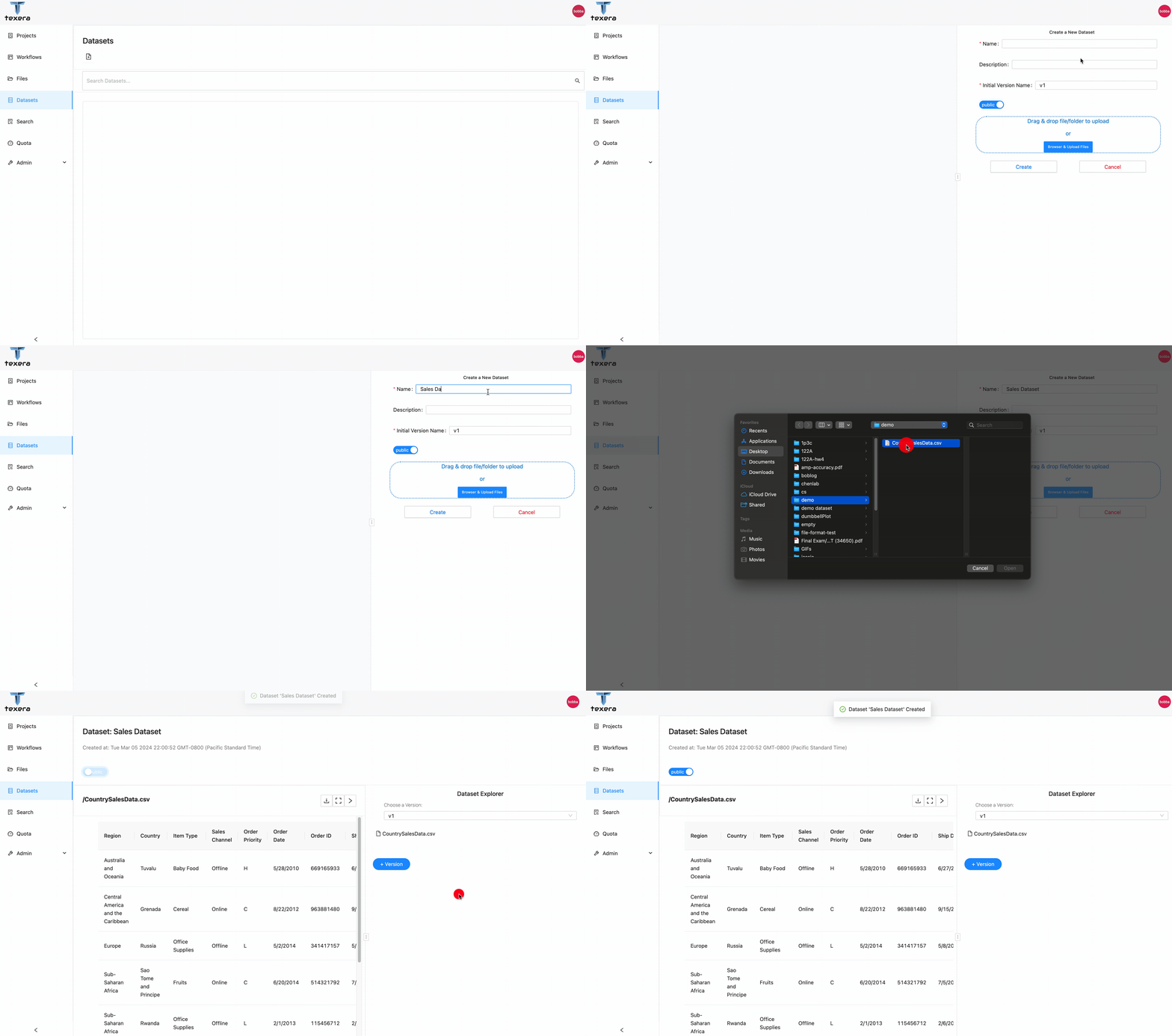
2. Read data in Workflow
- On the left panel, go to the
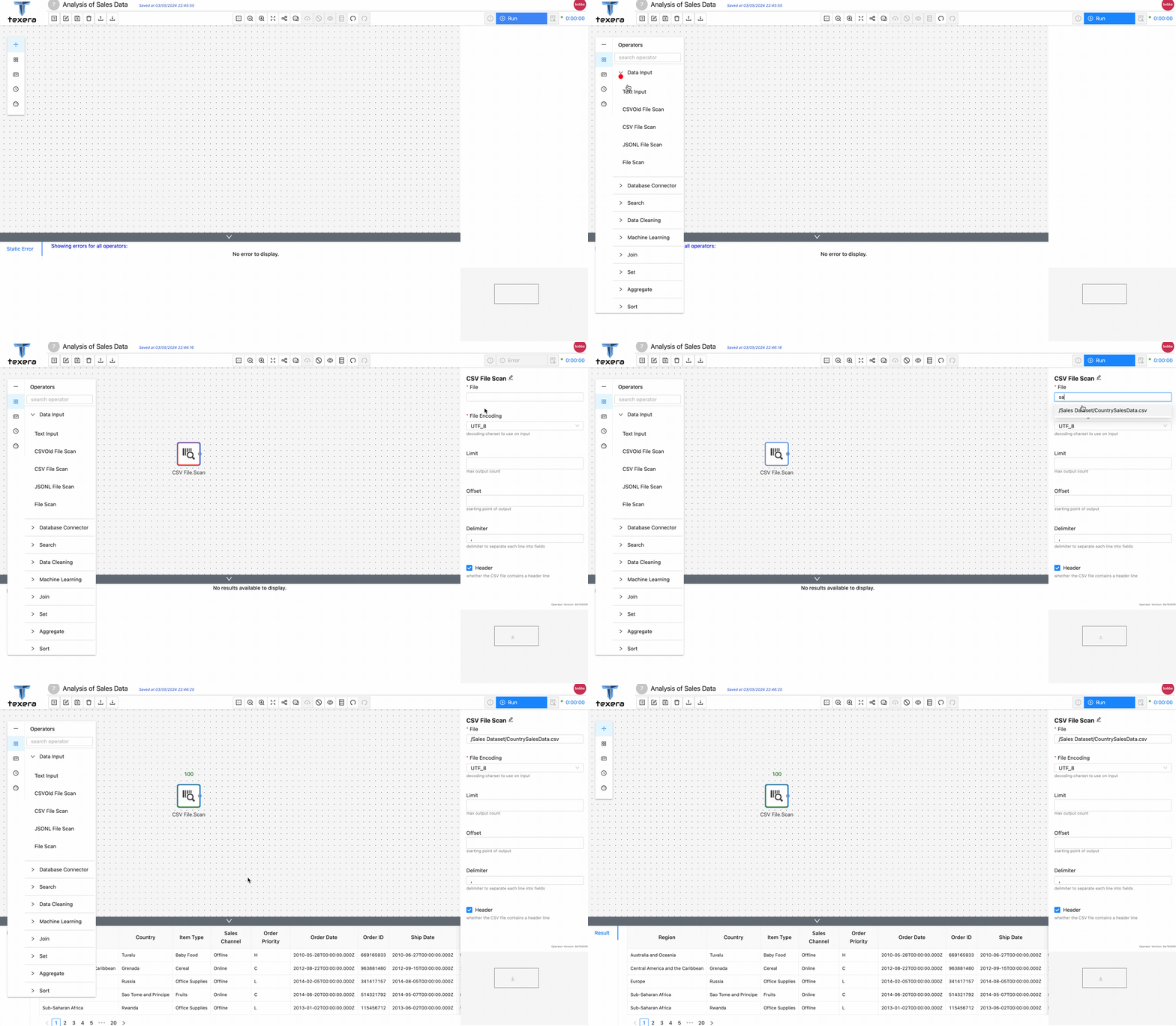
environmenttab and clickAdd Datasetto add theSales Datasetto current workflow.CountrySalesData.csvwill be available to be previewed and loaded to the workflow.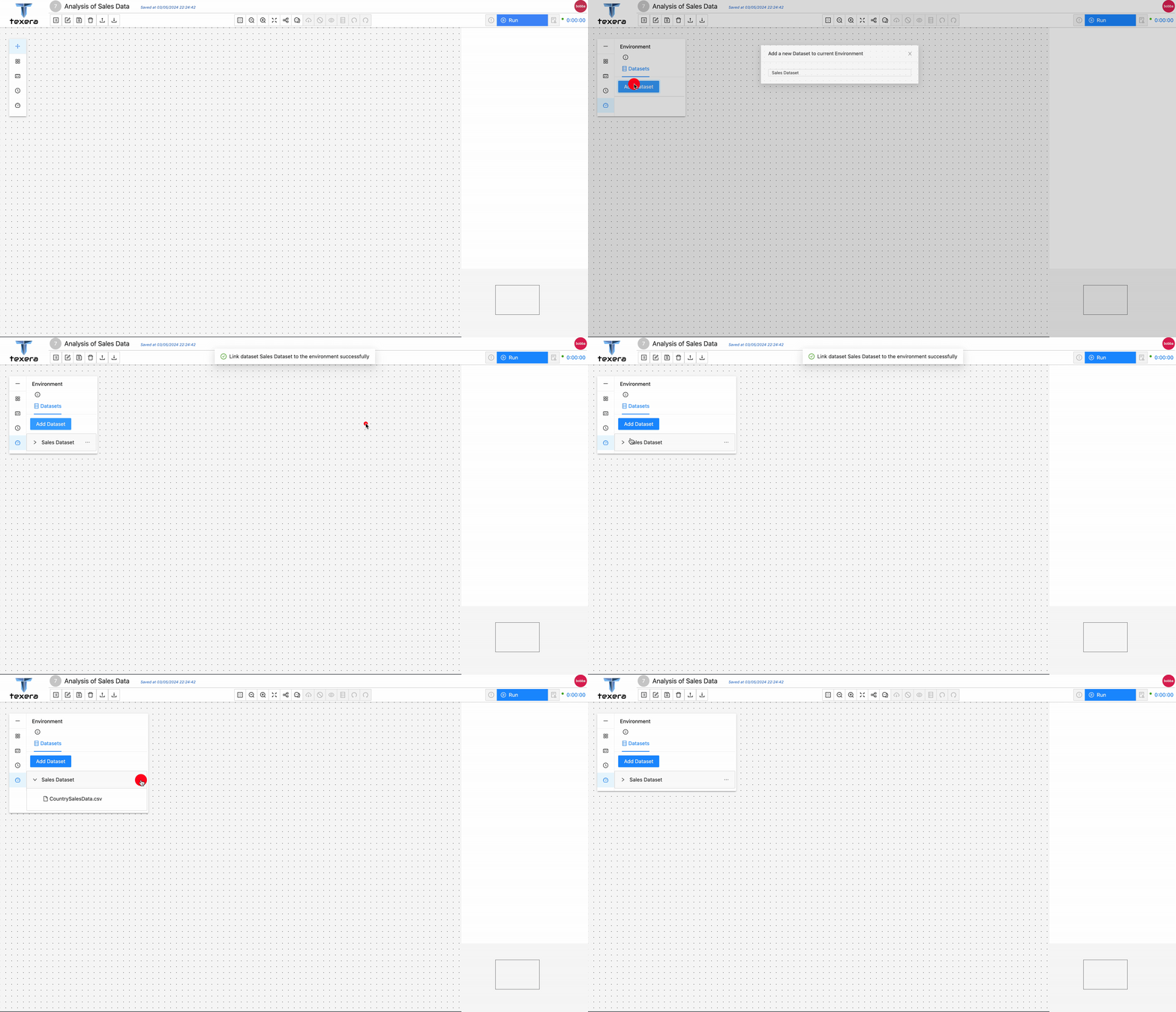 '
' - Drag and drop a
CSV File Scanoperator. On the right panel, input the file nameCountrySalesData.csvand select the path from the drop down menu - Run the workflow, you should be able to see the loaded sales data.
3. Add operators to analyze data
Drag and drop a
Filteroperator to keep only the sales data inEurope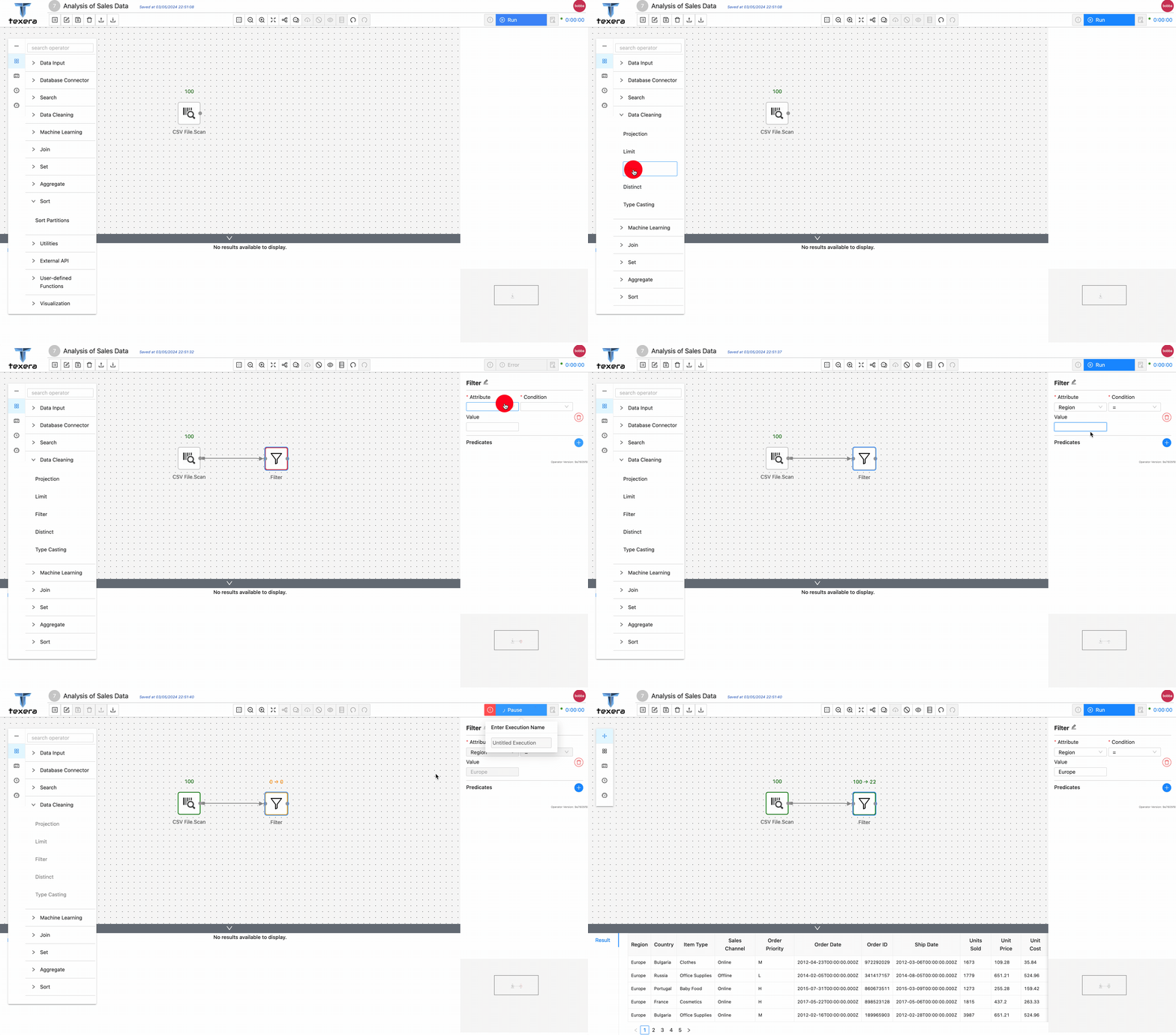
Drag and drop a
Aggregateoperator to get the average sold units group byItem Type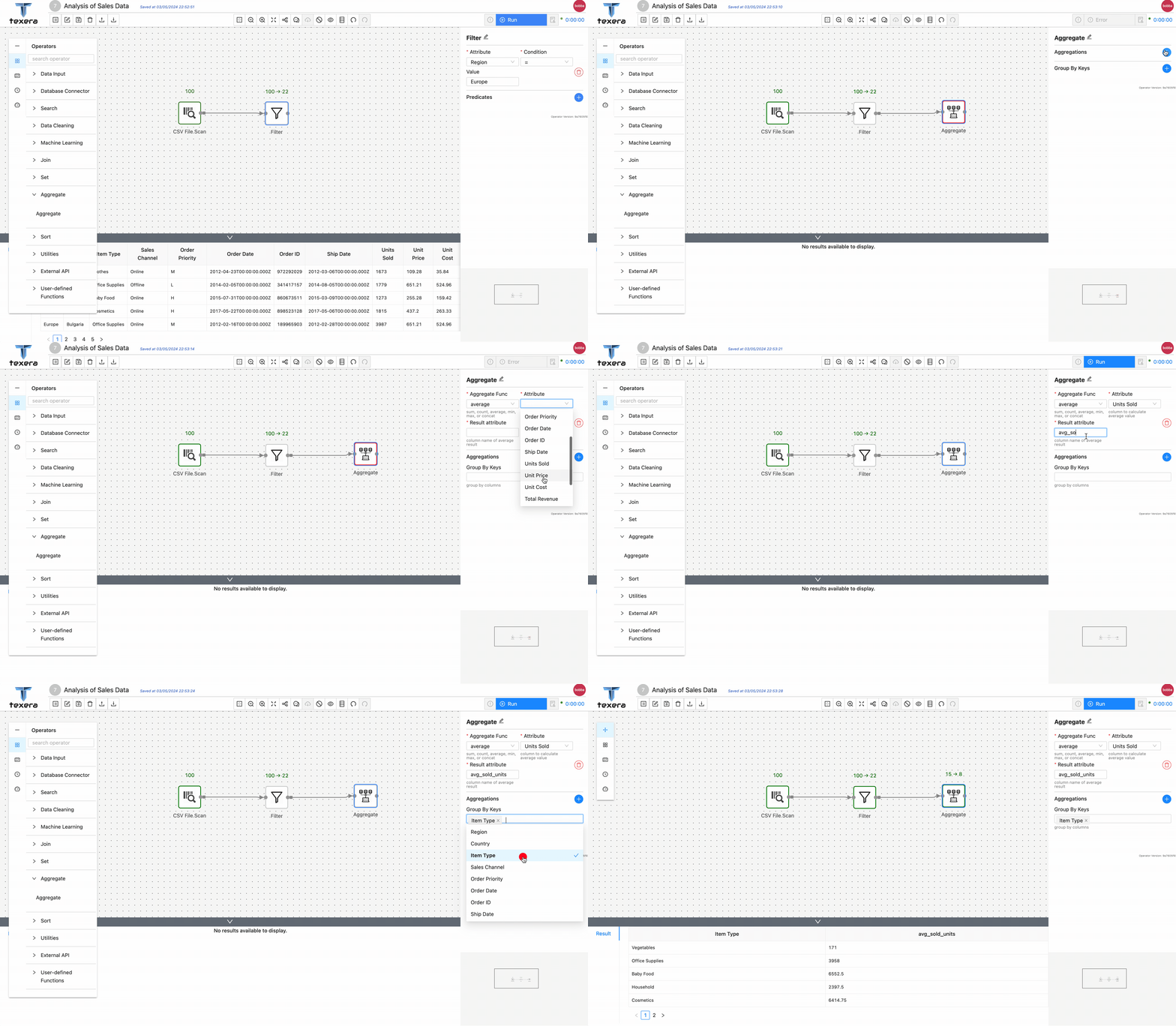
1.4.3 - Guide to Use a Python UDF
What is Python UDF
User-defined Functions (UDFs) provide a means to incorporate custom logic into Texera. Texera offers comprehensive Python UDF APIs, enabling users to accomplish various tasks. This guide will delve into the usage of UDFs, breaking down the process step by step.
UDF UI and Editor
The UDF operator offers the following interface, requiring the user to provide the following inputs: Python code, worker count, and output schema.
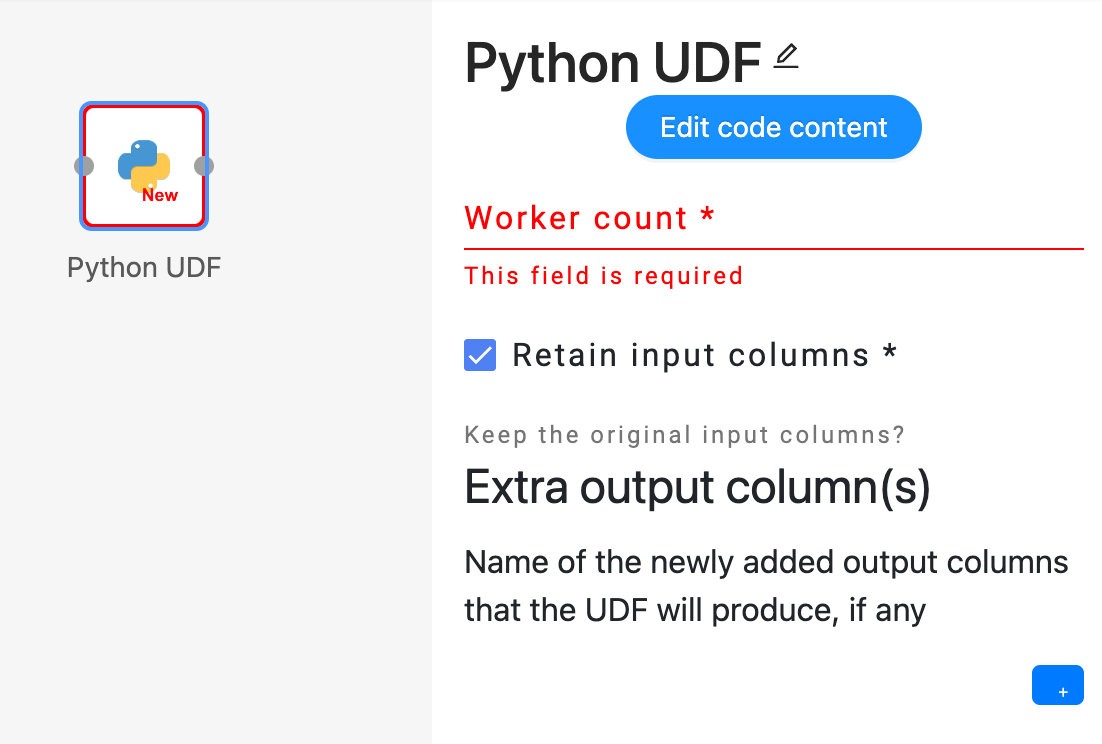
 Users can click on the “Edit code content” button to open the UDF code editor, where they can enter their custom Python code to define the desired operator.
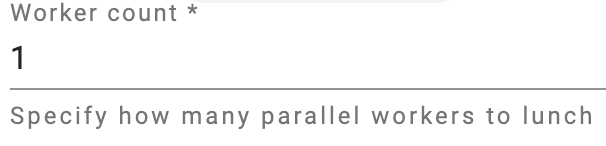 Users have the flexibility to adjust the parallelism of the UDF operator by modifying the number of workers. The engine will then create the corresponding number of workers to execute the same operator in parallel.
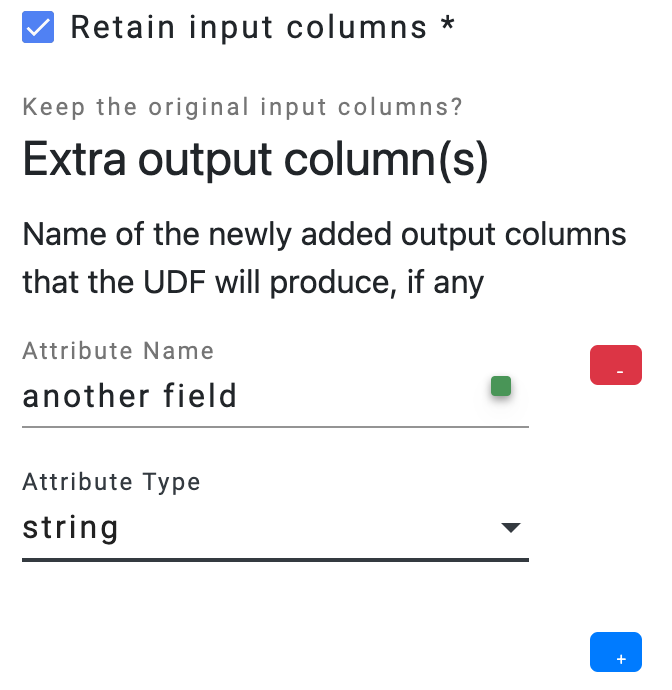 Users need to provide the output schema of the UDF operator, which describes the output data’s fields.
- The option
Retain input columnsallows users to include the input schema as the foundation for the output schema. - The
Extra output column(s)list allows users to define additional fields that should be included in the output schema.
- The option
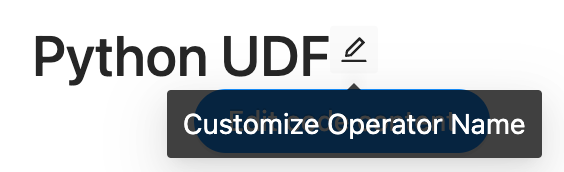 Optionally, users can click on the pencil icon located next to the operator name to make modifications to the name of the operator.
Operator Definition
Iterator-based operator
In Texera, all operators are implemented as iterators, including Python UDFs. Concepturally, a defined operator is executed as:
operator = UDF() # initialize a UDF operator

... # some other initialization logic

# the main process loop
while input_stream.has_more():
    input_data = next_data()
    output_iterator = operator.process(input_data)
    for output_data in output_iterator:
        send(output_data)

... # some cleanup logic
Operator Life Cycle
The complete life cycle of a UDF operator consists of the following APIs:
open() -> NoneOpen a context of the operator. Usually it can be used for loading/initiating some resources, such as a file, a model, or an API client. It will be invoked once per operator.process(data, port: int) -> Iterator[Optional[data]]Process an input data from the given port, returning an iterator of optional data as output. It will be invoked once for every unit of data.on_finish(port: int) -> Iterator[Optional[data]]Callback when one input port is exhausted, returning an iterator of optional data as output. It will be invoked once per port.close() -> NoneClose the context of the operator. It will be invoked once per operator.
Process Data APIs
There are three APIs to process the data in different units.
- Tuple API.
class ProcessTupleOperator(UDFOperatorV2):

    def process_tuple(self, tuple_: Tuple, port: int) -> Iterator[Optional[TupleLike]]:
        yield tuple_
Tuple API takes one input tuple from a port at a time. It returns an iterator of optional TupleLike instances. A TupleLike is any data structure that supports key-value pairs, such as pytexera.Tuple, dict, defaultdict, NamedTuple, etc.
Tuple API is useful for implementing functional operations which are applied to tuples one by one, such as map, reduce, and filter.
- Table API.
class ProcessTableOperator(UDFTableOperator):

    def process_table(self, table: Table, port: int) -> Iterator[Optional[TableLike]]:
        yield table
Table API consumes a Table at a time, which consists of all the tuples from a port. It returns an iterator of optional TableLike instances. A TableLike is a collection of TupleLike, and currently, we support pytexera.Table and pandas.DataFrame as a TableLike instance. More flexible types will be supported down the road.
Table API is useful for implementing blocking operations that will consume all the data from one port, such as join, sort, and machine learning training.
- Batch API.
class ProcessBatchOperator(UDFBatchOperator):

    BATCH_SIZE = 10

    def process_batch(self, batch: Batch, port: int) -> Iterator[Optional[BatchLike]]:
        yield batch
Batch API consumes a batch of tuples at a time. Similar to Table, a Batch is also a collection of Tuples; however, its size is defined by the BATCH_SIZE, and one port can have multiple batches. It returns an iterator of optional BatchLike instances. A BatchLike is a collection of TupleLike, and currently, we support pytexera.Batch and pandas.DataFrame as a BatchLike instance. More flexible types will be supported down the road.
The Batch API serves as a hybrid API combining the features of both the Tuple and Table APIs. It is particularly valuable for striking a balance between time and space considerations, offering a trade-off that optimizes efficiency.
All three APIs can return an empty iterator by yield None.
Schemas
A UDF has an input Schema and an output Schema. The input schema is determined by the upstream operator’s output schema and the engine will make sure the input data (tuple, table, or batch) matches the input schema. On the other hand, users are required to define the output schema of the UDF, and it is the user’s responsibility to make sure the data output from the UDF matches the defined output schema.
Ports
Input ports: A UDF can take zero, one or multiple input ports, different ports can have different input schemas. Each port can take in multiple links, as long as they share the same schema.
Output ports: Currently, a UDF can only have exactly one output port. This means it cannot be used as a terminal operator (i.e., operator without output ports), or have more than one output port.
1-out UDF
This UDF has zero input port and one output port. It is considered as a source operator (operator that produces data without an upstream). It has a special API:
class GenerateOperator(UDFSourceOperator):

    @overrides
    def produce(self) -> Iterator[Union[TupleLike, TableLike, None]]:
        yield
This produce() API returns an iterator of TupleLike, TableLike, or simply None.
See Generator Operator for an example of 1-out UDF.
2-in UDF
This UDF has two input ports, namely model port and tuples port. The tuples port depends on the model port, which means that during the execution, the model port will execute first, and the tuples port will start after the model port consumes all its input data.
This dependency is particularly useful to implement machine learning inference operators, where a machine learning model is sent into the 2-in UDF through the model port, and becomes an operator state, then the tuples are coming in through the tuples port to be processed by the model.
An example of 2-in UDF:
class SVMClassifier(UDFOperatorV2):


    @overrides
    def process_tuple(self, tuple_: Tuple, port: int) -> Iterator[Optional[TupleLike]]:

        if port == 0: # models port
           self.model = tuple_['model']

        else: # tuples port
           tuple_['pred'] = self.model.predict(tuple_['text'])
           yield tuple_
Currently, in 2-in UDF, “Retain input columns” will retain only the tuples port’s input schema.
1.4.4 - Guide to enable the LLM‐based Texera agent
This guide explains how to enable the AI agent feature in Texera. For detailed explanation about this feature, see https://github.com/apache/texera/pull/4020.
Prerequisites
- Already know how to setup Texera
- Python 3.10+
- API key from a supported LLM provider (e.g., Anthropic, OpenAI)
Step 1: Install LiteLLM
Run command:
pip install 'litellm[proxy]'
Step 2: Configure API Keys
Set your LLM provider API key as an environment variable:
For Anthropic (Claude):
export ANTHROPIC_API_KEY=<your-anthropic-api-key>
For OpenAI:
export OPENAI_API_KEY=<your-openai-api-key>
You can set multiple API keys if you want to use models from different providers.
Step 3: Start LiteLLM Service
Start the LiteLLM proxy using the provided configuration:
litellm --config bin/litellm-config.yaml
By default, LiteLLM runs on http://0.0.0.0:4000.
To customize available models, edit
bin/litellm-config.yaml. See LiteLLM documentation for more options. Also see LiteLLM Model Configuration for supported providers and model formats.
Step 4: Enable agent in Configuration
Modify common/config/src/main/resources/gui.conf to enable the agent feature:
 gui {
   workflow-workspace {
     # ... other settings ...

     # whether AI agent feature is enabled
-    copilot-enabled = false
+    copilot-enabled = true
   }
 }
Step 5: Configure LiteLLM Connection (Optional)
The AccessControlService acts as a gateway between the frontend and LiteLLM. If LiteLLM is running on a different host or port, modify common/config/src/main/resources/llm.conf:
 llm {
   # Base URL for LiteLLM service
-  base-url = "http://0.0.0.0:4000"
+  base-url = "http://your-litellm-host:4000"

   # Master key for LiteLLM authentication
-  master-key = ""
+  master-key = "your-master-key"
 }
Alternatively, set environment variables:
export LITELLM_BASE_URL=http://your-litellm-host:4000
export LITELLM_MASTER_KEY=your-master-key
Step 6: Start Texera Services
Start the all Texera micro services, including the AccessControlService.
Done!
After opening any workflow, you should now see a robot icon at the bottom right. Click on it will expand a panel with all the available models:
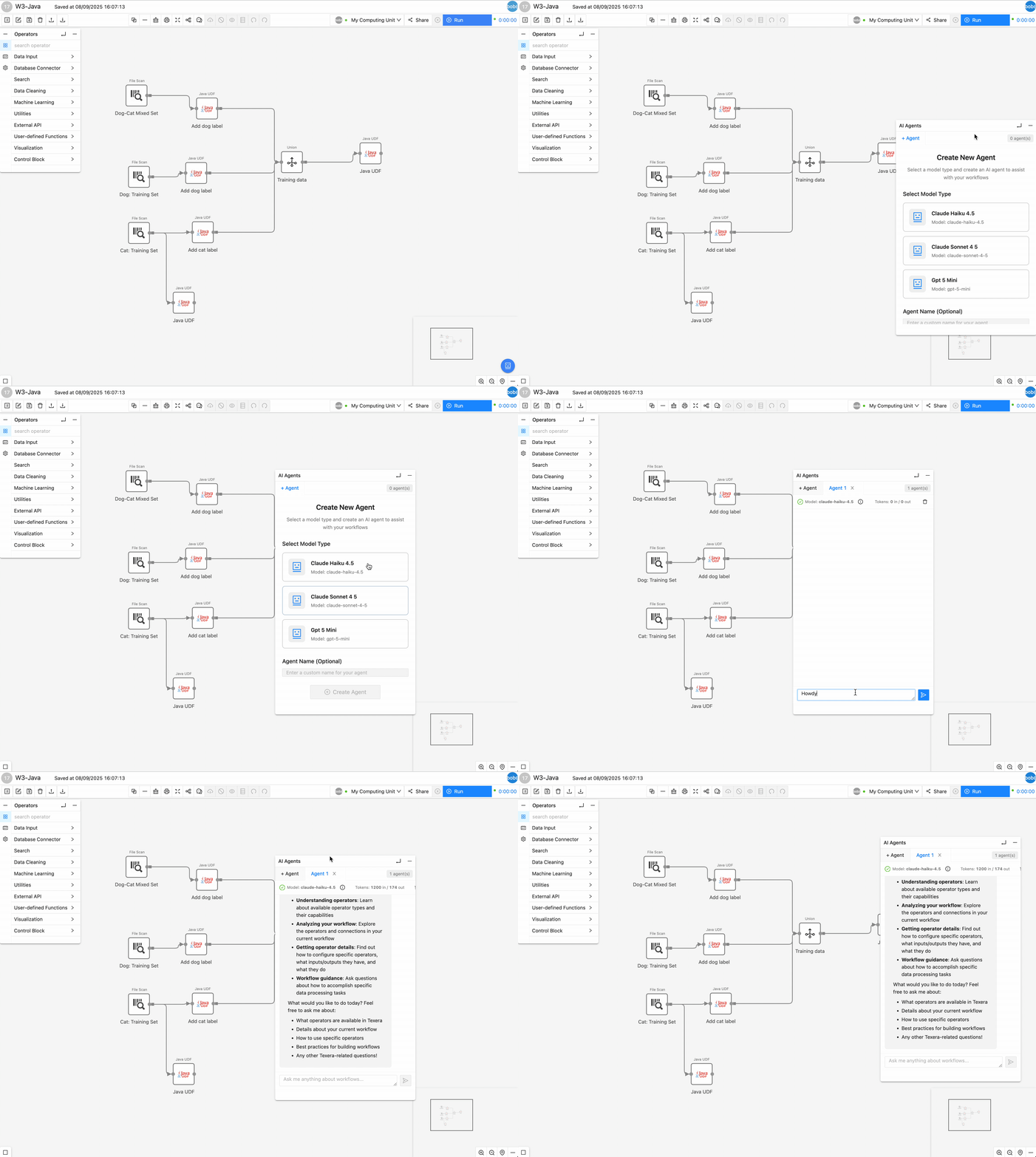
1.4.5 - Guide to launch Lakekeeper as the RESTCatalog Service for Texera's workflow result storage
This guide goes through the process of setting up Lakekeeper, which can be used as the REST Catalog service for Texera’s workflow result storage.
For more information of why using RESTCatalog, see Issue #4126.
Prerequisites
- OS: macOS or Linux
- Already know how to setup Texera
- A running PostgreSQL instance
- An accessible S3 Bucket Endpoint
- awscli needs to be installed
Step 1: Install Lakekeeper
On macOS / Linux, run
brew install lakekeeper
Verify the installation by running:
lakekeeper --version
Alternatively, you can download a pre-built binary from the https://github.com/lakekeeper/lakekeeper/releases and place it on your $PATH.
Step 2: Create a Database for Lakekeeper in Postgres
Create a database using the SQL script in Texera’s repository:
psql -f sql/texera_lakekeeper.sql
Step 3: Configure the Bootstrap Script
Edit the User Configuration section at the top of bin/bootstrap-lakekeeper.sh.
First, set the PostgreSQL connection URLs used by Lakekeeper:
-LAKEKEEPER__PG_DATABASE_URL_READ=""
-LAKEKEEPER__PG_DATABASE_URL_WRITE=""
+LAKEKEEPER__PG_DATABASE_URL_READ="postgres://<user>:<urlencoded_password>@<host>:5432/texera_lakekeeper"
+LAKEKEEPER__PG_DATABASE_URL_WRITE="postgres://<user>:<urlencoded_password>@<host>:5432/texera_lakekeeper"
If you have customized storage-related values in common/config/src/main/resources/storage.conf (for example, the bucket name, S3 endpoint, or MinIO credentials), check the below environment variables in the script and modify their values accordingly:
  # Storage settings — must stay in sync with storage.conf
  # if needed, update the default values after `:-` to match storage.conf
STORAGE_ICEBERG_CATALOG_REST_URI="${STORAGE_ICEBERG_CATALOG_REST_URI:-http://localhost:8181/catalog}"
STORAGE_ICEBERG_CATALOG_REST_WAREHOUSE_NAME="${STORAGE_ICEBERG_CATALOG_REST_WAREHOUSE_NAME:-texera}"
STORAGE_ICEBERG_CATALOG_REST_REGION="${STORAGE_ICEBERG_CATALOG_REST_REGION:-us-west-2}"
STORAGE_ICEBERG_CATALOG_REST_S3_BUCKET="${STORAGE_ICEBERG_CATALOG_REST_S3_BUCKET:-texera-iceberg}"
STORAGE_S3_ENDPOINT="${STORAGE_S3_ENDPOINT:-http://localhost:9000}"
STORAGE_S3_AUTH_USERNAME="${STORAGE_S3_AUTH_USERNAME:-texera_minio}"
STORAGE_S3_AUTH_PASSWORD="${STORAGE_S3_AUTH_PASSWORD:-password}"
Step 4: Run the Bootstrap Script
Run the following script in Texera repo:
bash bin/bootstrap-lakekeeper.sh
The script will:
- Start Lakekeeper if it’s not already running (on http://localhost:8181)
- Bootstrap the Lakekeeper server (creates the default project)
- Create the texera-iceberg bucket in MinIO if it doesn’t exist
- Register the texera warehouse with Lakekeeper, pointing at that bucket
Step 5: Verify
Check that Lakekeeper is healthy by running:
curl http://localhost:8181/health
You should see a JSON response with "health":"ok".
Verify that the warehouse has been created by running:
curl http://localhost:8181/management/v1/warehouse
You should see a warehouse in the response.
Step 6: Switch Texera to use the REST catalog
To make Texera actually use the Lakekeeper REST catalog you just set up, edit common/config/src/main/resources/storage.conf:
  storage {
      iceberg {
          catalog {
-             type = postgres
+             type = rest
              ...
          }
      }
  }
Done!
Lakekeeper is now your service of managing Iceberg RESTCatalog. Texera workflows that produce Iceberg results will write to the S3 bucket via the Iceberg RESTCatalog.
1.4.6 - Migrate a Jupyter Notebook to a Texera Workflow
This document provides guidelines on how to migrate a Jupyter notebook to a Texera workflow.
1. Overview
Jupyter Notebook is an open-source, browser-based environment for interactive computing that blends executable code with rich media in a single document. Work is organized into discrete cells that can be run individually, with each cell’s output persisted in the notebook.
A Texera workflow provides an operator-centric abstraction for data-science pipelines. A workflow is a directed acyclic graph (DAG) in which every node is an operator, such as CSV Scan, Projection, Filter, Aggregate, Python UDF, or ML Model, and an edge represents the flow of data between operators.
Migrating notebook code into Texera operators, then wiring those operators with links, transforms ad-hoc analyses into shareable, pipeline-oriented workflows that enable collaboration and scalable execution.
2. Example: convert a “tweet analysis” notebook into a workflow
The notebook, dataset and workflow in this example are available on TexeraHub.
Notebook Overview
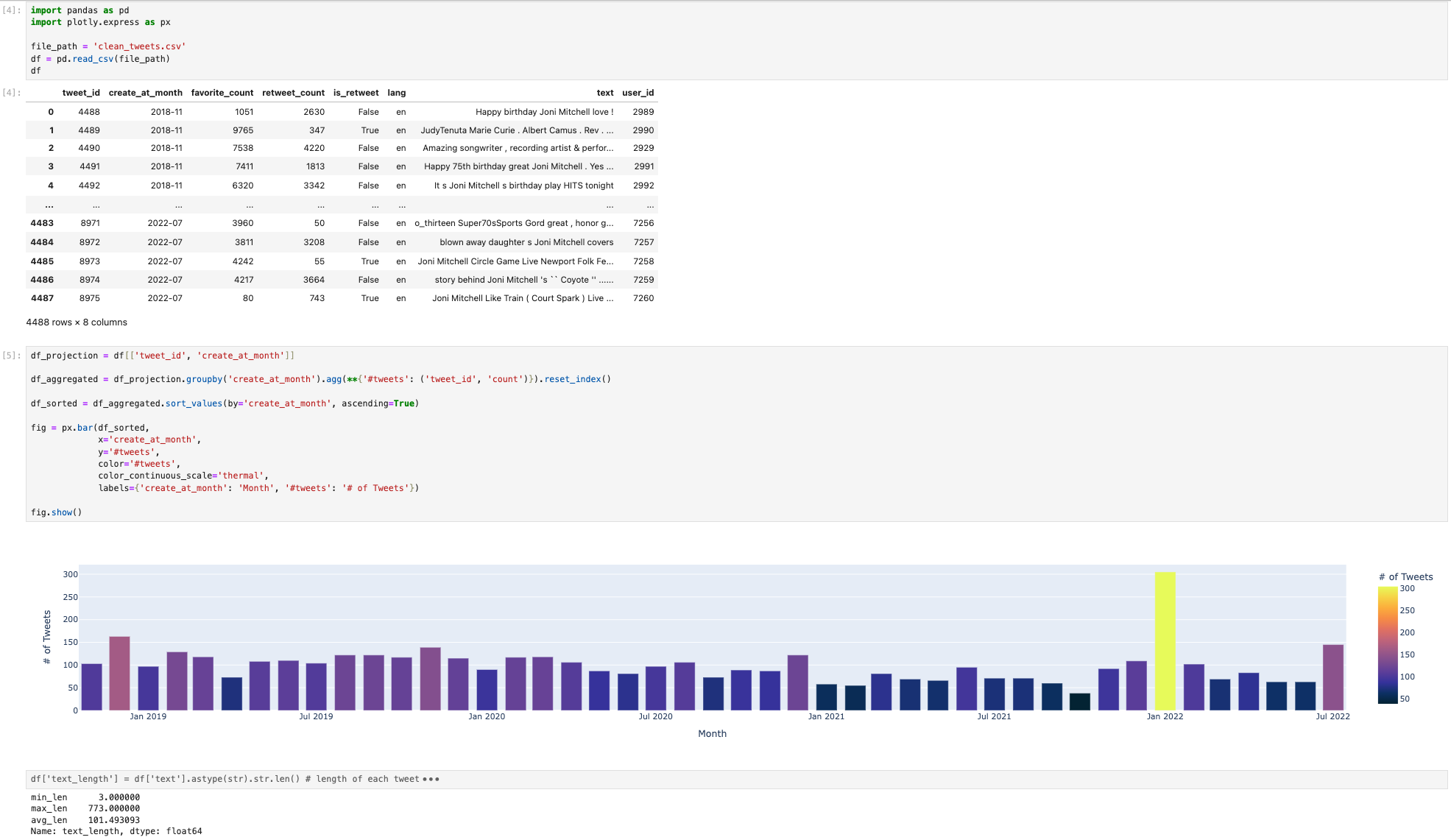
We will use a Tweet-Analysis notebook to demonstrate the migration process. The notebook has three cells:
- Cell 1
import pandas as pd
import plotly.express as px

file_path = 'clean_tweets.csv'
df = pd.read_csv(file_path)
df
- Cell 2
df_projection = df[['tweet_id', 'create_at_month']]
df_aggregated = df_projection.groupby('create_at_month').agg(**{'#tweets': ('tweet_id', 'count')}).reset_index()
df_sorted = df_aggregated.sort_values(by='create_at_month', ascending=True)
fig = px.bar(df_sorted,
             x='create_at_month',
             y='#tweets',
             color='#tweets',
             color_continuous_scale='thermal',
             labels={'create_at_month': 'Month', '#tweets': '# of Tweets'})
fig.show()
- Cell 3
df['text_length'] = df['text'].astype(str).str.len()
length_stats = df['text_length'].agg(['min', 'max', 'mean'])
print(length_stats)
Below is the screenshot of the notebook after the execution:
2.1. Identify the data files and upload them to a Texera dataset
From cell 1, we see the notebook reads clean_tweets.csv.
#...
file_path = 'clean_tweets.csv'
df = pd.read_csv(file_path)
df
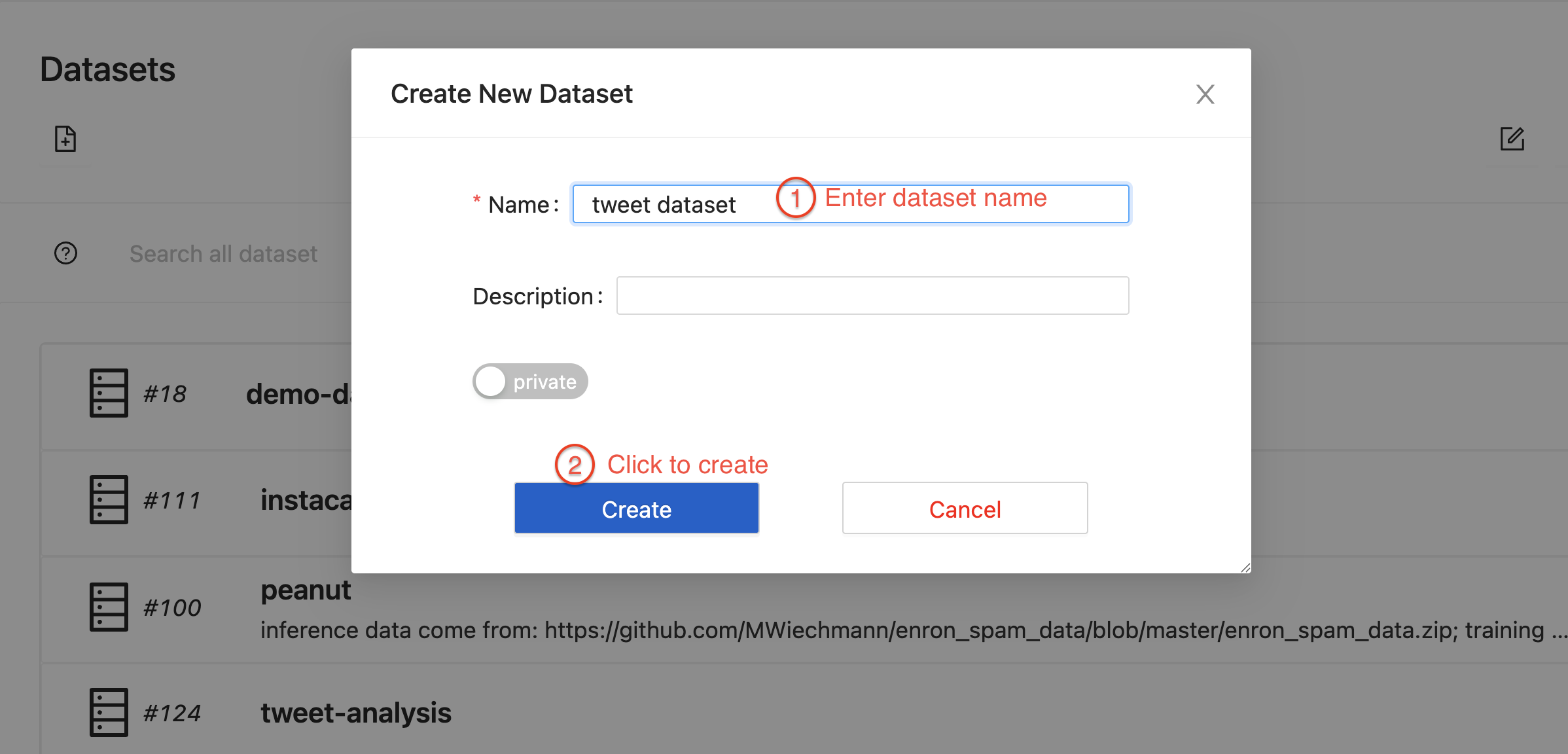
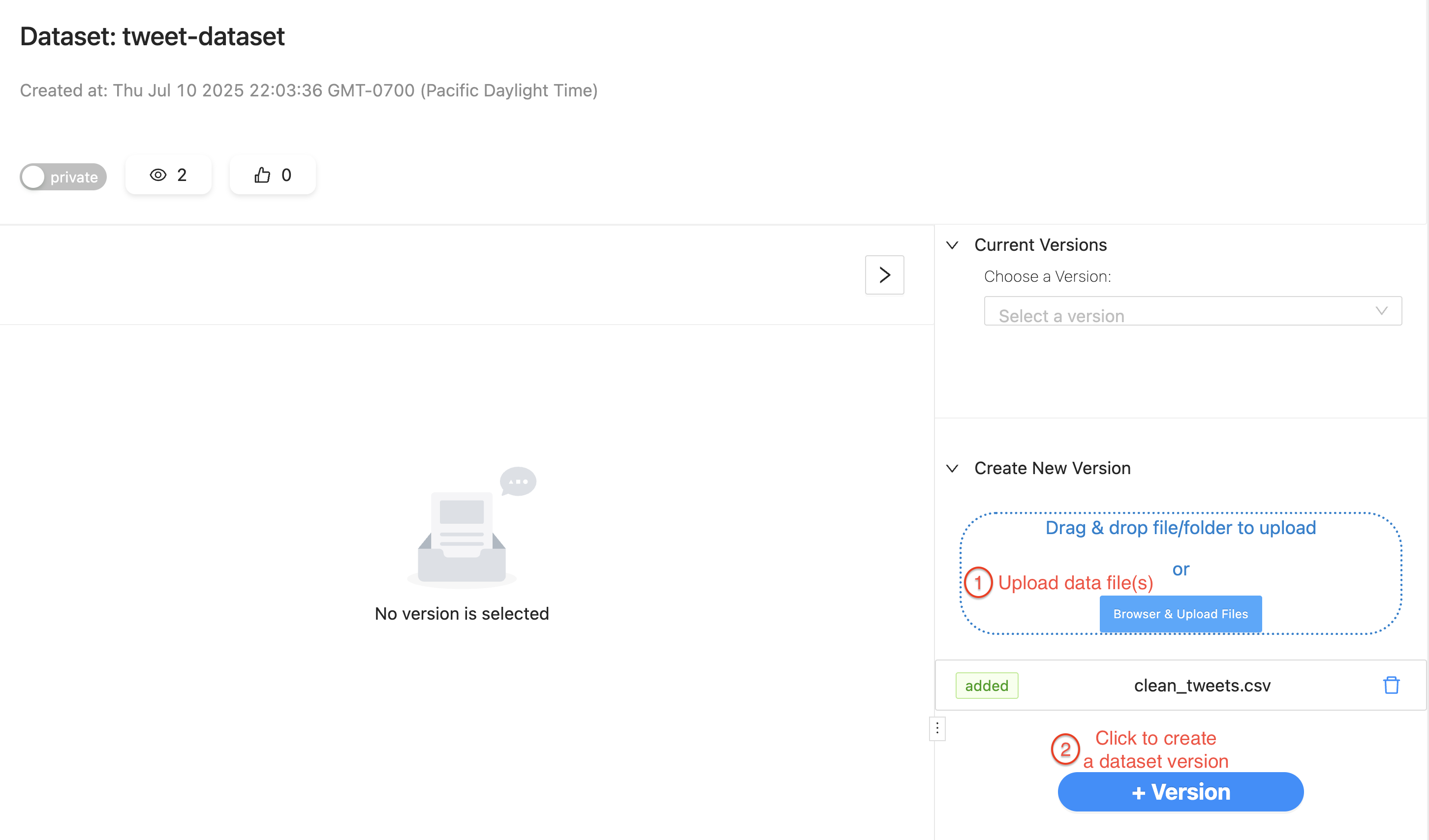
To let Texera read the same file, create a dataset in Texera, drag-and-drop the CSV file into it, and create a version:
2.2. Read the source data using data input operators
After the file is in a dataset, create a workflow and add a data-input operator that reads the file.
Because the file is CSV, we should use CSVFileScanOperator and specify the file path. Running the workflow should display the same table as Cell 1 in the result panel:
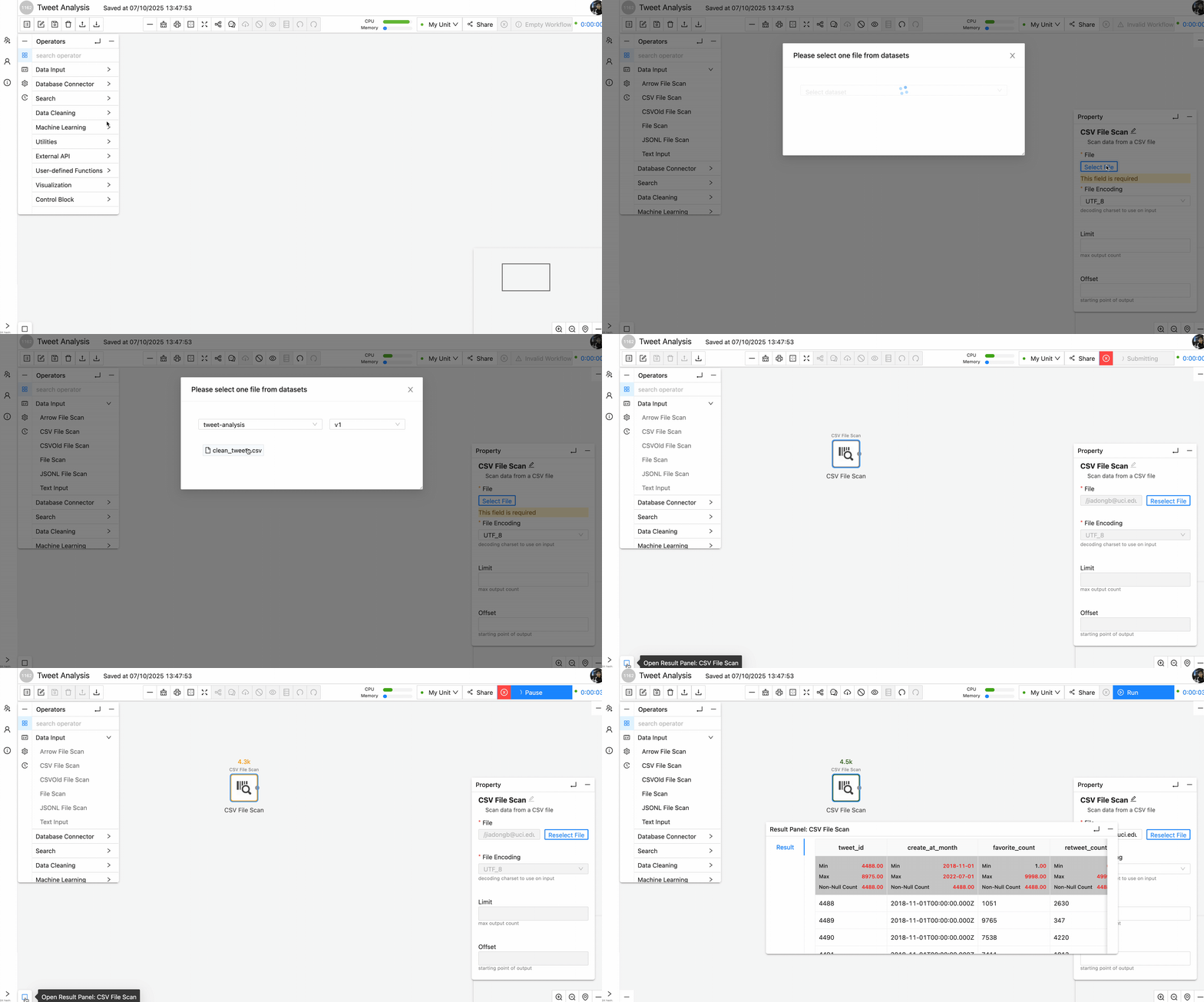
After this step, we have successfully converted cell 1 into a Texera operator.
2.3. Migrate data-processing logic into operators and links
Case 1: Use native operators for common processing logic
Cell 2 performs a sequence of operations after reading the data source: projection to keep only two columns, aggregation to calculate the number of tweets per month, sort based on count, and then visualizing using the bar chart:
df_projection = df[['tweet_id', 'create_at_month']]
df_aggregated = df_projection.groupby('create_at_month').agg(**{'#tweets': ('tweet_id', 'count')}).reset_index()
df_sorted = df_aggregated.sort_values(by='create_at_month', ascending=True)
fig = px.bar(df_sorted,
             x='create_at_month',
             y='#tweets',
             color='#tweets',
             color_continuous_scale='thermal',
             labels={'create_at_month': 'Month', '#tweets': '# of Tweets'})
fig.show()
These operations are very common in data science pipelines. And Texera provides several native operators that have the exact same functionalities and are easy to use:
- Projection operator →
df[['tweet_id', 'create_at_month']] - Aggregate operator →
groupby('create_at_month').agg(...).reset_index() - Sort operator →
sort_values(by='create_at_month', ascending=True) - Barchart operator →
px.bar(...)
Therefore, we can drag-n-drop these operators, connect them after the CSVFileScan. Running the workflow should display the same bar chart as in Cell 2.
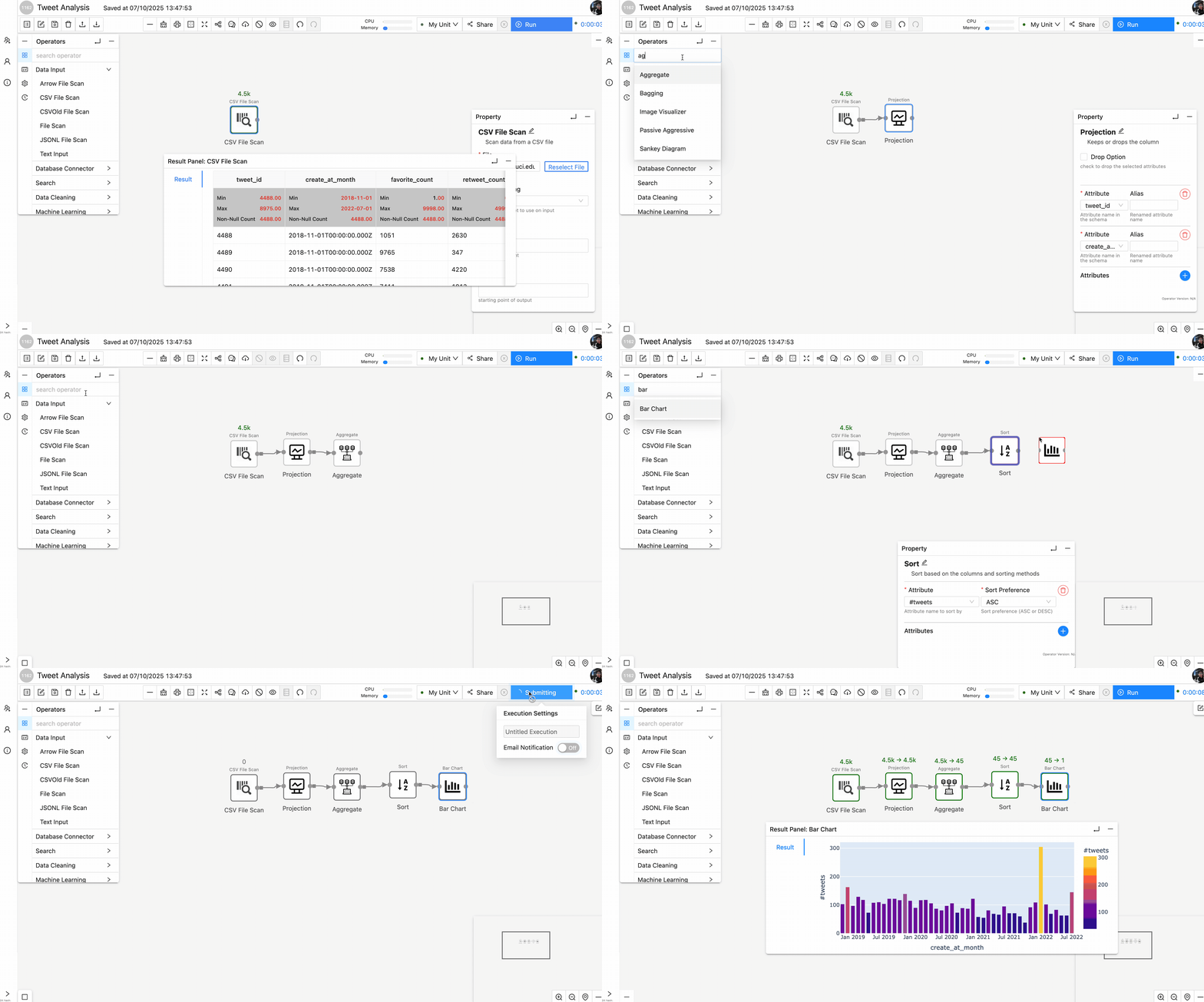
Now we have successfully migrate cell 2 into Texera.
Case 2: Use UDF operators for complex processing logic
According to cell 3, a new column is added to the original tweet data table to represent the length of the text column. After that, min, max, mean of the text_length column are calculated.
df['text_length'] = df['text'].astype(str).str.len()
length_stats = df['text_length'].agg(['min', 'max', 'mean'])
print(length_stats.rename({'min': 'min_len', 'max': 'max_len', 'mean': 'avg_len'}))
For code that involves column addition/removal and other complex data operations, Texera supports UDF operators that allow users to write custom logic as an operator that processes the data.
In this example, we can add a PythonUDF operator after the CSVScanOperator. Inside the UDF we use TableAPI as it involves the table-level column addition. Since in the pytexera package, Table supports most of the pandas Dataframe APIs, we can simply adjust the code in Cell 3 and put it into UDF as the processing logic. There are two ways to show the final result:
- Use
printstatement in the UDF code block. The result will be shown in the “Console” tab:
from typing import Iterator, Optional
from pytexera import *
import pandas as pd
class TextLengthStatsOperator(UDFTableOperator):
    @overrides
    def process_table(self, table: Table, port: int) -> Iterator[Optional[TableLike]]:
        # add a new column text_length
        table['text_length'] = table['text'].astype(str).str.len()

        # Aggregate min, max, and mean
        length_stats = table['text_length'].agg(['min', 'max', 'mean'])
        print(length_stats)
        yield None
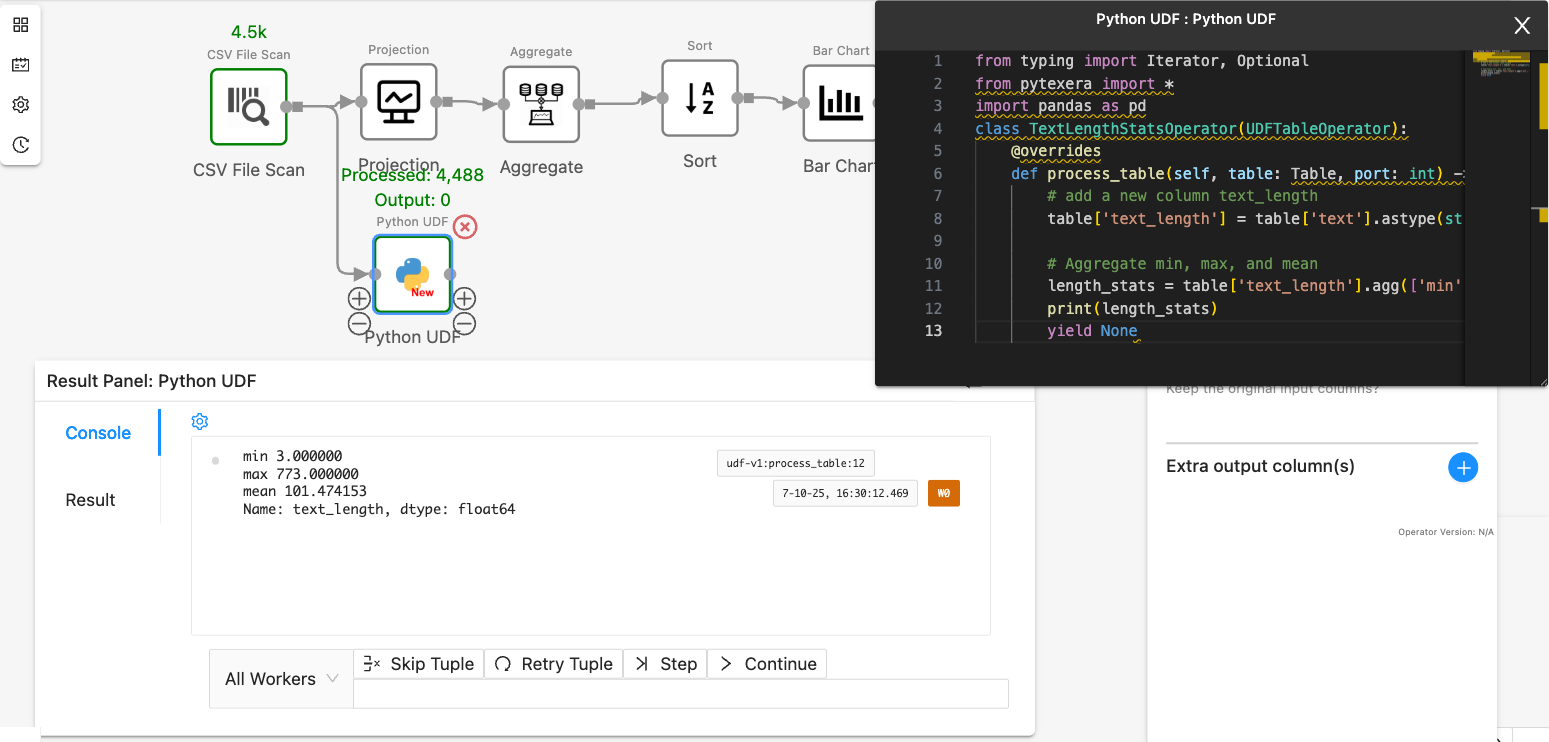
- Yield the result as a table with columns
min,max, andmeanto the downstream. Make sure to declare the output schema in the operator panel. The result will be shown in the “Result” tab:
from typing import Iterator, Optional
from pytexera import *
import pandas as pd
class TextLengthStatsOperator(UDFTableOperator):
    @overrides
    def process_table(self, table: Table, port: int) -> Iterator[Optional[TableLike]]:
        # add a new column text_length
        table['text_length'] = table['text'].astype(str).str.len()

        # Aggregate min, max, and mean
        length_stats = table['text_length'].agg(['min', 'max', 'mean'])
        yield length_stats
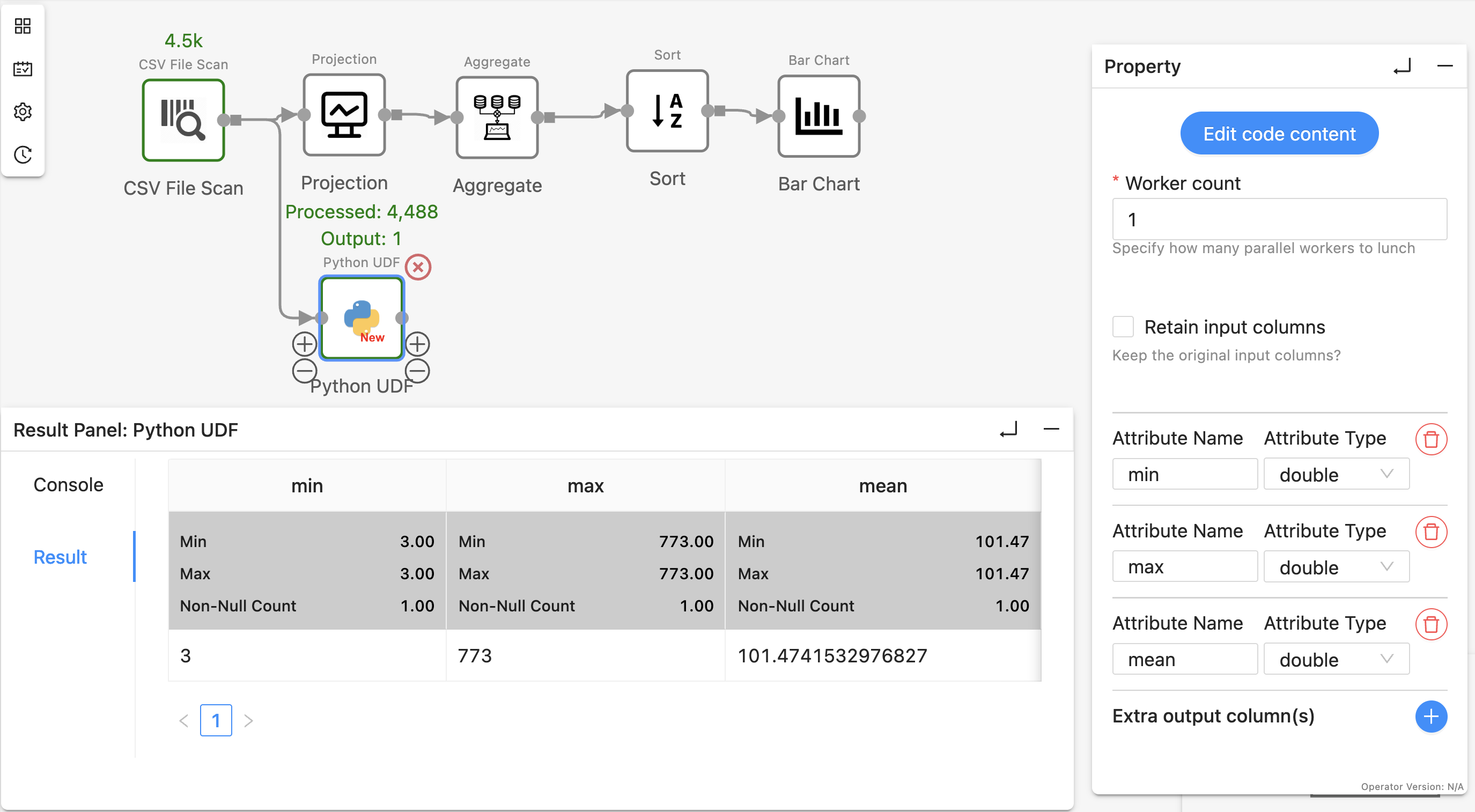
Step 4: Annotate some operators as ‘View Result’ to display the same results as Notebook
Jupyter displays the output of every cell, whereas Texera shows only sink-operator outputs by default.
To view intermediate results, for example, the results after SortOperator, right-click the operator, select “View Result” shown in the drop-down menu, and re-run the workflow:
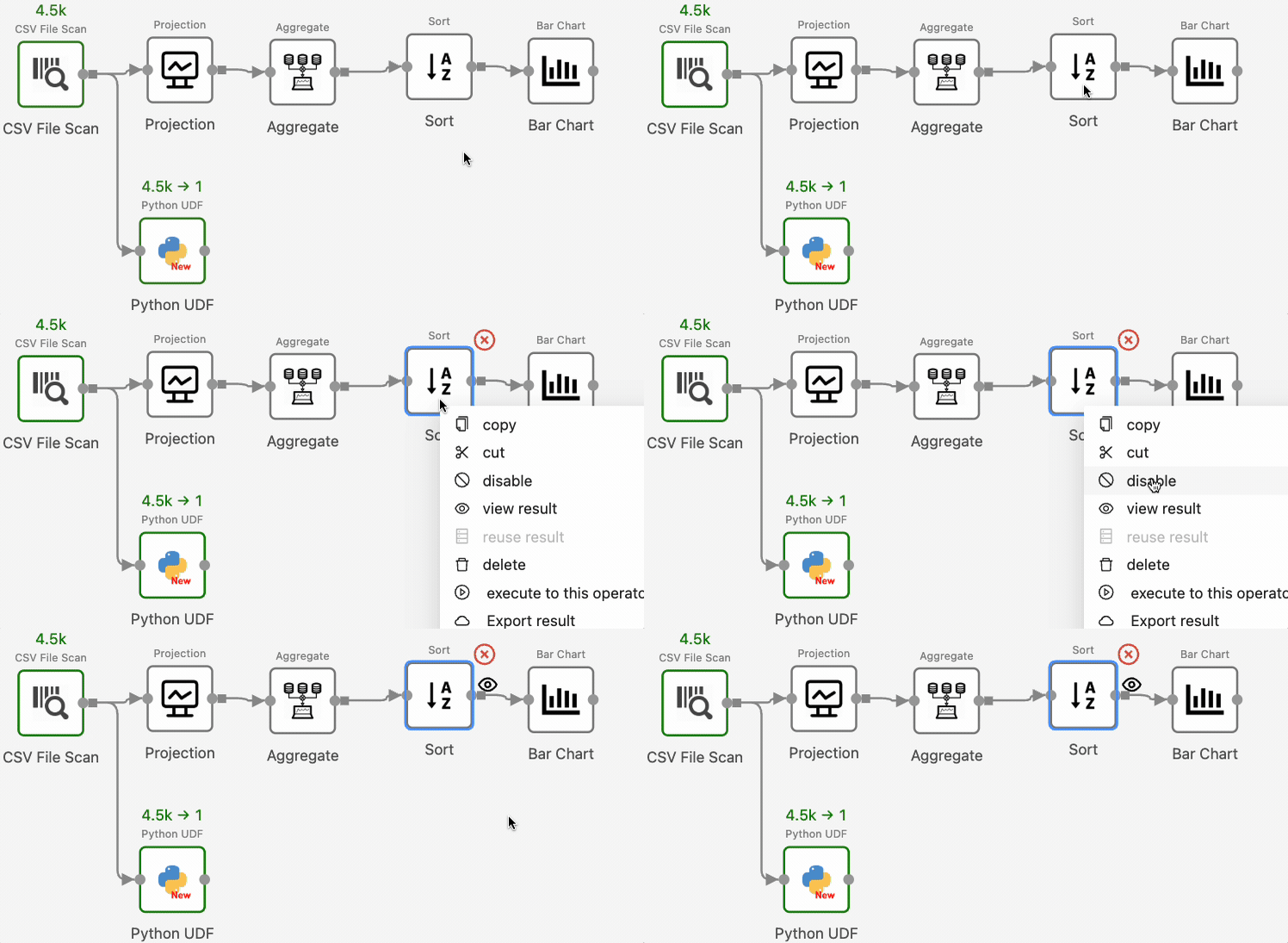
Texera will now show the operator’s output in the result panel.
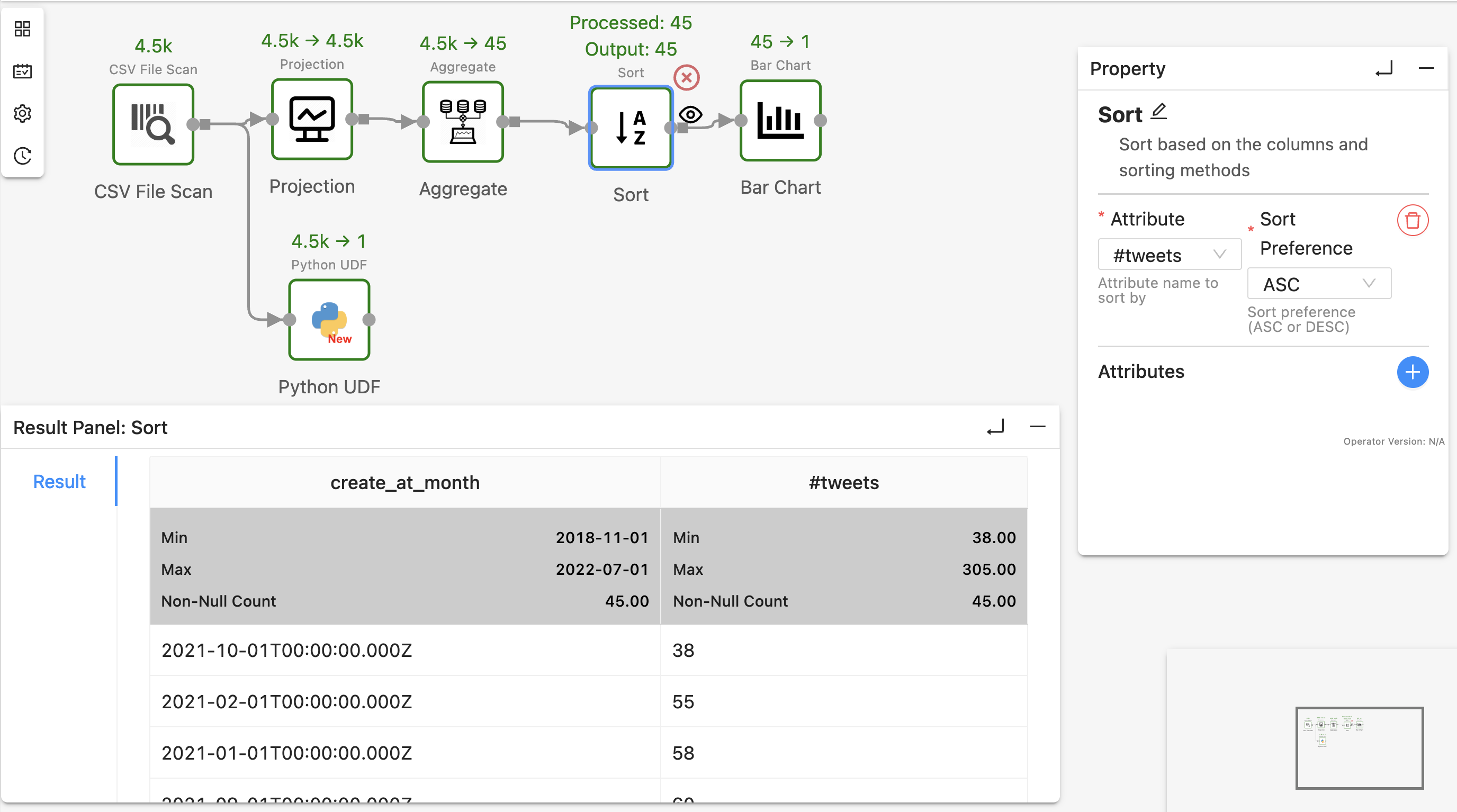
3. Tips
- Utilize Texera native operators as much as possible
Texera contains more than 110 built-in operators that cover data loading, cleaning, wrangling, visualization, and AI/ML. Replacing custom code with native operators makes workflows clearer and usually improves performance.
- Identify the data dependencies in the Python code in order to connect operators
In Texera, data flows along links. Before wiring operators, review the notebook to understand which variables feed which; then reproduce those dependencies via links so the executions matches the original notebook.
1.5 - Reference
In-depth technical and configuration references for Texera’s components and environment.
This section contains detailed, low-level reference materials for Texera’s configuration, components, and internal modules.
The Reference section provides look-up documentation for developers and maintainers who need specific, technical information about Texera’s internals or environment.
Unlike the Concepts section, which explains how Texera works, this section focuses on how Texera is configured, built, and extended.
What you’ll find here
This section includes reference information for:
- Configuration and Environment Setup: Detailed parameters and environment variables used for development, deployment, and testing.
- Project Structure: Explanation of major code directories, module dependencies, and naming conventions.
- Execution Engine Details: Low-level reference for engine modules, operators’ lifecycle, and workflow translation.
- Operator Framework: Technical notes on operator registration, metadata, and extension mechanisms.
- Frontend Components: Descriptions of UI module structure, Angular components, and visualization hooks.
- Persistence and Storage: Information about Texera’s internal storage models, catalog, and workflow metadata.
When to use this section
Use this section when you need:
- To understand or modify Texera’s internal modules or configuration files.
- To debug, extend, or refactor parts of the codebase.
- To deploy Texera in a local, testing, or production environment and need to adjust settings or dependencies.
How to maintain this section
Reference pages are often technical and version-specific. Keep them up to date by:
- Linking or embedding auto-generated documentation from code comments (e.g., Javadoc for backend modules or TypeDoc for frontend).
- Including manual reference pages for configuration files, startup scripts, and architecture diagrams.
- Updating this section whenever internal modules or configuration formats change.
Suggested subpages
| File | Purpose |
|---|---|
reference/configuration.md | Environment variables, ports, and server settings. |
reference/project-structure.md | Directory overview and build system explanation. |
reference/engine.md | Detailed explanation of execution engine internals. |
reference/operators/ | Built-in operator catalog, grouped by category. |
reference/frontend.md | Frontend architecture and components. |
reference/storage.md | Persistence layer, catalog, and metadata handling. |
This section is meant to be a developer’s technical handbook for Texera’s internal systems — a precise reference for anyone maintaining, extending, or deploying the platform.
1.5.1 - Operators
Complete reference for all Texera operators organized by category
Quick Links
- Parameter Reference - ML parameter specifications
Operator Categories
- Data Input (8 operators)
- Database Connector (3 operators)
- Search (4 operators)
- Data Cleaning (16 operators)
- Machine Learning (63 operators)
- Sklearn (54 operators)
- Sklearn Training (26 operators)
- Advanced Sklearn (4 operators)
- Hugging Face (4 operators)
- Machine Learning General (1 operator)
- Sklearn (54 operators)
- Utilities (4 operators)
- External API (4 operators)
- User-defined Functions (8 operators)
- Visualization (50 operators)
- Basic (16 operators)
- Statistical (8 operators)
- Scientific (14 operators)
- Financial (5 operators)
- Media (4 operators)
- Advanced (2 operators)
- Control Block (2 operators)
1.5.1.1 - Data Input
Operators in the Data Input category
Home > Data Input
Operators
| Operator | Description |
|---|---|
| Arrow File Scan | Scan data from an Arrow file |
| CSV File Scan | Scan data from a CSV file |
| CSVOld File Scan | Scan data from a CSVOld file |
| File Lister | Select a dataset version and output one filename tuple per file |
| File Scan | Scan data from a file |
| File Scan From Input | Scan data from file paths provided by input tuples |
| JSONL File Scan | Scan data from a JSONL file |
| Text Input | Source data from manually inputted text |
Total: 8 operators
1.5.1.1.1 - Arrow File Scan
Scan data from an Arrow file
Input Properties
| Property | Requirement | Type | Default | Description |
|---|---|---|---|---|
| File | ✓ | String | - | |
| Limit | Integer | - | Max output count | |
| Offset | Integer | - | Starting point of output |
Output Ports
| Port | Mode |
|---|---|
| 0 | Set Snapshot |
1.5.1.1.2 - CSV File Scan
Scan data from a CSV file
Input Properties
| Property | Requirement | Type | Default | Description |
|---|---|---|---|---|
| File | ✓ | String | - | |
| File Encoding | ✓ | UTF_8, UTF_16, US_ASCII | UTF_8 | Decoding charset to use on input |
| Limit | Integer | - | Max output count | |
| Offset | Integer | - | Starting point of output | |
| Delimiter | String | , | Delimiter to separate each line into fields | |
| Header | Boolean | true | Whether the CSV file contains a header line |
Output Ports
| Port | Mode |
|---|---|
| 0 | Set Snapshot |
1.5.1.1.3 - CSVOld File Scan
Scan data from a CSVOld file
Input Properties
| Property | Requirement | Type | Default | Description |
|---|---|---|---|---|
| File | ✓ | String | - | |
| File Encoding | ✓ | UTF_8, UTF_16, US_ASCII | UTF_8 | Decoding charset to use on input |
| Limit | Integer | - | Max output count | |
| Offset | Integer | - | Starting point of output | |
| Delimiter | String | , | Delimiter to separate each line into fields | |
| Header | Boolean | true | Whether the CSV file contains a header line |
Output Ports
| Port | Mode |
|---|---|
| 0 | Set Snapshot |
1.5.1.1.4 - File Lister
Select a dataset version and output one filename tuple per file
Input Properties
| Property | Requirement | Type | Default | Description |
|---|---|---|---|---|
| Dataset | ✓ | String | - |
Output Ports
| Port | Mode |
|---|---|
| 0 | Set Snapshot |
1.5.1.1.5 - File Scan
Scan data from a file
Input Properties
| Property | Requirement | Type | Default | Description |
|---|---|---|---|---|
| File | ✓ | String | - | |
| Encoding | ✓ | UTF_8, UTF_16, US_ASCII | UTF_8 | |
| Extract | Boolean | false | ||
| ↳ Include Filename | Boolean | false | ||
| Attribute Type | ✓ | string, single string, integer, long, double, boolean, timestamp, binary, large binary | string | |
| Attribute Name | ✓ | String | line | |
| Limit | Integer | - | ||
| Offset | Integer | - |
Output Ports
| Port | Mode |
|---|---|
| 0 | Set Snapshot |
1.5.1.1.6 - File Scan From Input
Scan data from file paths provided by input tuples
Input Properties
| Property | Requirement | Type | Default | Description |
|---|---|---|---|---|
| Encoding | ✓ | UTF_8, UTF_16, US_ASCII | UTF_8 | |
| Extract | Boolean | false | ||
| Include Filename | Boolean | false | ||
| Attribute Type | ✓ | string, single string, integer, long, double, boolean, timestamp, binary, large binary | string | |
| Attribute Name | ✓ | String | line | |
| Limit | Integer | - | ||
| Offset | Integer | - |
Output Ports
| Port | Mode |
|---|---|
| 0 | Set Snapshot |
1.5.1.1.7 - JSONL File Scan
Scan data from a JSONL file
Input Properties
| Property | Requirement | Type | Default | Description |
|---|---|---|---|---|
| File | ✓ | String | - | |
| File Encoding | ✓ | UTF_8, UTF_16, US_ASCII | UTF_8 | Decoding charset to use on input |
| Limit | Integer | - | Max output count | |
| Offset | Integer | - | Starting point of output | |
| Flatten | ✓ | Boolean | false | Flatten nested objects and arrays |
Output Ports
| Port | Mode |
|---|---|
| 0 | Set Snapshot |
1.5.1.1.8 - Text Input
Source data from manually inputted text
Input Properties
| Property | Requirement | Type | Default | Description |
|---|---|---|---|---|
| Text | ✓ | String | - | |
| Attribute Type | ✓ | string, single string, integer, long, double, boolean, timestamp, binary, large binary | string | |
| Attribute Name | ✓ | String | line | |
| Limit | Integer | - | ||
| Offset | Integer | - |
Output Ports
| Port | Mode |
|---|---|
| 0 | Set Snapshot |
1.5.1.2 - Database Connector
Operators in the Database Connector category
Home > Database Connector
Operators
| Operator | Description |
|---|---|
| AsterixDB Source | Read data from a AsterixDB instance |
| MySQL Source | Read data from a MySQL instance |
| PostgreSQL Source | Read data from a PostgreSQL instance |
Total: 3 operators
1.5.1.2.1 - AsterixDB Source
Read data from a AsterixDB instance
Input Properties
| Property | Requirement | Type | Default | Description |
|---|---|---|---|---|
| Host | ✓ | String | - | |
| Port | ✓ | String | default | A port number or ‘default’ |
| Database | ✓ | String | - | |
| Table Name | ✓ | String | - | |
| Limit | Long | - | Max output count | |
| Offset | Long | - | Starting point of output | |
| Keyword Search? | Boolean | false | ||
| ↳ Keyword Search Column | String | - | ||
| ↳ Keywords to Search | String | - | “[‘hello’, ‘world’], {‘mode’:‘any’}” OR "[‘hello’, ‘world’], {‘mode’:‘all’}" | |
| Progressive? | Boolean | false | ||
| ↳ Batch by Column | String | - | ||
| ↳ Min | String | auto | ||
| ↳ Max | String | auto | ||
| ↳ Batch by Interval | Long | 1000000000 | ||
| Geo Search? | Boolean | false | ||
| ↳ Geo Search By Columns | List | - | Column(s) to check if any of them is in the bounding box below | |
| ↳ Geo Search Bounding Box | List | - | At least 2 entries should be provided to form a bounding box. format of each entry: long, lat | |
| Regex Search? | Boolean | false | ||
| ↳ Regex Search By Column | String | - | ||
| ↳ Regex to Search | String | - | ||
| Filter Condition? | Boolean | false | ||
| ↳ Predicates | List | - | Multiple predicates in OR | |
| ↳ Attribute | ✓ | String | - | |
| ↳ Condition | ✓ | =, >, >=, <, <=, !=, is null, is not null | - | |
| ↳ Value | String | - |
Output Ports
| Port | Mode |
|---|---|
| 0 | Set Snapshot |
1.5.1.2.2 - MySQL Source
Read data from a MySQL instance
Input Properties
| Property | Requirement | Type | Default | Description |
|---|---|---|---|---|
| Host | ✓ | String | - | |
| Port | ✓ | String | default | A port number or ‘default’ |
| Database | ✓ | String | - | |
| Table Name | ✓ | String | - | |
| Username | ✓ | String | - | |
| Password | ✓ | String | - | |
| Limit | Long | - | Max output count | |
| Offset | Long | - | Starting point of output | |
| Keyword Search? | Boolean | false | ||
| ↳ Keyword Search Column | String | - | ||
| ↳ Keywords to Search | String | - | ||
| Progressive? | Boolean | false | ||
| ↳ Batch by Column | String | - | ||
| ↳ Min | String | auto | ||
| ↳ Max | String | auto | ||
| ↳ Batch by Interval | Long | 1000000000 |
Output Ports
| Port | Mode |
|---|---|
| 0 | Set Snapshot |
1.5.1.2.3 - PostgreSQL Source
Read data from a PostgreSQL instance
Input Properties
| Property | Requirement | Type | Default | Description |
|---|---|---|---|---|
| Host | ✓ | String | - | |
| Port | ✓ | String | default | A port number or ‘default’ |
| Database | ✓ | String | - | |
| Table Name | ✓ | String | - | |
| Username | ✓ | String | - | |
| Password | ✓ | String | - | |
| Limit | Long | - | Max output count | |
| Offset | Long | - | Starting point of output | |
| Keyword Search? | Boolean | false | ||
| ↳ Keyword Search Column | String | - | ||
| ↳ Keywords to Search | String | - | E.g. ‘sore & throat’ for AND; ‘sore’, ’throat’ for OR. See official postgres documents for details | |
| Progressive? | Boolean | false | ||
| ↳ Batch by Column | String | - | ||
| ↳ Min | String | auto | ||
| ↳ Max | String | auto | ||
| ↳ Batch by Interval | Long | 1000000000 |
Output Ports
| Port | Mode |
|---|---|
| 0 | Set Snapshot |
1.5.1.3 - Search
Operators in the Search category
Home > Search
Operators
| Operator | Description |
|---|---|
| Dictionary matcher | Matches tuples if they appear in a given dictionary |
| Keyword Search | Search for keyword(s) in a string column |
| Regular Expression | Search a regular expression in a string column |
| Substring Search | Search for Substring(s) in a string column |
Total: 4 operators
1.5.1.3.1 - Dictionary matcher
Matches tuples if they appear in a given dictionary
Input Properties
| Property | Requirement | Type | Default | Description |
|---|---|---|---|---|
| Dictionary | ✓ | String | - | Dictionary values separated by a comma |
| Attribute | ✓ | String | - | Column name to match |
| Result Attribute | ✓ | String | matched | Column name of the matching result |
| Matching Type | ✓ | Scan, Substring, Conjunction | - |
Output Ports
| Port | Mode |
|---|---|
| 0 | Set Snapshot |
1.5.1.3.2 - Keyword Search
Search for keyword(s) in a string column
Input Properties
| Property | Requirement | Type | Default | Description |
|---|---|---|---|---|
| attribute | ✓ | String | - | Column to search keyword on |
| keywords | ✓ | String | - | Keywords |
Output Ports
| Port | Mode |
|---|---|
| 0 | Set Snapshot |
1.5.1.3.3 - Regular Expression
Search a regular expression in a string column
Input Properties
| Property | Requirement | Type | Default | Description |
|---|---|---|---|---|
| Case Insensitive | Boolean | false | Regex match is case sensitive | |
| Attribute | ✓ | String | - | Column to search regex on |
| Regex | ✓ | String | - | Regular expression |
Output Ports
| Port | Mode |
|---|---|
| 0 | Set Snapshot |
1.5.1.3.4 - Substring Search
Search for Substring(s) in a string column
Input Properties
| Property | Requirement | Type | Default | Description |
|---|---|---|---|---|
| attribute | ✓ | String | - | Column to search substring on |
| Substring | ✓ | String | - | Substring |
| Case Sensitive | ✓ | Boolean | false | Whether the substring match is case sensitive |
Output Ports
| Port | Mode |
|---|---|
| 0 | Set Snapshot |
1.5.1.4 - Data Cleaning
Operators in the Data Cleaning category
Home > Data Cleaning
Subcategories
Operators
| Operator | Description |
|---|---|
| Distinct | Remove duplicate tuples |
| Filter | Performs a filter operation using OR between multiple predicates |
| Limit | Limit the number of output rows |
| Projection | Keeps or drops the column |
| Type Casting | Cast between types |
Total: 5 operators
1.5.1.4.1 - Join
Operators in the Join category
Home > Data Cleaning > Join
Operators
| Operator | Description |
|---|---|
| Cartesian Product | Append fields together to get the cartesian product of two inputs |
| Hash Join | Join two inputs |
| Interval Join | Join two inputs with left table join key in the range of [right table join key, right table join key + constant value] |
Total: 3 operators
1.5.1.4.1.1 - Cartesian Product
Append fields together to get the cartesian product of two inputs
Home > Data Cleaning > Join
Output Ports
| Port | Mode |
|---|---|
| 0 | Set Snapshot |
1.5.1.4.1.2 - Hash Join
Join two inputs
Home > Data Cleaning > Join
Input Properties
| Property | Requirement | Type | Default | Description |
|---|---|---|---|---|
| Left Input Attribute | ✓ | String | - | Attribute to be joined on the Left Input |
| Right Input Attribute | ✓ | String | - | Attribute to be joined on the Right Input |
| Join Type | ✓ | inner, left outer, right outer, full outer | inner | Select the join type to execute |
Output Ports
| Port | Mode |
|---|---|
| 0 | Set Snapshot |
1.5.1.4.1.3 - Interval Join
Join two inputs with left table join key in the range of [right table join key, right table join key + constant value]
Home > Data Cleaning > Join
Input Properties
| Property | Requirement | Type | Default | Description |
|---|---|---|---|---|
| Interval Constant | ✓ | Long | 10 | Left attri in (right, right + constant) |
| Include Left Bound | ✓ | Boolean | true | Include condition left attri = right attri |
| Include Right Bound | ✓ | Boolean | true | Include condition left attri = right attri |
| Time interval type | TimeIntervalType | day | Year, Month, Day, Hour, Minute or Second | |
| Left Input attr | ✓ | String (integer, long, double, timestamp) | - | Choose one attribute in the left table |
| Right Input attr | ✓ | String | - | Choose one attribute in the right table |
Output Ports
| Port | Mode |
|---|---|
| 0 | Set Snapshot |
1.5.1.4.2 - Set
Operators in the Set category
Home > Data Cleaning > Set
Operators
| Operator | Description |
|---|---|
| Difference | Find the set difference of two inputs |
| Intersect | Take the intersect of two inputs |
| SymmetricDifference | Find the symmetric difference (the set of elements which are in either of the sets, but not in their intersection) of two inputs |
| Union | Unions the output rows from multiple input operators |
Total: 4 operators
1.5.1.4.2.1 - Difference
Find the set difference of two inputs
Home > Data Cleaning > Set
Output Ports
| Port | Mode |
|---|---|
| 0 | Set Snapshot |
1.5.1.4.2.2 - Intersect
Take the intersect of two inputs
Home > Data Cleaning > Set
Output Ports
| Port | Mode |
|---|---|
| 0 | Set Snapshot |
1.5.1.4.2.3 - SymmetricDifference
Find the symmetric difference (the set of elements which are in either of the sets, but not in their intersection) of two inputs
Home > Data Cleaning > Set
Output Ports
| Port | Mode |
|---|---|
| 0 | Set Snapshot |
1.5.1.4.2.4 - Union
Unions the output rows from multiple input operators
Home > Data Cleaning > Set
Output Ports
| Port | Mode |
|---|---|
| 0 | Set Snapshot |
1.5.1.4.3 - Aggregate
Operators in the Aggregate category
Home > Data Cleaning > Aggregate
Operators
| Operator | Description |
|---|---|
| Aggregate | Calculate different types of aggregation values |
Total: 1 operator
1.5.1.4.3.1 - Aggregate
Calculate different types of aggregation values
Home > Data Cleaning > Aggregate
Input Properties
| Property | Requirement | Type | Default | Description |
|---|---|---|---|---|
| Aggregations | ✓ | List | - | Multiple aggregation functions (min: 1, aggregations cannot be empty) |
| ↳ Aggregate Func | ✓ | sum, count, average, min, max, concat | - | Sum, count, average, min, max, or concat |
| ↳ Attribute | ✓ | String | - | Column to calculate average value |
| ↳ Result Attribute | ✓ | String | - | Column name of average result |
| Group By Keys | List | - | Group by columns |
Output Ports
| Port | Mode |
|---|---|
| 0 | Set Snapshot |
1.5.1.4.4 - Sort
Operators in the Sort category
Home > Data Cleaning > Sort
Operators
| Operator | Description |
|---|---|
| Sort | Sort based on the columns and sorting methods |
| Sort Partitions | Sort Partitions |
| Stable Merge Sort | Stable per-partition sort with multi-key ordering (incremental stack of sorted buckets) |
Total: 3 operators
1.5.1.4.4.1 - Sort
Sort based on the columns and sorting methods
Home > Data Cleaning > Sort
Input Properties
| Property | Requirement | Type | Default | Description |
|---|---|---|---|---|
| Attributes | ✓ | List | - | Column to perform sorting on |
| ↳ Attribute | ✓ | String | - | Attribute name to sort by |
| ↳ Sort Preference | ✓ | ASC, DESC | - | Sort preference (ASC or DESC) |
Output Ports
| Port | Mode |
|---|---|
| 0 | Set Snapshot |
1.5.1.4.4.2 - Sort Partitions
Sort Partitions
Home > Data Cleaning > Sort
Input Properties
| Property | Requirement | Type | Default | Description |
|---|---|---|---|---|
| Attribute | ✓ | String (integer, long, double) | - | Attribute to sort (must be numerical) |
| Attribute Domain Min | ✓ | Long | 0 | Minimum value of the domain of the attribute |
| Attribute Domain Max | ✓ | Long | 0 | Maximum value of the domain of the attribute |
Output Ports
| Port | Mode |
|---|---|
| 0 | Set Snapshot |
1.5.1.4.4.3 - Stable Merge Sort
Stable per-partition sort with multi-key ordering (incremental stack of sorted buckets)
Home > Data Cleaning > Sort
Input Properties
| Property | Requirement | Type | Default | Description |
|---|---|---|---|---|
| Sort Keys | ✓ | List | - | List of attributes to sort by with ordering preferences |
| ↳ Attribute | ✓ | String | - | Attribute name to sort by |
| ↳ Sort Preference | ✓ | ASC, DESC | - | Sort preference (ASC or DESC) |
Output Ports
| Port | Mode |
|---|---|
| 0 | Set Snapshot |
1.5.1.4.6 - Filter
Performs a filter operation using OR between multiple predicates
Input Properties
| Property | Requirement | Type | Default | Description |
|---|---|---|---|---|
| Predicates | ✓ | List | - | Multiple predicates in OR |
| ↳ Attribute | ✓ | String | - | |
| ↳ Condition | ✓ | =, >, >=, <, <=, !=, is null, is not null | - | |
| ↳ Value | String | - |
Output Ports
| Port | Mode |
|---|---|
| 0 | Set Snapshot |
1.5.1.4.7 - Limit
Limit the number of output rows
Input Properties
| Property | Requirement | Type | Default | Description |
|---|---|---|---|---|
| Limit | ✓ | Integer | 0 | The max number of output rows |
Output Ports
| Port | Mode |
|---|---|
| 0 | Set Snapshot |
1.5.1.4.8 - Projection
Keeps or drops the column
Input Properties
| Property | Requirement | Type | Default | Description |
|---|---|---|---|---|
| Drop Option | ✓ | Boolean | false | Check to drop the selected attributes |
| Attributes | ✓ | List | - | |
| ↳ Attribute | ✓ | String | - | Attribute name in the schema |
| ↳ Alias | String | - | Renamed attribute name |
Output Ports
| Port | Mode |
|---|---|
| 0 | Set Snapshot |
1.5.1.4.9 - Type Casting
Cast between types
Input Properties
| Property | Requirement | Type | Default | Description |
|---|---|---|---|---|
| TypeCasting Units | ✓ | List | - | Multiple type castings |
| ↳ Attribute | ✓ | String | - | Attribute for type casting |
| ↳ Cast type | ✓ | string, integer, long, double, boolean, timestamp, binary, large_binary | - | Result type after type casting |
Output Ports
| Port | Mode |
|---|---|
| 0 | Set Snapshot |
1.5.1.5 - Machine Learning
Operators in the Machine Learning category
Home > Machine Learning
Subcategories
1.5.1.5.1 - Sklearn
Operators in the Sklearn category
Home > Machine Learning > Sklearn
Subcategories
Operators
| Operator | Description |
|---|---|
| Adaptive Boosting | Sklearn Adaptive Boosting Operator |
| Bagging | Sklearn Bagging Operator |
| Bernoulli Naive Bayes | Sklearn Bernoulli Naive Bayes Operator |
| Complement Naive Bayes | Sklearn Complement Naive Bayes Operator |
| Decision Tree | Sklearn Decision Tree Operator |
| Dummy Classifier | Sklearn Dummy Classifier Operator |
| Extra Tree | Sklearn Extra Tree Operator |
| Extra Trees | Sklearn Extra Trees Operator |
| Gaussian Naive Bayes | Sklearn Gaussian Naive Bayes Operator |
| Gradient Boosting | Sklearn Gradient Boosting Operator |
| K-nearest Neighbors | Sklearn K-nearest Neighbors Operator |
| Linear Regression | Sklearn Linear Regression Operator |
| Linear Support Vector Machine | Sklearn Linear Support Vector Machine Operator |
| Logistic Regression | Sklearn Logistic Regression Operator |
| Logistic Regression Cross Validation | Sklearn Logistic Regression Cross Validation Operator |
| Multi-layer Perceptron | Sklearn Multi-layer Perceptron Operator |
| Multinomial Naive Bayes | Sklearn Multinomial Naive Bayes Operator |
| Nearest Centroid | Sklearn Nearest Centroid Operator |
| Passive Aggressive | Sklearn Passive Aggressive Operator |
| Linear Perceptron | Sklearn Linear Perceptron Operator |
| Sklearn Prediction | Sklearn Prediction Operator |
| Probability Calibration | Sklearn Probability Calibration Operator |
| Random Forest | Sklearn Random Forest Operator |
| Ridge Regression | Sklearn Ridge Regression Operator |
| Ridge Regression Cross Validation | Sklearn Ridge Regression Cross Validation Operator |
| Stochastic Gradient Descent | Sklearn Stochastic Gradient Descent Operator |
| Support Vector Machine | Sklearn Support Vector Machine Operator |
| Sklearn Testing | It will generate scorers for Sklearn model |
Total: 28 operators
1.5.1.5.1.1 - Sklearn Training
Operators in the Sklearn Training category
Home > Sklearn > Sklearn Training
Operators
| Operator | Description |
|---|---|
| Training: Adaptive Boosting | Sklearn Training: Adaptive Boosting Operator |
| Training: Bagging Training | Sklearn Training: Bagging Training Operator |
| Training: Bernoulli Naive Bayes | Sklearn Training: Bernoulli Naive Bayes Operator |
| Training: Complement Naive Bayes | Sklearn Training: Complement Naive Bayes Operator |
| Training: Decision Tree | Sklearn Training: Decision Tree Operator |
| Training: Dummy Classifier | Sklearn Training: Dummy Classifier Operator |
| Training: Extra Tree | Sklearn Training: Extra Tree Operator |
| Training: Extra Trees | Sklearn Training: Extra Trees Operator |
| Training: Gaussian Naive Bayes | Sklearn Training: Gaussian Naive Bayes Operator |
| Training: Gradient Boosting | Sklearn Training: Gradient Boosting Operator |
| Training: K-nearest Neighbors | Sklearn Training: K-nearest Neighbors Operator |
| Training: Linear Regression | Sklearn Training: Linear Regression Operator |
| Training: Linear Support Vector Machine | Sklearn Training: Linear Support Vector Machine Operator |
| Training: Logistic Regression | Sklearn Training: Logistic Regression Operator |
| Training: Logistic Regression Cross Validation | Sklearn Training: Logistic Regression Cross Validation Operator |
| Training: Multi-layer Perceptron | Sklearn Training: Multi-layer Perceptron Operator |
| Training: Multinomial Naive Bayes | Sklearn Training: Multinomial Naive Bayes Operator |
| Training: Nearest Centroid | Sklearn Training: Nearest Centroid Operator |
| Training: Passive Aggressive | Sklearn Training: Passive Aggressive Operator |
| Training: Linear Perceptron | Sklearn Training: Linear Perceptron Operator |
| Training: Probability Calibration | Sklearn Training: Probability Calibration Operator |
| Training: Random Forest | Sklearn Training: Random Forest Operator |
| Training: Ridge Regression | Sklearn Training: Ridge Regression Operator |
| Training: Ridge Regression Cross Validation | Sklearn Training: Ridge Regression Cross Validation Operator |
| Training: Stochastic Gradient Descent | Sklearn Training: Stochastic Gradient Descent Operator |
| Training: Support Vector Machine | Sklearn Training: Support Vector Machine Operator |
Total: 26 operators
1.5.1.5.1.1.1 - Training: Adaptive Boosting
Sklearn Training: Adaptive Boosting Operator
Home > Machine Learning > Sklearn > Sklearn Training
Input Properties
| Property | Requirement | Type | Default | Description |
|---|---|---|---|---|
| Target Attribute | ✓ | String | - | Attribute in your dataset corresponding to target |
| Count Vectorizer | Boolean | false | Convert a collection of text documents to a matrix of token counts | |
| ↳ Text Attribute | String | - | Attribute in your dataset with text to vectorize | |
| ↳ Tfidf Transformer | Boolean | false | Transform a count matrix to a normalized tf or tf-idf representation |
Output Ports
| Port | Mode |
|---|---|
| 0 | Set Snapshot |
1.5.1.5.1.1.2 - Training: Bagging Training
Sklearn Training: Bagging Training Operator
Home > Machine Learning > Sklearn > Sklearn Training
Input Properties
| Property | Requirement | Type | Default | Description |
|---|---|---|---|---|
| Target Attribute | ✓ | String | - | Attribute in your dataset corresponding to target |
| Count Vectorizer | Boolean | false | Convert a collection of text documents to a matrix of token counts | |
| ↳ Text Attribute | String | - | Attribute in your dataset with text to vectorize | |
| ↳ Tfidf Transformer | Boolean | false | Transform a count matrix to a normalized tf or tf-idf representation |
Output Ports
| Port | Mode |
|---|---|
| 0 | Set Snapshot |
1.5.1.5.1.1.3 - Training: Bernoulli Naive Bayes
Sklearn Training: Bernoulli Naive Bayes Operator
Home > Machine Learning > Sklearn > Sklearn Training
Input Properties
| Property | Requirement | Type | Default | Description |
|---|---|---|---|---|
| Target Attribute | ✓ | String | - | Attribute in your dataset corresponding to target |
| Count Vectorizer | Boolean | false | Convert a collection of text documents to a matrix of token counts | |
| ↳ Text Attribute | String | - | Attribute in your dataset with text to vectorize | |
| ↳ Tfidf Transformer | Boolean | false | Transform a count matrix to a normalized tf or tf-idf representation |
Output Ports
| Port | Mode |
|---|---|
| 0 | Set Snapshot |
1.5.1.5.1.1.4 - Training: Complement Naive Bayes
Sklearn Training: Complement Naive Bayes Operator
Home > Machine Learning > Sklearn > Sklearn Training
Input Properties
| Property | Requirement | Type | Default | Description |
|---|---|---|---|---|
| Target Attribute | ✓ | String | - | Attribute in your dataset corresponding to target |
| Count Vectorizer | Boolean | false | Convert a collection of text documents to a matrix of token counts | |
| ↳ Text Attribute | String | - | Attribute in your dataset with text to vectorize | |
| ↳ Tfidf Transformer | Boolean | false | Transform a count matrix to a normalized tf or tf-idf representation |
Output Ports
| Port | Mode |
|---|---|
| 0 | Set Snapshot |
1.5.1.5.1.1.5 - Training: Decision Tree
Sklearn Training: Decision Tree Operator
Home > Machine Learning > Sklearn > Sklearn Training
Input Properties
| Property | Requirement | Type | Default | Description |
|---|---|---|---|---|
| Target Attribute | ✓ | String | - | Attribute in your dataset corresponding to target |
| Count Vectorizer | Boolean | false | Convert a collection of text documents to a matrix of token counts | |
| ↳ Text Attribute | String | - | Attribute in your dataset with text to vectorize | |
| ↳ Tfidf Transformer | Boolean | false | Transform a count matrix to a normalized tf or tf-idf representation |
Output Ports
| Port | Mode |
|---|---|
| 0 | Set Snapshot |
1.5.1.5.1.1.6 - Training: Dummy Classifier
Sklearn Training: Dummy Classifier Operator
Home > Machine Learning > Sklearn > Sklearn Training
Input Properties
| Property | Requirement | Type | Default | Description |
|---|---|---|---|---|
| Target Attribute | ✓ | String | - | Attribute in your dataset corresponding to target |
| Count Vectorizer | Boolean | false | Convert a collection of text documents to a matrix of token counts | |
| ↳ Text Attribute | String | - | Attribute in your dataset with text to vectorize | |
| ↳ Tfidf Transformer | Boolean | false | Transform a count matrix to a normalized tf or tf-idf representation |
Output Ports
| Port | Mode |
|---|---|
| 0 | Set Snapshot |
1.5.1.5.1.1.7 - Training: Extra Tree
Sklearn Training: Extra Tree Operator
Home > Machine Learning > Sklearn > Sklearn Training
Input Properties
| Property | Requirement | Type | Default | Description |
|---|---|---|---|---|
| Target Attribute | ✓ | String | - | Attribute in your dataset corresponding to target |
| Count Vectorizer | Boolean | false | Convert a collection of text documents to a matrix of token counts | |
| ↳ Text Attribute | String | - | Attribute in your dataset with text to vectorize | |
| ↳ Tfidf Transformer | Boolean | false | Transform a count matrix to a normalized tf or tf-idf representation |
Output Ports
| Port | Mode |
|---|---|
| 0 | Set Snapshot |
1.5.1.5.1.1.8 - Training: Extra Trees
Sklearn Training: Extra Trees Operator
Home > Machine Learning > Sklearn > Sklearn Training
Input Properties
| Property | Requirement | Type | Default | Description |
|---|---|---|---|---|
| Target Attribute | ✓ | String | - | Attribute in your dataset corresponding to target |
| Count Vectorizer | Boolean | false | Convert a collection of text documents to a matrix of token counts | |
| ↳ Text Attribute | String | - | Attribute in your dataset with text to vectorize | |
| ↳ Tfidf Transformer | Boolean | false | Transform a count matrix to a normalized tf or tf-idf representation |
Output Ports
| Port | Mode |
|---|---|
| 0 | Set Snapshot |
1.5.1.5.1.1.9 - Training: Gaussian Naive Bayes
Sklearn Training: Gaussian Naive Bayes Operator
Home > Machine Learning > Sklearn > Sklearn Training
Input Properties
| Property | Requirement | Type | Default | Description |
|---|---|---|---|---|
| Target Attribute | ✓ | String | - | Attribute in your dataset corresponding to target |
| Count Vectorizer | Boolean | false | Convert a collection of text documents to a matrix of token counts | |
| ↳ Text Attribute | String | - | Attribute in your dataset with text to vectorize | |
| ↳ Tfidf Transformer | Boolean | false | Transform a count matrix to a normalized tf or tf-idf representation |
Output Ports
| Port | Mode |
|---|---|
| 0 | Set Snapshot |
1.5.1.5.1.1.10 - Training: Gradient Boosting
Sklearn Training: Gradient Boosting Operator
Home > Machine Learning > Sklearn > Sklearn Training
Input Properties
| Property | Requirement | Type | Default | Description |
|---|---|---|---|---|
| Target Attribute | ✓ | String | - | Attribute in your dataset corresponding to target |
| Count Vectorizer | Boolean | false | Convert a collection of text documents to a matrix of token counts | |
| ↳ Text Attribute | String | - | Attribute in your dataset with text to vectorize | |
| ↳ Tfidf Transformer | Boolean | false | Transform a count matrix to a normalized tf or tf-idf representation |
Output Ports
| Port | Mode |
|---|---|
| 0 | Set Snapshot |
1.5.1.5.1.1.11 - Training: K-nearest Neighbors
Sklearn Training: K-nearest Neighbors Operator
Home > Machine Learning > Sklearn > Sklearn Training
Input Properties
| Property | Requirement | Type | Default | Description |
|---|---|---|---|---|
| Target Attribute | ✓ | String | - | Attribute in your dataset corresponding to target |
| Count Vectorizer | Boolean | false | Convert a collection of text documents to a matrix of token counts | |
| ↳ Text Attribute | String | - | Attribute in your dataset with text to vectorize | |
| ↳ Tfidf Transformer | Boolean | false | Transform a count matrix to a normalized tf or tf-idf representation |
Output Ports
| Port | Mode |
|---|---|
| 0 | Set Snapshot |
1.5.1.5.1.1.12 - Training: Linear Perceptron
Sklearn Training: Linear Perceptron Operator
Home > Machine Learning > Sklearn > Sklearn Training
Input Properties
| Property | Requirement | Type | Default | Description |
|---|---|---|---|---|
| Target Attribute | ✓ | String | - | Attribute in your dataset corresponding to target |
| Count Vectorizer | Boolean | false | Convert a collection of text documents to a matrix of token counts | |
| ↳ Text Attribute | String | - | Attribute in your dataset with text to vectorize | |
| ↳ Tfidf Transformer | Boolean | false | Transform a count matrix to a normalized tf or tf-idf representation |
Output Ports
| Port | Mode |
|---|---|
| 0 | Set Snapshot |
1.5.1.5.1.1.13 - Training: Linear Regression
Sklearn Training: Linear Regression Operator
Home > Machine Learning > Sklearn > Sklearn Training
Input Properties
| Property | Requirement | Type | Default | Description |
|---|---|---|---|---|
| Target Attribute | ✓ | String | - | Attribute in your dataset corresponding to target |
| Count Vectorizer | Boolean | false | Convert a collection of text documents to a matrix of token counts | |
| ↳ Text Attribute | String | - | Attribute in your dataset with text to vectorize | |
| ↳ Tfidf Transformer | Boolean | false | Transform a count matrix to a normalized tf or tf-idf representation |
Output Ports
| Port | Mode |
|---|---|
| 0 | Set Snapshot |
1.5.1.5.1.1.14 - Training: Linear Support Vector Machine
Sklearn Training: Linear Support Vector Machine Operator
Home > Machine Learning > Sklearn > Sklearn Training
Input Properties
| Property | Requirement | Type | Default | Description |
|---|---|---|---|---|
| Target Attribute | ✓ | String | - | Attribute in your dataset corresponding to target |
| Count Vectorizer | Boolean | false | Convert a collection of text documents to a matrix of token counts | |
| ↳ Text Attribute | String | - | Attribute in your dataset with text to vectorize | |
| ↳ Tfidf Transformer | Boolean | false | Transform a count matrix to a normalized tf or tf-idf representation |
Output Ports
| Port | Mode |
|---|---|
| 0 | Set Snapshot |
1.5.1.5.1.1.15 - Training: Logistic Regression
Sklearn Training: Logistic Regression Operator
Home > Machine Learning > Sklearn > Sklearn Training
Input Properties
| Property | Requirement | Type | Default | Description |
|---|---|---|---|---|
| Target Attribute | ✓ | String | - | Attribute in your dataset corresponding to target |
| Count Vectorizer | Boolean | false | Convert a collection of text documents to a matrix of token counts | |
| ↳ Text Attribute | String | - | Attribute in your dataset with text to vectorize | |
| ↳ Tfidf Transformer | Boolean | false | Transform a count matrix to a normalized tf or tf-idf representation |
Output Ports
| Port | Mode |
|---|---|
| 0 | Set Snapshot |
1.5.1.5.1.1.16 - Training: Logistic Regression Cross Validation
Sklearn Training: Logistic Regression Cross Validation Operator
Home > Machine Learning > Sklearn > Sklearn Training
Input Properties
| Property | Requirement | Type | Default | Description |
|---|---|---|---|---|
| Target Attribute | ✓ | String | - | Attribute in your dataset corresponding to target |
| Count Vectorizer | Boolean | false | Convert a collection of text documents to a matrix of token counts | |
| ↳ Text Attribute | String | - | Attribute in your dataset with text to vectorize | |
| ↳ Tfidf Transformer | Boolean | false | Transform a count matrix to a normalized tf or tf-idf representation |
Output Ports
| Port | Mode |
|---|---|
| 0 | Set Snapshot |
1.5.1.5.1.1.17 - Training: Multi-layer Perceptron
Sklearn Training: Multi-layer Perceptron Operator
Home > Machine Learning > Sklearn > Sklearn Training
Input Properties
| Property | Requirement | Type | Default | Description |
|---|---|---|---|---|
| Target Attribute | ✓ | String | - | Attribute in your dataset corresponding to target |
| Count Vectorizer | Boolean | false | Convert a collection of text documents to a matrix of token counts | |
| ↳ Text Attribute | String | - | Attribute in your dataset with text to vectorize | |
| ↳ Tfidf Transformer | Boolean | false | Transform a count matrix to a normalized tf or tf-idf representation |
Output Ports
| Port | Mode |
|---|---|
| 0 | Set Snapshot |
1.5.1.5.1.1.18 - Training: Multinomial Naive Bayes
Sklearn Training: Multinomial Naive Bayes Operator
Home > Machine Learning > Sklearn > Sklearn Training
Input Properties
| Property | Requirement | Type | Default | Description |
|---|---|---|---|---|
| Target Attribute | ✓ | String | - | Attribute in your dataset corresponding to target |
| Count Vectorizer | Boolean | false | Convert a collection of text documents to a matrix of token counts | |
| ↳ Text Attribute | String | - | Attribute in your dataset with text to vectorize | |
| ↳ Tfidf Transformer | Boolean | false | Transform a count matrix to a normalized tf or tf-idf representation |
Output Ports
| Port | Mode |
|---|---|
| 0 | Set Snapshot |
1.5.1.5.1.1.19 - Training: Nearest Centroid
Sklearn Training: Nearest Centroid Operator
Home > Machine Learning > Sklearn > Sklearn Training
Input Properties
| Property | Requirement | Type | Default | Description |
|---|---|---|---|---|
| Target Attribute | ✓ | String | - | Attribute in your dataset corresponding to target |
| Count Vectorizer | Boolean | false | Convert a collection of text documents to a matrix of token counts | |
| ↳ Text Attribute | String | - | Attribute in your dataset with text to vectorize | |
| ↳ Tfidf Transformer | Boolean | false | Transform a count matrix to a normalized tf or tf-idf representation |
Output Ports
| Port | Mode |
|---|---|
| 0 | Set Snapshot |
1.5.1.5.1.1.20 - Training: Passive Aggressive
Sklearn Training: Passive Aggressive Operator
Home > Machine Learning > Sklearn > Sklearn Training
Input Properties
| Property | Requirement | Type | Default | Description |
|---|---|---|---|---|
| Target Attribute | ✓ | String | - | Attribute in your dataset corresponding to target |
| Count Vectorizer | Boolean | false | Convert a collection of text documents to a matrix of token counts | |
| ↳ Text Attribute | String | - | Attribute in your dataset with text to vectorize | |
| ↳ Tfidf Transformer | Boolean | false | Transform a count matrix to a normalized tf or tf-idf representation |
Output Ports
| Port | Mode |
|---|---|
| 0 | Set Snapshot |
1.5.1.5.1.1.21 - Training: Probability Calibration
Sklearn Training: Probability Calibration Operator
Home > Machine Learning > Sklearn > Sklearn Training
Input Properties
| Property | Requirement | Type | Default | Description |
|---|---|---|---|---|
| Target Attribute | ✓ | String | - | Attribute in your dataset corresponding to target |
| Count Vectorizer | Boolean | false | Convert a collection of text documents to a matrix of token counts | |
| ↳ Text Attribute | String | - | Attribute in your dataset with text to vectorize | |
| ↳ Tfidf Transformer | Boolean | false | Transform a count matrix to a normalized tf or tf-idf representation |
Output Ports
| Port | Mode |
|---|---|
| 0 | Set Snapshot |
1.5.1.5.1.1.22 - Training: Random Forest
Sklearn Training: Random Forest Operator
Home > Machine Learning > Sklearn > Sklearn Training
Input Properties
| Property | Requirement | Type | Default | Description |
|---|---|---|---|---|
| Target Attribute | ✓ | String | - | Attribute in your dataset corresponding to target |
| Count Vectorizer | Boolean | false | Convert a collection of text documents to a matrix of token counts | |
| ↳ Text Attribute | String | - | Attribute in your dataset with text to vectorize | |
| ↳ Tfidf Transformer | Boolean | false | Transform a count matrix to a normalized tf or tf-idf representation |
Output Ports
| Port | Mode |
|---|---|
| 0 | Set Snapshot |
1.5.1.5.1.1.23 - Training: Ridge Regression
Sklearn Training: Ridge Regression Operator
Home > Machine Learning > Sklearn > Sklearn Training
Input Properties
| Property | Requirement | Type | Default | Description |
|---|---|---|---|---|
| Target Attribute | ✓ | String | - | Attribute in your dataset corresponding to target |
| Count Vectorizer | Boolean | false | Convert a collection of text documents to a matrix of token counts | |
| ↳ Text Attribute | String | - | Attribute in your dataset with text to vectorize | |
| ↳ Tfidf Transformer | Boolean | false | Transform a count matrix to a normalized tf or tf-idf representation |
Output Ports
| Port | Mode |
|---|---|
| 0 | Set Snapshot |
1.5.1.5.1.1.24 - Training: Ridge Regression Cross Validation
Sklearn Training: Ridge Regression Cross Validation Operator
Home > Machine Learning > Sklearn > Sklearn Training
Input Properties
| Property | Requirement | Type | Default | Description |
|---|---|---|---|---|
| Target Attribute | ✓ | String | - | Attribute in your dataset corresponding to target |
| Count Vectorizer | Boolean | false | Convert a collection of text documents to a matrix of token counts | |
| ↳ Text Attribute | String | - | Attribute in your dataset with text to vectorize | |
| ↳ Tfidf Transformer | Boolean | false | Transform a count matrix to a normalized tf or tf-idf representation |
Output Ports
| Port | Mode |
|---|---|
| 0 | Set Snapshot |
1.5.1.5.1.1.25 - Training: Stochastic Gradient Descent
Sklearn Training: Stochastic Gradient Descent Operator
Home > Machine Learning > Sklearn > Sklearn Training
Input Properties
| Property | Requirement | Type | Default | Description |
|---|---|---|---|---|
| Target Attribute | ✓ | String | - | Attribute in your dataset corresponding to target |
| Count Vectorizer | Boolean | false | Convert a collection of text documents to a matrix of token counts | |
| ↳ Text Attribute | String | - | Attribute in your dataset with text to vectorize | |
| ↳ Tfidf Transformer | Boolean | false | Transform a count matrix to a normalized tf or tf-idf representation |
Output Ports
| Port | Mode |
|---|---|
| 0 | Set Snapshot |
1.5.1.5.1.1.26 - Training: Support Vector Machine
Sklearn Training: Support Vector Machine Operator
Home > Machine Learning > Sklearn > Sklearn Training
Input Properties
| Property | Requirement | Type | Default | Description |
|---|---|---|---|---|
| Target Attribute | ✓ | String | - | Attribute in your dataset corresponding to target |
| Count Vectorizer | Boolean | false | Convert a collection of text documents to a matrix of token counts | |
| ↳ Text Attribute | String | - | Attribute in your dataset with text to vectorize | |
| ↳ Tfidf Transformer | Boolean | false | Transform a count matrix to a normalized tf or tf-idf representation |
Output Ports
| Port | Mode |
|---|---|
| 0 | Set Snapshot |
1.5.1.5.1.2 - Adaptive Boosting
Sklearn Adaptive Boosting Operator
Home > Machine Learning > Sklearn
Input Properties
| Property | Requirement | Type | Default | Description |
|---|---|---|---|---|
| Target Attribute | ✓ | String | - | Attribute in your dataset corresponding to target |
| Count Vectorizer | Boolean | false | Convert a collection of text documents to a matrix of token counts | |
| ↳ Text Attribute | String | - | Attribute in your dataset with text to vectorize | |
| ↳ Tfidf Transformer | Boolean | false | Transform a count matrix to a normalized tf or tf-idf representation |
Output Ports
| Port | Mode |
|---|---|
| 0 | Set Snapshot |
1.5.1.5.1.3 - Bagging
Sklearn Bagging Operator
Home > Machine Learning > Sklearn
Input Properties
| Property | Requirement | Type | Default | Description |
|---|---|---|---|---|
| Target Attribute | ✓ | String | - | Attribute in your dataset corresponding to target |
| Count Vectorizer | Boolean | false | Convert a collection of text documents to a matrix of token counts | |
| ↳ Text Attribute | String | - | Attribute in your dataset with text to vectorize | |
| ↳ Tfidf Transformer | Boolean | false | Transform a count matrix to a normalized tf or tf-idf representation |
Output Ports
| Port | Mode |
|---|---|
| 0 | Set Snapshot |
1.5.1.5.1.4 - Bernoulli Naive Bayes
Sklearn Bernoulli Naive Bayes Operator
Home > Machine Learning > Sklearn
Input Properties
| Property | Requirement | Type | Default | Description |
|---|---|---|---|---|
| Target Attribute | ✓ | String | - | Attribute in your dataset corresponding to target |
| Count Vectorizer | Boolean | false | Convert a collection of text documents to a matrix of token counts | |
| ↳ Text Attribute | String | - | Attribute in your dataset with text to vectorize | |
| ↳ Tfidf Transformer | Boolean | false | Transform a count matrix to a normalized tf or tf-idf representation |
Output Ports
| Port | Mode |
|---|---|
| 0 | Set Snapshot |
1.5.1.5.1.5 - Complement Naive Bayes
Sklearn Complement Naive Bayes Operator
Home > Machine Learning > Sklearn
Input Properties
| Property | Requirement | Type | Default | Description |
|---|---|---|---|---|
| Target Attribute | ✓ | String | - | Attribute in your dataset corresponding to target |
| Count Vectorizer | Boolean | false | Convert a collection of text documents to a matrix of token counts | |
| ↳ Text Attribute | String | - | Attribute in your dataset with text to vectorize | |
| ↳ Tfidf Transformer | Boolean | false | Transform a count matrix to a normalized tf or tf-idf representation |
Output Ports
| Port | Mode |
|---|---|
| 0 | Set Snapshot |
1.5.1.5.1.6 - Decision Tree
Sklearn Decision Tree Operator
Home > Machine Learning > Sklearn
Input Properties
| Property | Requirement | Type | Default | Description |
|---|---|---|---|---|
| Target Attribute | ✓ | String | - | Attribute in your dataset corresponding to target |
| Count Vectorizer | Boolean | false | Convert a collection of text documents to a matrix of token counts | |
| ↳ Text Attribute | String | - | Attribute in your dataset with text to vectorize | |
| ↳ Tfidf Transformer | Boolean | false | Transform a count matrix to a normalized tf or tf-idf representation |
Output Ports
| Port | Mode |
|---|---|
| 0 | Set Snapshot |
1.5.1.5.1.7 - Dummy Classifier
Sklearn Dummy Classifier Operator
Home > Machine Learning > Sklearn
Input Properties
| Property | Requirement | Type | Default | Description |
|---|---|---|---|---|
| Target Attribute | ✓ | String | - | Attribute in your dataset corresponding to target |
| Count Vectorizer | Boolean | false | Convert a collection of text documents to a matrix of token counts | |
| ↳ Text Attribute | String | - | Attribute in your dataset with text to vectorize | |
| ↳ Tfidf Transformer | Boolean | false | Transform a count matrix to a normalized tf or tf-idf representation |
Output Ports
| Port | Mode |
|---|---|
| 0 | Set Snapshot |
1.5.1.5.1.8 - Extra Tree
Sklearn Extra Tree Operator
Home > Machine Learning > Sklearn
Input Properties
| Property | Requirement | Type | Default | Description |
|---|---|---|---|---|
| Target Attribute | ✓ | String | - | Attribute in your dataset corresponding to target |
| Count Vectorizer | Boolean | false | Convert a collection of text documents to a matrix of token counts | |
| ↳ Text Attribute | String | - | Attribute in your dataset with text to vectorize | |
| ↳ Tfidf Transformer | Boolean | false | Transform a count matrix to a normalized tf or tf-idf representation |
Output Ports
| Port | Mode |
|---|---|
| 0 | Set Snapshot |
1.5.1.5.1.9 - Extra Trees
Sklearn Extra Trees Operator
Home > Machine Learning > Sklearn
Input Properties
| Property | Requirement | Type | Default | Description |
|---|---|---|---|---|
| Target Attribute | ✓ | String | - | Attribute in your dataset corresponding to target |
| Count Vectorizer | Boolean | false | Convert a collection of text documents to a matrix of token counts | |
| ↳ Text Attribute | String | - | Attribute in your dataset with text to vectorize | |
| ↳ Tfidf Transformer | Boolean | false | Transform a count matrix to a normalized tf or tf-idf representation |
Output Ports
| Port | Mode |
|---|---|
| 0 | Set Snapshot |
1.5.1.5.1.10 - Gaussian Naive Bayes
Sklearn Gaussian Naive Bayes Operator
Home > Machine Learning > Sklearn
Input Properties
| Property | Requirement | Type | Default | Description |
|---|---|---|---|---|
| Target Attribute | ✓ | String | - | Attribute in your dataset corresponding to target |
| Count Vectorizer | Boolean | false | Convert a collection of text documents to a matrix of token counts | |
| ↳ Text Attribute | String | - | Attribute in your dataset with text to vectorize | |
| ↳ Tfidf Transformer | Boolean | false | Transform a count matrix to a normalized tf or tf-idf representation |
Output Ports
| Port | Mode |
|---|---|
| 0 | Set Snapshot |
1.5.1.5.1.11 - Gradient Boosting
Sklearn Gradient Boosting Operator
Home > Machine Learning > Sklearn
Input Properties
| Property | Requirement | Type | Default | Description |
|---|---|---|---|---|
| Target Attribute | ✓ | String | - | Attribute in your dataset corresponding to target |
| Count Vectorizer | Boolean | false | Convert a collection of text documents to a matrix of token counts | |
| ↳ Text Attribute | String | - | Attribute in your dataset with text to vectorize | |
| ↳ Tfidf Transformer | Boolean | false | Transform a count matrix to a normalized tf or tf-idf representation |
Output Ports
| Port | Mode |
|---|---|
| 0 | Set Snapshot |
1.5.1.5.1.12 - K-nearest Neighbors
Sklearn K-nearest Neighbors Operator
Home > Machine Learning > Sklearn
Input Properties
| Property | Requirement | Type | Default | Description |
|---|---|---|---|---|
| Target Attribute | ✓ | String | - | Attribute in your dataset corresponding to target |
| Count Vectorizer | Boolean | false | Convert a collection of text documents to a matrix of token counts | |
| ↳ Text Attribute | String | - | Attribute in your dataset with text to vectorize | |
| ↳ Tfidf Transformer | Boolean | false | Transform a count matrix to a normalized tf or tf-idf representation |
Output Ports
| Port | Mode |
|---|---|
| 0 | Set Snapshot |
1.5.1.5.1.13 - Linear Perceptron
Sklearn Linear Perceptron Operator
Home > Machine Learning > Sklearn
Input Properties
| Property | Requirement | Type | Default | Description |
|---|---|---|---|---|
| Target Attribute | ✓ | String | - | Attribute in your dataset corresponding to target |
| Count Vectorizer | Boolean | false | Convert a collection of text documents to a matrix of token counts | |
| ↳ Text Attribute | String | - | Attribute in your dataset with text to vectorize | |
| ↳ Tfidf Transformer | Boolean | false | Transform a count matrix to a normalized tf or tf-idf representation |
Output Ports
| Port | Mode |
|---|---|
| 0 | Set Snapshot |
1.5.1.5.1.14 - Linear Regression
Sklearn Linear Regression Operator
Home > Machine Learning > Sklearn
Input Properties
| Property | Requirement | Type | Default | Description |
|---|---|---|---|---|
| Target Attribute | ✓ | String | - | Attribute in your dataset corresponding to target |
| Degree | ✓ | Integer | 1 | Degree of polynomial function |
Output Ports
| Port | Mode |
|---|---|
| 0 | Set Snapshot |
1.5.1.5.1.15 - Linear Support Vector Machine
Sklearn Linear Support Vector Machine Operator
Home > Machine Learning > Sklearn
Input Properties
| Property | Requirement | Type | Default | Description |
|---|---|---|---|---|
| Target Attribute | ✓ | String | - | Attribute in your dataset corresponding to target |
| Count Vectorizer | Boolean | false | Convert a collection of text documents to a matrix of token counts | |
| ↳ Text Attribute | String | - | Attribute in your dataset with text to vectorize | |
| ↳ Tfidf Transformer | Boolean | false | Transform a count matrix to a normalized tf or tf-idf representation |
Output Ports
| Port | Mode |
|---|---|
| 0 | Set Snapshot |
1.5.1.5.1.16 - Logistic Regression
Sklearn Logistic Regression Operator
Home > Machine Learning > Sklearn
Input Properties
| Property | Requirement | Type | Default | Description |
|---|---|---|---|---|
| Target Attribute | ✓ | String | - | Attribute in your dataset corresponding to target |
| Count Vectorizer | Boolean | false | Convert a collection of text documents to a matrix of token counts | |
| ↳ Text Attribute | String | - | Attribute in your dataset with text to vectorize | |
| ↳ Tfidf Transformer | Boolean | false | Transform a count matrix to a normalized tf or tf-idf representation |
Output Ports
| Port | Mode |
|---|---|
| 0 | Set Snapshot |
1.5.1.5.1.17 - Logistic Regression Cross Validation
Sklearn Logistic Regression Cross Validation Operator
Home > Machine Learning > Sklearn
Input Properties
| Property | Requirement | Type | Default | Description |
|---|---|---|---|---|
| Target Attribute | ✓ | String | - | Attribute in your dataset corresponding to target |
| Count Vectorizer | Boolean | false | Convert a collection of text documents to a matrix of token counts | |
| ↳ Text Attribute | String | - | Attribute in your dataset with text to vectorize | |
| ↳ Tfidf Transformer | Boolean | false | Transform a count matrix to a normalized tf or tf-idf representation |
Output Ports
| Port | Mode |
|---|---|
| 0 | Set Snapshot |
1.5.1.5.1.18 - Multi-layer Perceptron
Sklearn Multi-layer Perceptron Operator
Home > Machine Learning > Sklearn
Input Properties
| Property | Requirement | Type | Default | Description |
|---|---|---|---|---|
| Target Attribute | ✓ | String | - | Attribute in your dataset corresponding to target |
| Count Vectorizer | Boolean | false | Convert a collection of text documents to a matrix of token counts | |
| ↳ Text Attribute | String | - | Attribute in your dataset with text to vectorize | |
| ↳ Tfidf Transformer | Boolean | false | Transform a count matrix to a normalized tf or tf-idf representation |
Output Ports
| Port | Mode |
|---|---|
| 0 | Set Snapshot |
1.5.1.5.1.19 - Multinomial Naive Bayes
Sklearn Multinomial Naive Bayes Operator
Home > Machine Learning > Sklearn
Input Properties
| Property | Requirement | Type | Default | Description |
|---|---|---|---|---|
| Target Attribute | ✓ | String | - | Attribute in your dataset corresponding to target |
| Count Vectorizer | Boolean | false | Convert a collection of text documents to a matrix of token counts | |
| ↳ Text Attribute | String | - | Attribute in your dataset with text to vectorize | |
| ↳ Tfidf Transformer | Boolean | false | Transform a count matrix to a normalized tf or tf-idf representation |
Output Ports
| Port | Mode |
|---|---|
| 0 | Set Snapshot |
1.5.1.5.1.20 - Nearest Centroid
Sklearn Nearest Centroid Operator
Home > Machine Learning > Sklearn
Input Properties
| Property | Requirement | Type | Default | Description |
|---|---|---|---|---|
| Target Attribute | ✓ | String | - | Attribute in your dataset corresponding to target |
| Count Vectorizer | Boolean | false | Convert a collection of text documents to a matrix of token counts | |
| ↳ Text Attribute | String | - | Attribute in your dataset with text to vectorize | |
| ↳ Tfidf Transformer | Boolean | false | Transform a count matrix to a normalized tf or tf-idf representation |
Output Ports
| Port | Mode |
|---|---|
| 0 | Set Snapshot |
1.5.1.5.1.21 - Passive Aggressive
Sklearn Passive Aggressive Operator
Home > Machine Learning > Sklearn
Input Properties
| Property | Requirement | Type | Default | Description |
|---|---|---|---|---|
| Target Attribute | ✓ | String | - | Attribute in your dataset corresponding to target |
| Count Vectorizer | Boolean | false | Convert a collection of text documents to a matrix of token counts | |
| ↳ Text Attribute | String | - | Attribute in your dataset with text to vectorize | |
| ↳ Tfidf Transformer | Boolean | false | Transform a count matrix to a normalized tf or tf-idf representation |
Output Ports
| Port | Mode |
|---|---|
| 0 | Set Snapshot |
1.5.1.5.1.22 - Probability Calibration
Sklearn Probability Calibration Operator
Home > Machine Learning > Sklearn
Input Properties
| Property | Requirement | Type | Default | Description |
|---|---|---|---|---|
| Target Attribute | ✓ | String | - | Attribute in your dataset corresponding to target |
| Count Vectorizer | Boolean | false | Convert a collection of text documents to a matrix of token counts | |
| ↳ Text Attribute | String | - | Attribute in your dataset with text to vectorize | |
| ↳ Tfidf Transformer | Boolean | false | Transform a count matrix to a normalized tf or tf-idf representation |
Output Ports
| Port | Mode |
|---|---|
| 0 | Set Snapshot |
1.5.1.5.1.23 - Random Forest
Sklearn Random Forest Operator
Home > Machine Learning > Sklearn
Input Properties
| Property | Requirement | Type | Default | Description |
|---|---|---|---|---|
| Target Attribute | ✓ | String | - | Attribute in your dataset corresponding to target |
| Count Vectorizer | Boolean | false | Convert a collection of text documents to a matrix of token counts | |
| ↳ Text Attribute | String | - | Attribute in your dataset with text to vectorize | |
| ↳ Tfidf Transformer | Boolean | false | Transform a count matrix to a normalized tf or tf-idf representation |
Output Ports
| Port | Mode |
|---|---|
| 0 | Set Snapshot |
1.5.1.5.1.24 - Ridge Regression
Sklearn Ridge Regression Operator
Home > Machine Learning > Sklearn
Input Properties
| Property | Requirement | Type | Default | Description |
|---|---|---|---|---|
| Target Attribute | ✓ | String | - | Attribute in your dataset corresponding to target |
| Count Vectorizer | Boolean | false | Convert a collection of text documents to a matrix of token counts | |
| ↳ Text Attribute | String | - | Attribute in your dataset with text to vectorize | |
| ↳ Tfidf Transformer | Boolean | false | Transform a count matrix to a normalized tf or tf-idf representation |
Output Ports
| Port | Mode |
|---|---|
| 0 | Set Snapshot |
1.5.1.5.1.25 - Ridge Regression Cross Validation
Sklearn Ridge Regression Cross Validation Operator
Home > Machine Learning > Sklearn
Input Properties
| Property | Requirement | Type | Default | Description |
|---|---|---|---|---|
| Target Attribute | ✓ | String | - | Attribute in your dataset corresponding to target |
| Count Vectorizer | Boolean | false | Convert a collection of text documents to a matrix of token counts | |
| ↳ Text Attribute | String | - | Attribute in your dataset with text to vectorize | |
| ↳ Tfidf Transformer | Boolean | false | Transform a count matrix to a normalized tf or tf-idf representation |
Output Ports
| Port | Mode |
|---|---|
| 0 | Set Snapshot |
1.5.1.5.1.26 - Sklearn Prediction
Sklearn Prediction Operator
Home > Machine Learning > Sklearn
Input Properties
| Property | Requirement | Type | Default | Description |
|---|---|---|---|---|
| Model Attribute | ✓ | String | model | Attribute corresponding to ML model |
| Output Attribute Name | ✓ | String | prediction | Attribute name of the prediction result |
| Ground Truth Attribute Name To Ignore | String | - | Attribute name of the ground truth |
Output Ports
| Port | Mode |
|---|---|
| 0 | Set Snapshot |
1.5.1.5.1.27 - Sklearn Testing
It will generate scorers for Sklearn model
Home > Machine Learning > Sklearn
Input Properties
| Property | Requirement | Type | Default | Description |
|---|---|---|---|---|
| Regression | ✓ | Boolean | false | Choose to solve a regression task |
| Model Attribute | ✓ | String | model | Attribute corresponding to ML model |
| Target Attribute | ✓ | String | - | Attribute in your dataset corresponding to target |
Output Ports
| Port | Mode |
|---|---|
| 0 | Set Snapshot |
1.5.1.5.1.28 - Stochastic Gradient Descent
Sklearn Stochastic Gradient Descent Operator
Home > Machine Learning > Sklearn
Input Properties
| Property | Requirement | Type | Default | Description |
|---|---|---|---|---|
| Target Attribute | ✓ | String | - | Attribute in your dataset corresponding to target |
| Count Vectorizer | Boolean | false | Convert a collection of text documents to a matrix of token counts | |
| ↳ Text Attribute | String | - | Attribute in your dataset with text to vectorize | |
| ↳ Tfidf Transformer | Boolean | false | Transform a count matrix to a normalized tf or tf-idf representation |
Output Ports
| Port | Mode |
|---|---|
| 0 | Set Snapshot |
1.5.1.5.1.29 - Support Vector Machine
Sklearn Support Vector Machine Operator
Home > Machine Learning > Sklearn
Input Properties
| Property | Requirement | Type | Default | Description |
|---|---|---|---|---|
| Target Attribute | ✓ | String | - | Attribute in your dataset corresponding to target |
| Count Vectorizer | Boolean | false | Convert a collection of text documents to a matrix of token counts | |
| ↳ Text Attribute | String | - | Attribute in your dataset with text to vectorize | |
| ↳ Tfidf Transformer | Boolean | false | Transform a count matrix to a normalized tf or tf-idf representation |
Output Ports
| Port | Mode |
|---|---|
| 0 | Set Snapshot |
1.5.1.5.2 - Advanced Sklearn
Operators in the Advanced Sklearn category
Home > Machine Learning > Advanced Sklearn
Operators
| Operator | Description |
|---|---|
| KNN Classifier | Sklearn KNN Classifier Operator |
| KNN Regressor | Sklearn KNN Regressor Operator |
| SVM Classifier | Sklearn SVM Classifier Operator |
| SVM Regressor | Sklearn SVM Regressor Operator |
Total: 4 operators
1.5.1.5.2.1 - KNN Classifier
Sklearn KNN Classifier Operator
Home > Machine Learning > Advanced Sklearn
Input Properties
| Property | Requirement | Type | Default | Description |
|---|---|---|---|---|
| Parameter Setting | ✓ | SklearnAdvancedKNNParameters | - | |
| Ground Truth Attribute Column | ✓ | String | - | Ground truth attribute column |
| Selected Features | ✓ | List | - | Features used to train the model |
Output Ports
| Port | Mode |
|---|---|
| 0 | Set Snapshot |
1.5.1.5.2.2 - KNN Regressor
Sklearn KNN Regressor Operator
Home > Machine Learning > Advanced Sklearn
Input Properties
| Property | Requirement | Type | Default | Description |
|---|---|---|---|---|
| Parameter Setting | ✓ | SklearnAdvancedKNNParameters | - | |
| Ground Truth Attribute Column | ✓ | String | - | Ground truth attribute column |
| Selected Features | ✓ | List | - | Features used to train the model |
Output Ports
| Port | Mode |
|---|---|
| 0 | Set Snapshot |
1.5.1.5.2.3 - SVM Classifier
Sklearn SVM Classifier Operator
Home > Machine Learning > Advanced Sklearn
Input Properties
| Property | Requirement | Type | Default | Description |
|---|---|---|---|---|
| Parameter Setting | ✓ | SklearnAdvancedSVCParameters | - | |
| Ground Truth Attribute Column | ✓ | String | - | Ground truth attribute column |
| Selected Features | ✓ | List | - | Features used to train the model |
Output Ports
| Port | Mode |
|---|---|
| 0 | Set Snapshot |
1.5.1.5.2.4 - SVM Regressor
Sklearn SVM Regressor Operator
Home > Machine Learning > Advanced Sklearn
Input Properties
| Property | Requirement | Type | Default | Description |
|---|---|---|---|---|
| Parameter Setting | ✓ | SklearnAdvancedSVRParameters | - | |
| Ground Truth Attribute Column | ✓ | String | - | Ground truth attribute column |
| Selected Features | ✓ | List | - | Features used to train the model |
Output Ports
| Port | Mode |
|---|---|
| 0 | Set Snapshot |
1.5.1.5.3 - Hugging Face
Operators in the Hugging Face category
Home > Machine Learning > Hugging Face
Operators
| Operator | Description |
|---|---|
| Hugging Face Iris Logistic Regression | Predict whether an iris is an Iris-setosa using a pre-trained logistic regression model |
| Hugging Face Sentiment Analysis | Analyzing Sentiments with a Twitter-Based Model from Hugging Face |
| Hugging Face Spam Detection | Spam Detection by SMS Spam Detection Model from Hugging Face |
| Hugging Face Text Summarization | Summarize the given text content with a mini2bert pre-trained model from Hugging Face |
Total: 4 operators
1.5.1.5.3.1 - Hugging Face Iris Logistic Regression
Predict whether an iris is an Iris-setosa using a pre-trained logistic regression model
Home > Machine Learning > Hugging Face
Input Properties
| Property | Requirement | Type | Default | Description |
|---|---|---|---|---|
| Petal Length Cm Attribute | ✓ | String | - | Attribute in your dataset corresponding to PetalLengthCm |
| Petal Width Cm Attribute | ✓ | String | - | Attribute in your dataset corresponding to PetalWidthCm |
| Prediction Class Name | ✓ | String | Species_prediction | Output attribute name for the predicted class of species |
| Prediction Probability Name | ✓ | String | Species_probability | Output attribute name for the prediction’s probability of being a Iris-setosa |
Output Ports
| Port | Mode |
|---|---|
| 0 | Set Snapshot |
1.5.1.5.3.2 - Hugging Face Sentiment Analysis
Analyzing Sentiments with a Twitter-Based Model from Hugging Face
Home > Machine Learning > Hugging Face
Input Properties
| Property | Requirement | Type | Default | Description |
|---|---|---|---|---|
| Attribute | ✓ | String | - | Column to perform sentiment analysis on |
| Positive Result Attribute | ✓ | String | huggingface_sentiment_positive | Column name of the sentiment analysis result (positive) |
| Neutral Result Attribute | ✓ | String | huggingface_sentiment_neutral | Column name of the sentiment analysis result (neutral) |
| Negative Result Attribute | ✓ | String | huggingface_sentiment_negative | Column name of the sentiment analysis result (negative) |
Output Ports
| Port | Mode |
|---|---|
| 0 | Set Snapshot |
1.5.1.5.3.3 - Hugging Face Spam Detection
Spam Detection by SMS Spam Detection Model from Hugging Face
Home > Machine Learning > Hugging Face
Input Properties
| Property | Requirement | Type | Default | Description |
|---|---|---|---|---|
| Attribute | ✓ | String | - | Column to perform spam detection on |
| Spam Result Attribute | ✓ | String | is_spam | Column name of whether spam or not |
| Score Result Attribute | ✓ | String | score | Column name of Probability for classification |
Output Ports
| Port | Mode |
|---|---|
| 0 | Set Snapshot |
1.5.1.5.3.4 - Hugging Face Text Summarization
Summarize the given text content with a mini2bert pre-trained model from Hugging Face
Home > Machine Learning > Hugging Face
Input Properties
| Property | Requirement | Type | Default | Description |
|---|---|---|---|---|
| Attribute | ✓ | String | - | Attribute to perform text summarization on |
| Result Attribute Name | String | summary | Attribute name of the text summary result |
Output Ports
| Port | Mode |
|---|---|
| 0 | Set Snapshot |
1.5.1.5.4 - Machine Learning General
Operators in the Machine Learning General category
Home > Machine Learning > Machine Learning General
Operators
| Operator | Description |
|---|---|
| Machine Learning Scorer | Scorer for machine learning models |
Total: 1 operator
1.5.1.5.4.1 - Machine Learning Scorer
Scorer for machine learning models
Home > Machine Learning > Machine Learning General
Input Properties
| Property | Requirement | Type | Default | Description |
|---|---|---|---|---|
| Regression | ✓ | Boolean | false | Choose to solve a regression task |
| ↳ Scorer Functions | List | - | Select classification tasks metrics | |
| ↳ Scorer Functions | List | - | Select regression tasks metrics | |
| Actual Value | ✓ | String | - | Specify the label attribute |
| Predicted Value | ✓ | String | - | Specify the attribute generated by the model |
Output Ports
| Port | Mode |
|---|---|
| 0 | Set Snapshot |
1.5.1.6 - Utilities
Operators in the Utilities category
Home > Utilities
Operators
| Operator | Description |
|---|---|
| Random K Sampling | Random sampling with given percentage |
| Reservoir Sampling | Reservoir Sampling with k items being kept randomly |
| Split | Split data to two different ports |
| Unnest String | Unnest the string values in the column separated by a delimiter to multiple values |
Total: 4 operators
1.5.1.6.1 - Random K Sampling
Random sampling with given percentage
Input Properties
| Property | Requirement | Type | Default | Description |
|---|---|---|---|---|
| Random K Sample Percentage | ✓ | Integer | 0 | Random k sampling with given percentage |
Output Ports
| Port | Mode |
|---|---|
| 0 | Set Snapshot |
1.5.1.6.2 - Reservoir Sampling
Reservoir Sampling with k items being kept randomly
Input Properties
| Property | Requirement | Type | Default | Description |
|---|---|---|---|---|
| Number Of Item Sampled In Reservoir Sampling | ✓ | Integer | 0 | Reservoir sampling with k items being kept randomly |
Output Ports
| Port | Mode |
|---|---|
| 0 | Set Snapshot |
1.5.1.6.3 - Split
Split data to two different ports
Input Properties
| Property | Requirement | Type | Default | Description |
|---|---|---|---|---|
| Split Percentage | Integer | 80 | Percentage of data going to the upper port | |
| Auto-Generate Seed | Boolean | true | Shuffle the data based on a random seed | |
| ↳ Seed | Integer | 1 | An int for reproducible output across multiple runs |
Output Ports
| Port | Mode |
|---|---|
| 0 | Set Snapshot |
| 1 | Set Snapshot |
1.5.1.6.4 - Unnest String
Unnest the string values in the column separated by a delimiter to multiple values
Input Properties
| Property | Requirement | Type | Default | Description |
|---|---|---|---|---|
| Delimiter | ✓ | String | , | String that separates the data |
| Attribute | ✓ | String | - | Column of the string to unnest |
| Result Attribute | ✓ | String | unnestResult | Column name of the unnest result |
Output Ports
| Port | Mode |
|---|---|
| 0 | Set Snapshot |
1.5.1.7 - External API
Operators in the External API category
Home > External API
Operators
| Operator | Description |
|---|---|
| Reddit Search | Search for recent posts with python-wrapped Reddit API, PRAW |
| Twitter Full Archive Search API | Retrieve data from Twitter Full Archive Search API |
| Twitter Search API | Retrieve data from Twitter Search API |
| URL Fetcher | Fetch the content of a single URL |
Total: 4 operators
1.5.1.7.1 - Reddit Search
Search for recent posts with python-wrapped Reddit API, PRAW
Input Properties
| Property | Requirement | Type | Default | Description |
|---|---|---|---|---|
| Client Id | ✓ | String | - | Client id that uses to access Reddit API |
| Client Secret | ✓ | String | - | Client secret that uses to access Reddit API |
| Query | ✓ | String | - | Search query |
| Limit | ✓ | Integer | 100 | Up to 1000 |
| Sorting | ✓ | none, controversial, gilded, hot, new, rising, top | none | The sorting method, hot, new, etc |
Output Ports
| Port | Mode |
|---|---|
| 0 | Set Snapshot |
1.5.1.7.2 - Twitter Full Archive Search API
Retrieve data from Twitter Full Archive Search API
Input Properties
| Property | Requirement | Type | Default | Description |
|---|---|---|---|---|
| API Key | ✓ | String | - | |
| API Secret Key | ✓ | String | - | |
| Stop Upon Rate Limit | ✓ | Boolean | false | Stop when hitting rate limit? |
| Search Query | ✓ | String | - | Up to 1024 characters (Limited By Twitter) |
| From Datetime | ✓ | String | 2021-04-01T00:00:00Z | ISO 8601 format |
| To Datetime | ✓ | String | 2021-05-01T00:00:00Z | ISO 8601 format |
| Limit | ✓ | Integer | 100 | Maximum number of tweets to retrieve |
Output Ports
| Port | Mode |
|---|---|
| 0 | Set Snapshot |
1.5.1.7.3 - Twitter Search API
Retrieve data from Twitter Search API
Input Properties
| Property | Requirement | Type | Default | Description |
|---|---|---|---|---|
| API Key | ✓ | String | - | |
| API Secret Key | ✓ | String | - | |
| Stop Upon Rate Limit | ✓ | Boolean | false | Stop when hitting rate limit? |
| Search Query | ✓ | String | - | Up to 1024 characters (Limited by Twitter) |
| Limit | ✓ | Integer | 100 | Maximum number of tweets to retrieve |
Output Ports
| Port | Mode |
|---|---|
| 0 | Set Snapshot |
1.5.1.7.4 - URL Fetcher
Fetch the content of a single URL
Input Properties
| Property | Requirement | Type | Default | Description |
|---|---|---|---|---|
| URL | ✓ | String | - | Only accepts standard URL format |
| Decoding | ✓ | UTF-8, RAW BYTES | - | The decoding method for the url content |
Output Ports
| Port | Mode |
|---|---|
| 0 | Set Snapshot |
1.5.1.8 - User-defined Functions
Operators in the User-defined Functions category
Home > User-defined Functions
Subcategories
1.5.1.8.1 - Python
Operators in the Python category
Home > User-defined Functions > Python
Operators
| Operator | Description |
|---|---|
| 2-in Python UDF | User-defined function operator in Python script |
| Python Lambda Function | Modify or add a new column with more ease |
| Python Table Reducer | Reduce Table to Tuple |
| 1-out Python UDF | User-defined function operator in Python script |
| Python UDF | User-defined function operator in Python script |
Total: 5 operators
1.5.1.8.1.1 - 1-out Python UDF
User-defined function operator in Python script
Home > User Defined Functions > Python
Input Properties
| Property | Requirement | Type | Default | Description |
|---|---|---|---|---|
| Python script | ✓ | Code (python) | See template below | Input your code here |
| Worker count | ✓ | Integer | 1 | Specify how many parallel workers to launch |
| Columns | List | - | The columns of the source | |
| ↳ Attribute Name | ✓ | String | - | |
| ↳ Attribute Type | ✓ | string, integer, long, double, boolean, timestamp, binary, large_binary | - |
Default Code Template
Python script
# from pytexera import *
# class GenerateOperator(UDFSourceOperator):
#
#     @overrides
#
#     def produce(self) -> Iterator[Union[TupleLike, TableLike, None]]:
#         yield
Output Ports
| Port | Mode |
|---|---|
| 0 | Set Snapshot |
1.5.1.8.1.2 - 2-in Python UDF
User-defined function operator in Python script
Home > User Defined Functions > Python
Input Properties
| Property | Requirement | Type | Default | Description |
|---|---|---|---|---|
| Python script | ✓ | Code (python) | See template below | Input your code here |
| Worker count | ✓ | Integer | 1 | Specify how many parallel workers to launch |
| Retain input columns | ✓ | Boolean | true | Keep the original input columns? |
| Extra output column(s) | List | - | Name of the newly added output columns that the UDF will produce, if any | |
| ↳ Attribute Name | ✓ | String | - | |
| ↳ Attribute Type | ✓ | string, integer, long, double, boolean, timestamp, binary, large_binary | - |
Default Code Template
Python script
# Choose from the following templates:
#
# from pytexera import *
#
# class ProcessTupleOperator(UDFOperatorV2):
#
#     @overrides
#     def process_tuple(self, tuple_: Tuple, port: int) -> Iterator[Optional[TupleLike]]:
#         yield tuple_
#
# class ProcessBatchOperator(UDFBatchOperator):
#     BATCH_SIZE = 10 # must be a positive integer
#
#     @overrides
#     def process_batch(self, batch: Batch, port: int) -> Iterator[Optional[BatchLike]]:
#         yield batch
#
# class ProcessTableOperator(UDFTableOperator):
#
#     @overrides
#     def process_table(self, table: Table, port: int) -> Iterator[Optional[TableLike]]:
#         yield table
Output Ports
| Port | Mode |
|---|---|
| 0 | Set Snapshot |
1.5.1.8.1.3 - Python Lambda Function
Modify or add a new column with more ease
Home > User Defined Functions > Python
Input Properties
| Property | Requirement | Type | Default | Description |
|---|---|---|---|---|
| Add/Modify column(s) | List | - | ||
| ↳ Attribute Name | ✓ | String | - | |
| ↳ Expression | ✓ | String | - | |
| ↳ Attribute Type | ✓ | string, integer, long, double, boolean, timestamp, binary, large_binary | - |
Output Ports
| Port | Mode |
|---|---|
| 0 | Set Snapshot |
1.5.1.8.1.4 - Python Table Reducer
Reduce Table to Tuple
Home > User Defined Functions > Python
Input Properties
| Property | Requirement | Type | Default | Description |
|---|---|---|---|---|
| Output columns | List | - | ||
| ↳ Attribute Name | ✓ | String | - | |
| ↳ Expression | ✓ | String | - | |
| ↳ Attribute Type | ✓ | string, integer, long, double, boolean, timestamp, binary, large_binary | - |
Output Ports
| Port | Mode |
|---|---|
| 0 | Set Snapshot |
1.5.1.8.1.5 - Python UDF
User-defined function operator in Python script
Home > User Defined Functions > Python
Input Properties
| Property | Requirement | Type | Default | Description |
|---|---|---|---|---|
| Python script | ✓ | Code (python) | See template below | Input your code here |
| Worker count | ✓ | Integer | 1 | Specify how many parallel workers to launch |
| Retain input columns | ✓ | Boolean | true | Keep the original input columns? |
| Extra output column(s) | List | - | Name of the newly added output columns that the UDF will produce, if any | |
| ↳ Attribute Name | ✓ | String | - | |
| ↳ Attribute Type | ✓ | string, integer, long, double, boolean, timestamp, binary, large_binary | - |
Default Code Template
Python script
# Choose from the following templates:
#
# from pytexera import *
#
# class ProcessTupleOperator(UDFOperatorV2):
#
#     @overrides
#     def process_tuple(self, tuple_: Tuple, port: int) -> Iterator[Optional[TupleLike]]:
#         yield tuple_
#
# class ProcessBatchOperator(UDFBatchOperator):
#     BATCH_SIZE = 10 # must be a positive integer
#
#     @overrides
#     def process_batch(self, batch: Batch, port: int) -> Iterator[Optional[BatchLike]]:
#         yield batch
#
# class ProcessTableOperator(UDFTableOperator):
#
#     @overrides
#     def process_table(self, table: Table, port: int) -> Iterator[Optional[TableLike]]:
#         yield table
Output Ports
| Port | Mode |
|---|---|
| 0 | Set Snapshot |
1.5.1.8.2 - Java
Operators in the Java category
Home > User-defined Functions > Java
Operators
| Operator | Description |
|---|---|
| Java UDF | User-defined function operator in Java script |
Total: 1 operator
1.5.1.8.2.1 - Java UDF
User-defined function operator in Java script
Home > User Defined Functions > Java
Input Properties
| Property | Requirement | Type | Default | Description |
|---|---|---|---|---|
| Java UDF script | ✓ | Code (java) | See template below | Input your code here |
| Worker count | ✓ | Integer | 1 | Specify how many parallel workers to launch |
| Retain input columns | ✓ | Boolean | true | Keep the original input columns? |
| Extra output column(s) | List | - | Name of the newly added output columns that the UDF will produce, if any | |
| ↳ Attribute Name | ✓ | String | - | |
| ↳ Attribute Type | ✓ | string, integer, long, double, boolean, timestamp, binary, large_binary | - |
Default Code Template
Java UDF script
import org.apache.texera.amber.operator.map.MapOpExec;
import org.apache.texera.amber.core.tuple.Tuple;
import org.apache.texera.amber.core.tuple.TupleLike;
import scala.Function1;
import java.io.Serializable;

public class JavaUDFOpExec extends MapOpExec {
    public JavaUDFOpExec () {
        this.setMapFunc((Function1<Tuple, TupleLike> & Serializable) this::processTuple);
    }

    public TupleLike processTuple(Tuple tuple) {
        return tuple;
    }
}
Output Ports
| Port | Mode |
|---|---|
| 0 | Set Snapshot |
1.5.1.8.3 - R
Operators in the R category
Home > User-defined Functions > R
Operators
| Operator | Description |
|---|---|
| R UDF | User-defined function operator in R script |
| 1-out R UDF | User-defined function operator in R script |
Total: 2 operators
1.5.1.8.3.1 - 1-out R UDF
User-defined function operator in R script
Home > User Defined Functions > R
Input Properties
| Property | Requirement | Type | Default | Description |
|---|---|---|---|---|
| R Source UDF Script | ✓ | Code (r) | See template below | Input your code here |
| Worker count | ✓ | Integer | 1 | Specify how many parallel workers to launch |
| Use Tuple API? | ✓ | Boolean | false | Check this box to use Tuple API, leave unchecked to use Table API |
| Columns | List | - | The columns of the source | |
| ↳ Attribute Name | ✓ | String | - | |
| ↳ Attribute Type | ✓ | string, integer, long, double, boolean, timestamp, binary, large_binary | - |
Default Code Template
R Source UDF Script
# If using Table API:
# function() {
#   return (data.frame(Column_Here = "Value_Here"))
# }

# If using Tuple API:
# library(coro)
# coro::generator(function() {
#   yield (list(text= "hello world!"))
# })
Output Ports
| Port | Mode |
|---|---|
| 0 | Set Snapshot |
1.5.1.8.3.2 - R UDF
User-defined function operator in R script
Home > User Defined Functions > R
Input Properties
| Property | Requirement | Type | Default | Description |
|---|---|---|---|---|
| R UDF Script | ✓ | Code (r) | See template below | Input your code here |
| Worker count | ✓ | Integer | 1 | Specify how many parallel workers to launch |
| Use Tuple API? | ✓ | Boolean | false | Check this box to use Tuple API, leave unchecked to use Table API |
| Retain input columns | ✓ | Boolean | true | Keep the original input columns? |
| Extra output column(s) | List | - | Name of the newly added output columns that the UDF will produce, if any | |
| ↳ Attribute Name | ✓ | String | - | |
| ↳ Attribute Type | ✓ | string, integer, long, double, boolean, timestamp, binary, large_binary | - |
Default Code Template
R UDF Script
# If using Table API:
# function(table, port) {
#   return (table)
# }

# If using Tuple API:
# library(coro)
# coro::generator(function(tuple, port) {
#   yield (tuple)
# })
Output Ports
| Port | Mode |
|---|---|
| 0 | Set Snapshot |
1.5.1.9 - Visualization
Operators in the Visualization category
Home > Visualization
Subcategories
Operators
| Operator | Description |
|---|---|
| Nested Table | Visualize Data in a Depth Two Nested Table |
Total: 1 operator
1.5.1.9.1 - Basic
Operators in the Basic category
Home > Visualization > Basic
Operators
| Operator | Description |
|---|---|
| Bar Chart | Visualize data in a Bar Chart |
| Bubble Chart | A 3D Scatter Plot; Bubbles are graphed using x and y labels, and their sizes determined by a z-value. |
| Dot Plot | Visualize data using a dot plot |
| Dumbbell Plot | Visualize data in a Dumbbell Plot. A dumbbell plot (also known as a lollipop chart) is typically used to compare two distinct values or time points for the same entity. |
| Figure Factory Table | Visualize data in a figure factory table |
| Filled Area Plot | Visualize data in a filled area plot |
| Gantt Chart | A Gantt chart is a type of bar chart that illustrates a project schedule. The chart lists the tasks to be performed on the vertical axis, and time intervals on the horizontal axis. The width of the horizontal bars in the graph shows the duration of each activity. |
| Hierarchy Chart | Visualize data in hierarchy |
| Icicle Chart | Visualize hierarchical data from root to leaves |
| Line Chart | View the result in line chart |
| Pie Chart | Visualize data in a Pie Chart |
| Range Slider | Visualize data in a Range Slider |
| Sankey Diagram | Visualize data using a Sankey diagram |
| Scatter Plot | View the result in a scatterplot |
| Tables Plot | Visualize data in a table chart. |
| Time Series Plot | Visualize trends and patterns over time. |
Total: 16 operators
1.5.1.9.1.1 - Bar Chart
Visualize data in a Bar Chart
Home > Visualization > Basic
Input Properties
| Property | Requirement | Type | Default | Description |
|---|---|---|---|---|
| Fields | ✓ | String | - | Visualize categorical data in a Bar Chart |
| Category Column | String | No Selection | Optional - Select a column to Color Code the Categories | |
| Horizontal Orientation | Boolean | false | Orientation Style | |
| Pattern | String | - | Add texture to the chart based on an attribute | |
| Value Column | ✓ | String (integer, long, double) | - | The value associated with each category |
Output Ports
| Port | Mode |
|---|---|
| 0 | Single Snapshot |
1.5.1.9.1.2 - Bubble Chart
A 3D Scatter Plot; Bubbles are graphed using x and y labels, and their sizes determined by a z-value.
Home > Visualization > Basic
Input Properties
| Property | Requirement | Type | Default | Description |
|---|---|---|---|---|
| X-Column | ✓ | String | - | Data column for the x-axis |
| Y-Column | ✓ | String | - | Data column for the y-axis |
| Z-Column | ✓ | String | - | Data column to determine bubble size |
| Enable Color | Boolean | false | Colors bubbles using a data column | |
| Color-Column | ✓ | String | - | Picks data column to color bubbles with if color is enabled |
Output Ports
| Port | Mode |
|---|---|
| 0 | Single Snapshot |
1.5.1.9.1.3 - Dot Plot
Visualize data using a dot plot
Home > Visualization > Basic
Input Properties
| Property | Requirement | Type | Default | Description |
|---|---|---|---|---|
| Count Attribute | ✓ | String | - | The attribute for the counting of the dot plot |
Output Ports
| Port | Mode |
|---|---|
| 0 | Single Snapshot |
1.5.1.9.1.4 - Dumbbell Plot
Visualize data in a Dumbbell Plot. A dumbbell plot (also known as a lollipop chart) is typically used to compare two distinct values or time points for the same entity.
Home > Visualization > Basic
Input Properties
| Property | Requirement | Type | Default | Description |
|---|---|---|---|---|
| Category Column Name | ✓ | String | - | The name of the category column |
| Dumbbell Start Value | ✓ | String | - | The start point value of each dumbbell |
| Dumbbell End Value | ✓ | String | - | The end value of each dumbbell |
| Measurement Column Name | ✓ | String (integer, long, double) | - | The name of the measurement column |
| Compared Column Name | ✓ | String | - | The column name that is being compared |
| Dots | List | - | ||
| ↳ Dot Column Value | ✓ | String (integer, long, double) | - | Value for dot axis |
| Show Legends? | Boolean | false | Whether to show legends in the graph |
Output Ports
| Port | Mode |
|---|---|
| 0 | Single Snapshot |
1.5.1.9.1.5 - Figure Factory Table
Visualize data in a figure factory table
Home > Visualization > Basic
Input Properties
| Property | Requirement | Type | Default | Description |
|---|---|---|---|---|
| Font Size | Double | 12 | Font size of the Figure Factory Table | |
| Font Color (Hex Code) | String | #000000 | Font color of the Figure Factory Table | |
| Row Height | Double | 30 | Row height of the Figure Factory Table | |
| Add Attribute | ✓ | List | [1 items] | List of columns to include in the figure factory table |
| ↳ Attribute Name | ✓ | String | - |
Output Ports
| Port | Mode |
|---|---|
| 0 | Single Snapshot |
1.5.1.9.1.6 - Filled Area Plot
Visualize data in a filled area plot
Home > Visualization > Basic
Input Properties
| Property | Requirement | Type | Default | Description |
|---|---|---|---|---|
| X-axis Attribute | ✓ | String | - | The attribute for your x-axis |
| Y-axis Attribute | ✓ | String | - | The attribute for your y-axis |
| Line Group | String | - | The attribute for group of each line | |
| Color | String | - | Choose an attribute to color the plot | |
| Split Plot by Line Group | ✓ | Boolean | false | Do you want to split the graph |
| Pattern | String | - | Add texture to the chart based on an attribute |
Output Ports
| Port | Mode |
|---|---|
| 0 | Single Snapshot |
1.5.1.9.1.7 - Gantt Chart
A Gantt chart is a type of bar chart that illustrates a project schedule. The chart lists the tasks to be performed on the vertical axis, and time intervals on the horizontal axis. The width of the horizontal bars in the graph shows the duration of each activity.
Home > Visualization > Basic
Input Properties
| Property | Requirement | Type | Default | Description |
|---|---|---|---|---|
| Pattern | String | - | Add texture to the chart based on an attribute | |
| Start Datetime Column | ✓ | String (timestamp) | - | The start timestamp of the task |
| Finish Datetime Column | ✓ | String (timestamp) | - | The end timestamp of the task |
| Task Column | ✓ | String | - | The name of the task |
| Color Column | String | - | Column to color tasks |
Output Ports
| Port | Mode |
|---|---|
| 0 | Single Snapshot |
1.5.1.9.1.8 - Hierarchy Chart
Visualize data in hierarchy
Home > Visualization > Basic
Input Properties
| Property | Requirement | Type | Default | Description |
|---|---|---|---|---|
| Chart Type | ✓ | treemap, sunburst | - | Treemap or Sunburst |
| Hierarchy Path | ✓ | List | - | Hierarchy of attributes from a higher-level category to lower-level category |
| ↳ Attribute Name | ✓ | String | - | |
| Value Column | ✓ | String (integer, long, double) | - | The value associated with the size of each sector in the chart |
Output Ports
| Port | Mode |
|---|---|
| 0 | Single Snapshot |
1.5.1.9.1.9 - Icicle Chart
Visualize hierarchical data from root to leaves
Home > Visualization > Basic
Input Properties
| Property | Requirement | Type | Default | Description |
|---|---|---|---|---|
| Hierarchy Path | ✓ | List | - | Hierarchy of attributes from a root (higher-level category) to leaves (lower-level category) |
| ↳ Attribute Name | ✓ | String | - | |
| Value Column | ✓ | String (integer, long, double) | - | The value associated with the size of each sector in the chart |
Output Ports
| Port | Mode |
|---|---|
| 0 | Single Snapshot |
1.5.1.9.1.10 - Line Chart
View the result in line chart
Home > Visualization > Basic
Input Properties
| Property | Requirement | Type | Default | Description |
|---|---|---|---|---|
| Y Label | String | Y Axis | The label for y axis | |
| X Label | String | X Axis | The label for x axis | |
| Lines | ✓ | List | - | |
| ↳ Y Value | ✓ | String | - | Value for y axis |
| ↳ X Value | ✓ | String | - | Value for x axis |
| ↳ Line Mode | ✓ | line, dots, line with dots | line with dots | |
| ↳ Line Name | String | - | ||
| ↳ Line Color | String | - | Must be a valid CSS color or hex color string |
Output Ports
| Port | Mode |
|---|---|
| 0 | Single Snapshot |
1.5.1.9.1.11 - Pie Chart
Visualize data in a Pie Chart
Home > Visualization > Basic
Input Properties
| Property | Requirement | Type | Default | Description |
|---|---|---|---|---|
| Value Column | ✓ | String (integer, long, double) | - | The value associated with slice of pie |
| Name Column | ✓ | String | - | The name of the slice of pie |
Output Ports
| Port | Mode |
|---|---|
| 0 | Single Snapshot |
1.5.1.9.1.12 - Range Slider
Visualize data in a Range Slider
Home > Visualization > Basic
Input Properties
| Property | Requirement | Type | Default | Description |
|---|---|---|---|---|
| Y-axis | ✓ | String | - | The name of the column to represent y-axis |
| X-axis | ✓ | String | - | The name of the column to represent the x-axis |
| Handle Duplicates | Nothing, Mean, Sum | NOTHING | How to handle duplicate values in y-axis |
Output Ports
| Port | Mode |
|---|---|
| 0 | Single Snapshot |
1.5.1.9.1.13 - Sankey Diagram
Visualize data using a Sankey diagram
Home > Visualization > Basic
Input Properties
| Property | Requirement | Type | Default | Description |
|---|---|---|---|---|
| Source Attribute | ✓ | String | - | The source node of the Sankey diagram |
| Target Attribute | ✓ | String | - | The target node of the Sankey diagram |
| Value Attribute | ✓ | String | - | The value/volume of the flow between source and target |
Output Ports
| Port | Mode |
|---|---|
| 0 | Single Snapshot |
1.5.1.9.1.14 - Scatter Plot
View the result in a scatterplot
Home > Visualization > Basic
Input Properties
| Property | Requirement | Type | Default | Description |
|---|---|---|---|---|
| X-Column | ✓ | String (integer, double) | - | X Column |
| Y-Column | ✓ | String (integer, double) | - | Y Column |
| Alpha Value | Double | 1.0 | Alpha (opacity) value from 0.0 (transparent) to 1.0 (opaque) | |
| Color-Column | String | - | Dots will be assigned different colors based on their values of this column | |
| log scale X | Boolean | false | Values in X-column is log-scaled | |
| log scale Y | Boolean | false | Values in Y-column is log-scaled | |
| Hover column | String | - | Column value to display when a dot is hovered over |
Output Ports
| Port | Mode |
|---|---|
| 0 | Single Snapshot |
1.5.1.9.1.15 - Tables Plot
Visualize data in a table chart.
Home > Visualization > Basic
Input Properties
| Property | Requirement | Type | Default | Description | |||||||||||||||||||||||||||||||||||||||||||||||||||||||||||||||||||||||||||||||||||||||||||||||||||||||||||||||||||||||||||||||||||||||||||||||||||||||||||||||||||||||||||||||||||||||||||||||||||||||||||||||||||||||||||||||||||||||||||||||||||||||||||||||||||||||||||||||||||||||||||||||||||||||||||||||||||||||||||||||||||||||||||||||||||||||||||||||||||||||||||||||||||||||||||||||||||||||||||||||||||||||||||||||||||||||||||||||||||||||||||||||||||||||||||||||||||||||||||||||||||||||||||||||||||||||||||||||||||||||||||||||||||||||||||||||||||||||||||||||||||||||||||||||||||||||||||||||||||||||||||||||||||||||||||||||||||||||||||||||||||||||||||||||||||||||||||||||||||||||||||||||||||||||||||||||||||||||||||||||||||||||||||||||||||||||||||||||||||||||||||||||||||||||||||||||||||||||||||||||||||||||||||||||||||||||||||||||||||||||||||||||||||||||||||||||||||||||||||||||||||||||||||||||||||||||||||||||||||||||||||||||||||||||||||||||||||||||||||||||||||||||||||||||||||||||||||||||||||
|---|---|---|---|---|---|---|---|---|---|---|---|---|---|---|---|---|---|---|---|---|---|---|---|---|---|---|---|---|---|---|---|---|---|---|---|---|---|---|---|---|---|---|---|---|---|---|---|---|---|---|---|---|---|---|---|---|---|---|---|---|---|---|---|---|---|---|---|---|---|---|---|---|---|---|---|---|---|---|---|---|---|---|---|---|---|---|---|---|---|---|---|---|---|---|---|---|---|---|---|---|---|---|---|---|---|---|---|---|---|---|---|---|---|---|---|---|---|---|---|---|---|---|---|---|---|---|---|---|---|---|---|---|---|---|---|---|---|---|---|---|---|---|---|---|---|---|---|---|---|---|---|---|---|---|---|---|---|---|---|---|---|---|---|---|---|---|---|---|---|---|---|---|---|---|---|---|---|---|---|---|---|---|---|---|---|---|---|---|---|---|---|---|---|---|---|---|---|---|---|---|---|---|---|---|---|---|---|---|---|---|---|---|---|---|---|---|---|---|---|---|---|---|---|---|---|---|---|---|---|---|---|---|---|---|---|---|---|---|---|---|---|---|---|---|---|---|---|---|---|---|---|---|---|---|---|---|---|---|---|---|---|---|---|---|---|---|---|---|---|---|---|---|---|---|---|---|---|---|---|---|---|---|---|---|---|---|---|---|---|---|---|---|---|---|---|---|---|---|---|---|---|---|---|---|---|---|---|---|---|---|---|---|---|---|---|---|---|---|---|---|---|---|---|---|---|---|---|---|---|---|---|---|---|---|---|---|---|---|---|---|---|---|---|---|---|---|---|---|---|---|---|---|---|---|---|---|---|---|---|---|---|---|---|---|---|---|---|---|---|---|---|---|---|---|---|---|---|---|---|---|---|---|---|---|---|---|---|---|---|---|---|---|---|---|---|---|---|---|---|---|---|---|---|---|---|---|---|---|---|---|---|---|---|---|---|---|---|---|---|---|---|---|---|---|---|---|---|---|---|---|---|---|---|---|---|---|---|---|---|---|---|---|---|---|---|---|---|---|---|---|---|---|---|---|---|---|---|---|---|---|---|---|---|---|---|---|---|---|---|---|---|---|---|---|---|---|---|---|---|---|---|---|---|---|---|---|---|---|---|---|---|---|---|---|---|---|---|---|---|---|---|---|---|---|---|---|---|---|---|---|---|---|---|---|---|---|---|---|---|---|---|---|---|---|---|---|---|---|---|---|---|---|---|---|---|---|---|---|---|---|---|---|---|---|---|---|---|---|---|---|---|---|---|---|---|---|---|---|---|---|---|---|---|---|---|---|---|---|---|---|---|---|---|---|---|---|---|---|---|---|---|---|---|---|---|---|---|---|---|---|---|---|---|---|---|---|---|---|---|---|---|---|---|---|---|---|---|---|---|---|---|---|---|---|---|---|---|---|---|---|---|---|---|---|---|---|---|---|---|---|---|---|---|---|---|---|---|---|---|---|---|---|---|---|---|---|---|---|---|---|---|---|---|---|---|---|---|---|---|---|---|---|---|---|---|---|---|---|---|---|---|---|---|---|---|---|---|---|---|---|---|---|---|---|---|---|---|---|---|---|---|---|---|---|---|---|---|---|---|---|---|---|---|---|---|---|---|---|---|---|---|---|---|---|---|---|---|---|---|---|---|---|---|---|---|---|---|---|---|---|---|---|---|---|---|---|---|---|---|---|---|---|---|---|---|---|---|---|---|---|---|---|---|---|---|---|---|---|---|---|---|---|---|---|---|---|---|---|---|---|---|---|---|---|---|---|---|---|---|---|---|---|---|---|---|---|---|---|---|---|---|---|---|---|---|---|---|---|---|---|---|---|---|---|---|---|---|---|---|---|---|---|---|---|---|---|---|---|---|---|---|---|---|---|---|---|---|---|---|---|---|---|---|---|---|---|---|---|---|---|---|---|---|---|---|---|---|---|---|---|---|---|---|---|---|---|---|---|---|---|---|---|---|---|---|---|---|---|---|---|---|---|---|---|---|---|---|---|---|---|---|---|---|---|---|---|---|---|---|---|---|---|---|---|---|---|---|---|---|---|---|---|---|---|---|---|---|---|---|---|---|---|---|---|---|---|---|---|---|---|---|---|---|---|---|---|---|---|---|---|---|---|---|---|---|---|---|---|---|---|---|---|---|---|---|---|---|---|---|---|---|---|---|---|---|---|---|---|---|---|---|---|---|---|---|---|---|---|---|---|---|---|---|---|---|---|---|---|---|---|---|---|---|---|---|---|---|---|---|---|---|---|---|---|---|---|---|---|---|
| Add Attribute | ✓ | List
Output Ports
1.5.1.9.1.16 - Time Series PlotVisualize trends and patterns over time. Home > Visualization > Basic Input Properties
Output Ports
1.5.1.9.2 - StatisticalOperators in the Statistical category Home > Visualization > Statistical Operators
Total: 8 operators 1.5.1.9.2.1 - Box/Violin PlotVisualize data using either a Box Plot or a Violin Plot. Box plots are drawn as a box with a vertical line down the middle which is mean value, and has horizontal lines attached to each side (known as “whiskers”). Violin plots provide more detail by showing a smoothed density curve on each side, and also include a box plot inside for comparison. Home > Visualization > Statistical Input Properties
Output Ports
1.5.1.9.2.2 - Continuous Error BandsVisualize error or uncertainty along a continuous line Home > Visualization > Statistical Input Properties
Output Ports
1.5.1.9.2.3 - Empirical Cumulative Distribution PlotVisualize the empirical cumulative distribution of a numeric column. Home > Visualization > Statistical Input Properties
Output Ports
1.5.1.9.2.4 - HistogramVisualize data in a Histogram Chart Home > Visualization > Statistical Input Properties
Output Ports
1.5.1.9.2.5 - Histogram2DDisplays a bivariate histogram as a density heatmap Home > Visualization > Statistical Input Properties
Output Ports
1.5.1.9.2.6 - Scatter Matrix ChartVisualize datasets in a Scatter Matrix Home > Visualization > Statistical Input Properties
Output Ports
1.5.1.9.2.7 - Strip ChartVisualize distribution of data points as a strip plot Home > Visualization > Statistical Input Properties
Output Ports
1.5.1.9.2.8 - Tree PlotVisualize hierarchical data as a top-down, interactive, auto-sizing tree Home > Visualization > Statistical Input Properties
Output Ports
1.5.1.9.3 - ScientificOperators in the Scientific category Home > Visualization > Scientific Operators
Total: 14 operators 1.5.1.9.3.1 - Carpet PlotVisualize data in a Carpet Plot Home > Visualization > Scientific Input Properties
Output Ports
1.5.1.9.3.2 - Contour PlotDisplays terrain or gradient variations in a Contour Plot Home > Visualization > Scientific Input Properties
Output Ports
1.5.1.9.3.3 - DendrogramVisualize data in a Dendrogram Home > Visualization > Scientific Input Properties
Output Ports
1.5.1.9.3.4 - HeatmapVisualize data in a HeatMap Chart Home > Visualization > Scientific Input Properties
Output Ports
1.5.1.9.3.5 - Network GraphVisualize data in a network graph Home > Visualization > Scientific Input Properties
Output Ports
1.5.1.9.3.6 - Parallel Coordinates PlotVisualize multivariate data using parallel coordinate axes Home > Visualization > Scientific Input Properties
Output Ports
1.5.1.9.3.7 - Polar ChartDisplays data points in a polar scatter plot Home > Visualization > Scientific Input Properties
Output Ports
1.5.1.9.3.8 - Quiver PlotVisualize vector data in a Quiver Plot Home > Visualization > Scientific Input Properties
Output Ports
1.5.1.9.3.9 - Radar ChartVisualize data in a Radar Chart Home > Visualization > Scientific Input Properties
Output Ports
1.5.1.9.3.10 - Radar PlotView the result in a radar plot. Home > Visualization > Scientific Input Properties
Output Ports
1.5.1.9.3.11 - Ternary ContourShows how a measured value changes across all mixtures of three components that sum to a constant Home > Visualization > Scientific Input Properties
Output Ports
1.5.1.9.3.12 - Ternary PlotPoints are graphed on a Ternary Plot using 3 specified data fields Home > Visualization > Scientific Input Properties
Output Ports
1.5.1.9.3.13 - Volcano PlotDisplays statistical significance versus effect size Home > Visualization > Scientific Input Properties
Output Ports
1.5.1.9.3.14 - Wind Rose ChartDisplays wind distribution using a polar bar chart Home > Visualization > Scientific Input Properties
Output Ports
1.5.1.9.4 - FinancialOperators in the Financial category Home > Visualization > Financial Operators
Total: 5 operators 1.5.1.9.4.1 - Bullet ChartVisualize data using a Bullet Chart that shows a primary quantitative bar and delta indicator. Optional elements such as qualitative ranges (steps) and a performance threshold are displayed only when provided. Home > Visualization > Financial Input Properties
Output Ports
1.5.1.9.4.2 - Candlestick ChartVisualize data in a Candlestick Chart Home > Visualization > Financial Input Properties
Output Ports
1.5.1.9.4.3 - Funnel PlotVisualize data in a Funnel Plot Home > Visualization > Financial Input Properties
Output Ports
1.5.1.9.4.4 - Gauge ChartVisualize a single value with a radial gauge chart, showing progress towards a goal with optional steps, threshold, and delta. Home > Visualization > Financial Input Properties
Output Ports
1.5.1.9.4.5 - Waterfall ChartVisualize data as a waterfall chart Home > Visualization > Financial Input Properties
Output Ports
1.5.1.9.5 - MediaOperators in the Media category Home > Visualization > Media Operators
Total: 4 operators 1.5.1.9.5.1 - HTML VisualizerRender the result of HTML content Home > Visualization > Media Input Properties
Output Ports
1.5.1.9.5.2 - Image VisualizerVisualize image content Home > Visualization > Media Input Properties
Output Ports
1.5.1.9.5.3 - URL VisualizerRender the content of URL Home > Visualization > Media Input Properties
Output Ports
1.5.1.9.5.4 - Word CloudGenerate word cloud for texts Home > Visualization > Media Input Properties
Output Ports
1.5.1.9.6 - AdvancedOperators in the Advanced category Home > Visualization > Advanced Operators
Total: 2 operators 1.5.1.9.6.1 - Choropleth MapVisualize data using a Choropleth Map that uses shades of colors to show differences in properties or quantities between regions Home > Visualization > Advanced Input Properties
Output Ports
1.5.1.9.6.2 - Scatter3D ChartVisualize data in a Scatter3D Plot Home > Visualization > Advanced Input Properties
Output Ports
1.5.1.9.7 - Nested TableVisualize Data in a Depth Two Nested Table Input Properties
Output Ports
1.5.1.10 - Control BlockOperators in the Control Block category Home > Control Block Operators
Total: 2 operators 1.5.1.10.1 - IfIf Input Properties
Output Ports
1.5.1.10.2 - SleepSleep n seconds between each tuple Input Properties
Output Ports
1.5.1.11 - Output Port ModesReference for operator output port modes Texera operators emit data through output ports. Each port advertises a mode that describes how downstream operators should interpret the stream of tuples it produces. Set SnapshotThe port re-emits the complete result set on each update. Downstream operators always see the full materialized result. Delta UpdatesThe port emits an incremental delta of the result set on each update. Downstream operators apply the delta on top of prior state instead of receiving a re-materialized snapshot. Single SnapshotThe port emits exactly one snapshot for the entire execution (not per update). Used for visualization operators whose output may exceed the memory limit, making repeated full-snapshot emission impractical. 1.5.1.12 - Parameter ReferenceComplete reference for machine learning operator parameters Available Parameter Sets
1.5.1.12.1 - SklearnAdvancedKNN ParametersHyperparameters accepted by SklearnAdvancedKNN Used ByThis parameter set is used by the following operators: Parameters
1.5.1.12.2 - SklearnAdvancedSVC ParametersHyperparameters accepted by SklearnAdvancedSVC Used ByThis parameter set is used by the following operators: Parameters
1.5.1.12.3 - SklearnAdvancedSVR ParametersHyperparameters accepted by SklearnAdvancedSVR Used ByThis parameter set is used by the following operators: Parameters
1.5.2 - EngineIn-depth technical and configuration references for Texera’s components and environment. 1.5.3 - FrontendIn-depth technical and configuration references for Texera’s components and environment. 1.5.4 - Project StructureIn-depth technical and configuration references for Texera’s components and environment. 1.5.5 - StorageIn-depth technical and configuration references for Texera’s components and environment. 1.5.6 - ConfigurationIn-depth technical and configuration references for Texera’s components and environment. 1.6 - Contribution GuidelinesHow to contribute to Texera code and documentation. Thank you for your interest in contributing to Texera! This guide explains how to contribute to both Texera’s codebase and documentation. Contributing to TexeraTexera welcomes contributions from everyone — whether you’re fixing a small bug, improving documentation, or adding new features. 👥 Roles in the Project
🛠 How to Contribute Code1. Fork the RepositoryFork the Texera repository on GitHub and clone it locally. 2. Find or Open an Issue
3. Create and Submit a Pull Request
PR Title and Commit FormatWe use Conventional Commits:
PR Description Should Include:
Avoid including:
🧪 Testing and Quality ChecksBackend (Scala)
Frontend (Angular)
Write 🔍 Pull Request Review Process
📝 Apache License HeaderAll new files must include the Apache License header.
✍️ Contributing to DocumentationTexera uses Hugo and the Docsy theme to build its website. Quick Steps
Preview LocallyTo preview locally: Visit 📚 Resources1.6.1 - Making ContributionsWe welcome interested developers to participate in the project and make contributions.
After making enough contributions, you may be promoted to be a committer. If you prefer, we can also add you to our Slack workspace and invite you to join our meetings. 1.6.2 - Guide for Developers0. RequirementsJava 11 JDKInstall Next, set On Windows, add a system environment variable called Python@3.12/3.11/3.10Install Python 3.12 (or 3.11/3.10) from the official site or your preferred package manager. GitOn Windows, install the software from https://gitforwindows.org/. On Mac and Linux, see https://git-scm.com/book/en/v2/Getting-Started-Installing-Git Verify the installation by: sbt (Scala Build Tool)Install Verify the installation by: If the above command fails on Windows after installation, it is recommended to restart your computer. node LTS Version > 18.xInstall an LTS version (not the latest) of On Windows, install from https://nodejs.org/en/. On Mac and Linux, use NVM to install NodeJS as it avoids permission issues. Verify the installation by: Angular 16 CliInstall the angular 16 cli globally: Verify the installation by: 1. Setup Backend Development.Clone and Configure TexeraIn the terminal, clone the Texera repo: Do the following changes to the configuration files:
Setup PostgreSQL locallyTexera uses PostgreSQL to manage the user data and system metadata. To install and configure it: Install Postgres. If you are using Mac, simply execute: Install Pgroonga for enabling full-text search, if you are using Mac, simply execute: Execute Execute Setup the LakeFS+Minio locallyTexera requires LakeFS and S3(Minio is one of the implementations) as the dataset storage. Setting up these two storage services locally are required to make Texera’s dataset feature functioning. Install Docker Desktop which contains both docker engine and docker compose. Make sure you launch the Docker after installing it. In the terminal, enter the directory containing the docker-compose file: Edit Execute the following command to start LakeFS and Minio: Import the project into IntelliJBefore you import the project, you need to have “Scala”, and “SBT Executor” plugins installed in Intellij.
This will generate proto-specified codes. And the IntelliJ indexing should start. Wait until the indexing and importing is completed. And on the right, you can open the sbt tab and check the loaded 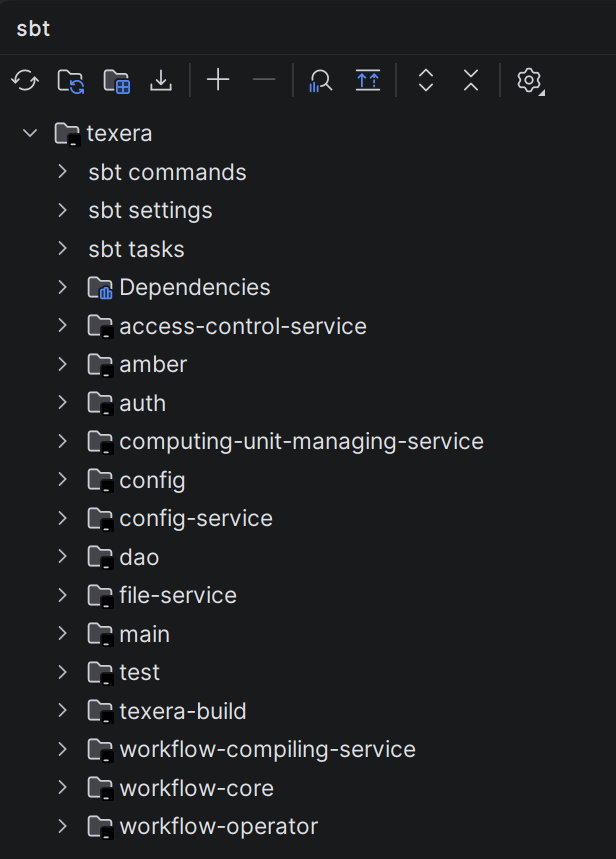
Run the backend micro services in IntelliJThe easiest way to run backend services is in IntelliJ. Currently we have couple of micro services for different purposes. If one microservice failed after running, it may have dependency to another microservice, so wait for other ones to start, also make sure to run LakeFS docker compose:
To run each of the above web service, go to the corresponding scala file(i.e. for For
For Enable Python-based OperatorsTexera has lots of Python-based operators like visualizations, and UDF operators. To enable them, install python dependencies by executing, you also need to install R in your system:
This is for developers that work on the frontend part of the project. This step is NOT needed if you develop the backend only. |